Cropink Review: Is This Catalog Ads Tool Worth It?
This Cropink review breaks down features, pricing, and real performance data. Case studies show up to 9x ROAS, 79% year over year ROAS growth, and 3x higher conversion rates from automated, enriched catalog ads at scale.


Online shoppers expect to see ads that are relevant to them. They want to see products they've browsed before, items available in their area, and offers that match their current stage in the buying journey.
When a brand manages thousands of products that change constantly, delivering such an experience will be nearly impossible if you’re doing it manually.
Dynamic Creative Optimization (DCO) platforms are super useful in such cases. That’s because these platforms can easily automate ad creation while still delivering personalized ads to shoppers.
Cropink is one of the most accessible DCO tools currently available on the market. In fact, nearly every review on G2 and Trustpilot mentions ease of use as the top reason people choose this platform.
Before we get ahead of ourselves, let’s take you through all you can do with Cropink so you can decide for yourself if it’s a platform worth using.
Key takeaways
- Cropink automates catalog ad creation by connecting directly to your product feed and generating hundreds of ads from customizable templates.
- Cropink allows you to apply design changes across hundreds of ad variations simultaneously to maintain brand consistency.
- Cropink works best for brands managing large catalogs with frequent updates.
- Performance data from retailers like Leroy Merlin and MediaMarkt shows that using Cropink catalog ads can help brands increase their ROAS up to 9x.
What is Cropink?
Cropink is an ad design platform that helps ecommerce brands create dynamic catalog ads. It turns your product feed into ready-to-run catalog ads in minutes.
We’ll get into how it works in a few, but the gist is that you first add your product catalog as an XML product feed, then choose one of the 100s of templates on Cropink. After that, you’ll customize the template as you wish, using Cropink’s built-in designer, and then apply the products you want to use with that specific template.
You’ll have hundreds of catalog ads in a few minutes, which you can export to Meta, Snapchat, or TikTok.
Who is Cropink meant for?
Cropink is for brands that want fresh, consistent, high-performing catalog ads without manually performing repetitive design tasks.
It was created with ecommerce businesses in mind for the following reasons.
- It automatically converts raw product feed data into ready-made ad creatives.
- It keeps ads fresh by updating visuals automatically whenever product information changes.
- It helps large inventories remain consistent and on brand, even with hundreds or thousands of SKUs.
- It shortens production time, allowing brands to react quickly in fast-moving ecommerce markets.
That said, any business with a structured product feed or catalog can benefit from Cropink. That includes:
- Car dealerships
- Retail chains
- Real estate agencies
- And travel and hospitality providers
8 main Cropink features you’ll find most useful
Now, let's see which features you can access while using Cropink and why they make sense for your business.
Product feed integration
Cropink allows you to upload your product catalog in two ways: as an XML file or by connecting your Shopify or Meta catalog.
Once uploaded, your product data maps directly onto ad templates without manual input.
Cropink is also able to update your ads in real time when product feed information changes. If a price drop or an item goes out of stock, the ad creative reflects that change immediately.
You can customize how product fields appear in your ads by adjusting titles, descriptions, and images to match platform requirements.
You can also set up email notifications so that the system alerts you if an update fails, which allows you to catch issues before they impact live campaigns.
Dynamic ad templates
Cropink’s templates aren't static designs with product images swapped in. They're dynamic containers that adapt based on variables like product category, price range, stock status, or promotional tags.
You can configure templates to display different layouts, colors, or messaging depending on the product attributes.
Since there are 100s of templates across multiple niches, your Meta catalog ads can look distinct while maintaining brand consistency.
Creative automation and batch generation
Cropink generates hundreds of unique ad creatives for your entire product feed with a single click. Rather than designing ads one by one, you apply a template across your catalog, and get variations for each product automatically.
Ad design tool
Cropink’s design tool gives you full control over how your catalog ads look.
For instance, you can customize colors, fonts, and layouts so every ad matches your brand. You can also save your brand kit once and apply it across all templates, which keeps everything consistent.
The bulk editing feature is a major time-saver, too.
You’ll be able to make one change and apply it to hundreds of ad variations at the same time.
For example, if you frequently use styles, you can create your own or choose from preset options, then reuse them across multiple designs with one click.
Figma integration
Cropink’s Figma plugin provides designers with an easy way to create custom templates or refine the ones already available on the platform.
You design in Figma as usual, then export the finished layout straight into Cropink.
The system applies all the dynamic data mapping for you, so your template is ready to power real catalog ads.
See our guide on how to use Cropink X Figma to create unique, adaptable designs for your catalog.
Teams and collaboration features
Cropink makes it easy for teams to work together without getting in each other’s way.
You’ll have the option to create multiple teams, share projects, and invite teammates or clients with view-only access when you just want them to approve designs. You can also give them edit access.
If you don’t want to add them as team members, you can create a publicly available preview link for them to view before approving designs.
Finally, Cropink has a version history feature to record every change so you always know who edited what. If something goes off track, you can revert to an earlier version with no stress.
Campaign management
Cropink gives you centralized control over how and when your ads go live.
You can set exact start and end dates, build recurring schedules, and select the specific hours during which your campaigns should run.
Another handy feature is that you can filter which products appear in a campaign by category, product ID, or promo details.
When everything is ready, you’re able to publish your dynamic creatives directly to Meta Ads without leaving the platform.
Custom labels
Cropink's custom labels let you tag and organize products for easier campaign management.
You can assign labels like 'New Arrivals,' 'Sale,' 'Best Sellers,' or any category that fits your marketing strategy.
These labels work as filters when you build campaigns.
Rather than manually selecting products one by one, you target entire groups based on the tags you've created. This makes it simple to run seasonal promotions or create campaigns around specific product margins without having to dig through your entire catalog each time.
How to use Cropink
Go from sign-up to live catalog ads in just #8 simple steps.
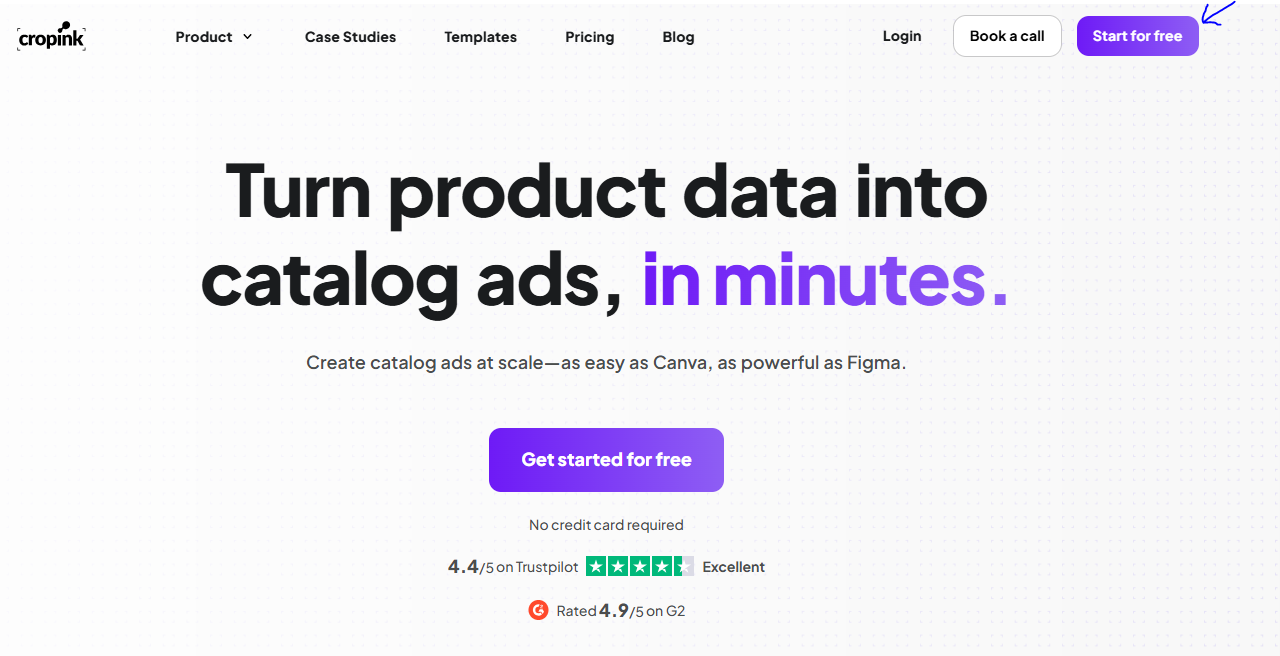
Step 1. Go to cropink.com and click Get Started for Free
When you land on the site, tap the Get Started for Free button on the top right and create your free account.
If you have more than 25 products and you already plan to scale, choose one of the paid plans and set things up right away.
After you sign up, Cropink may ask for your logo and brand colors.
You can add them later, so feel free to skip that part for now and proceed directly to the dashboard.
Step 2. Choose a template from the options given
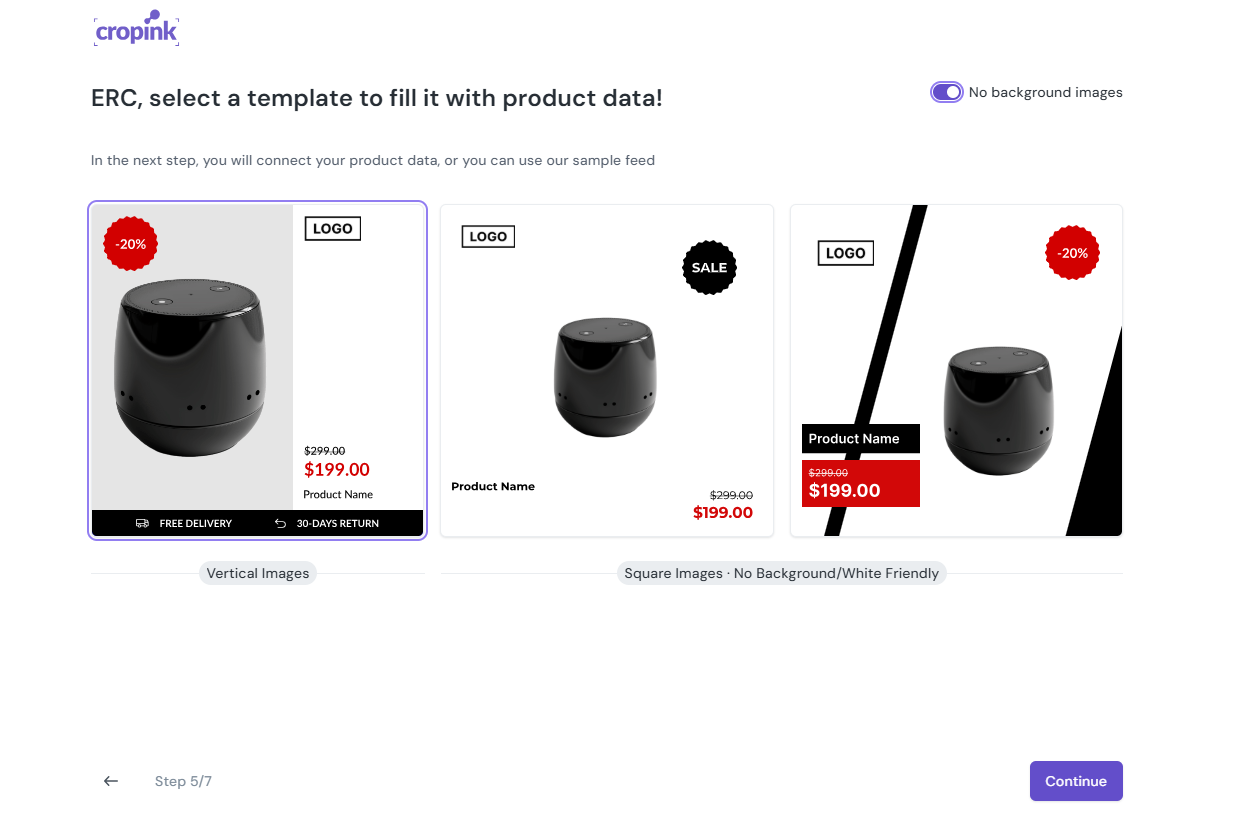
From the dashboard, pick a template from the list you. Each option gives you a good starting point, but you can adjust the details later.
Select the one that feels closest to the style you want, and then proceed. We chose the first template for this example.
Step 3. Connect your product feed
Cropink supports XML files in Google RSS format. Paste your feed URL into the provided field, and the system will start importing your products.
This process will pull in all your product details, allowing the platform to build catalog ads for you.
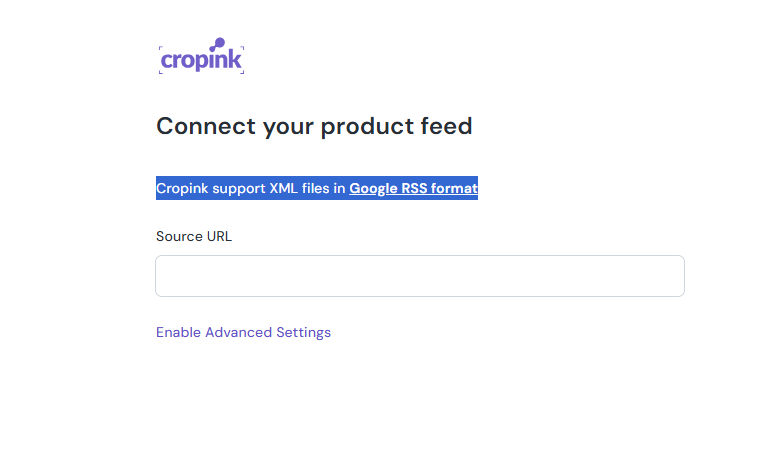
For this example, we’ll be using Cropink’s sample feed.
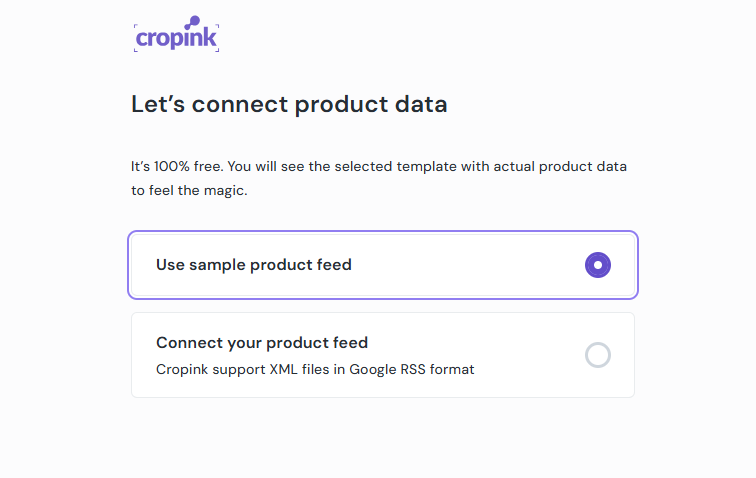
Step 4. Cropink will automatically create catalog ads for you
As soon as your feed finishes importing, Cropink uses the template you picked to generate a full set of catalog ads.
These ads are ready to download or export, and you can start building campaigns with them right away.
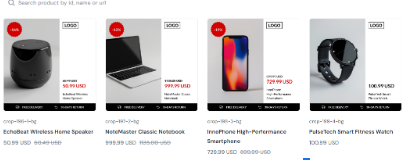
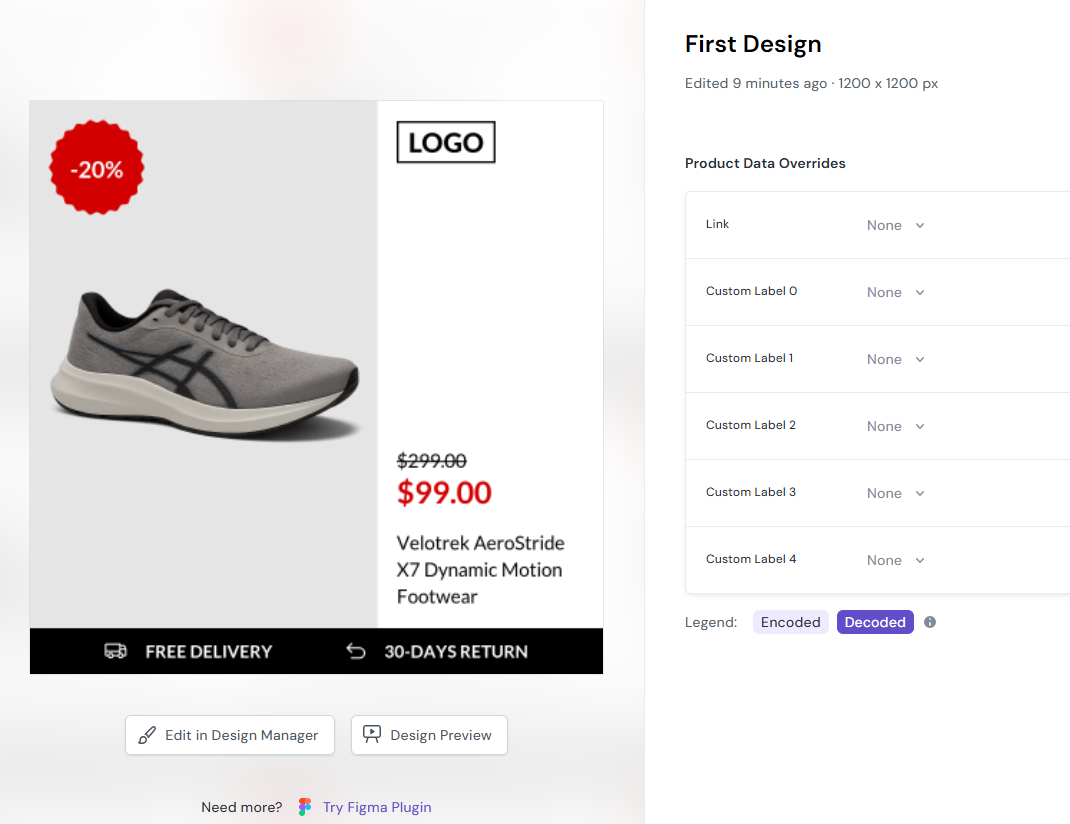
If you want to fine-tune your product fields or adjust your templates, open the Design tab. You’ll see all the designs linked to your products.
You can edit the current one, add a new template, or create a fresh design with the Figma integration.

Step 5. Choose edit in the design manager
Click the Edit in Design Manager button to open the design editor tool.
You’ll see all your layers on the left side, and each one provides you with more control over how your ads appear.
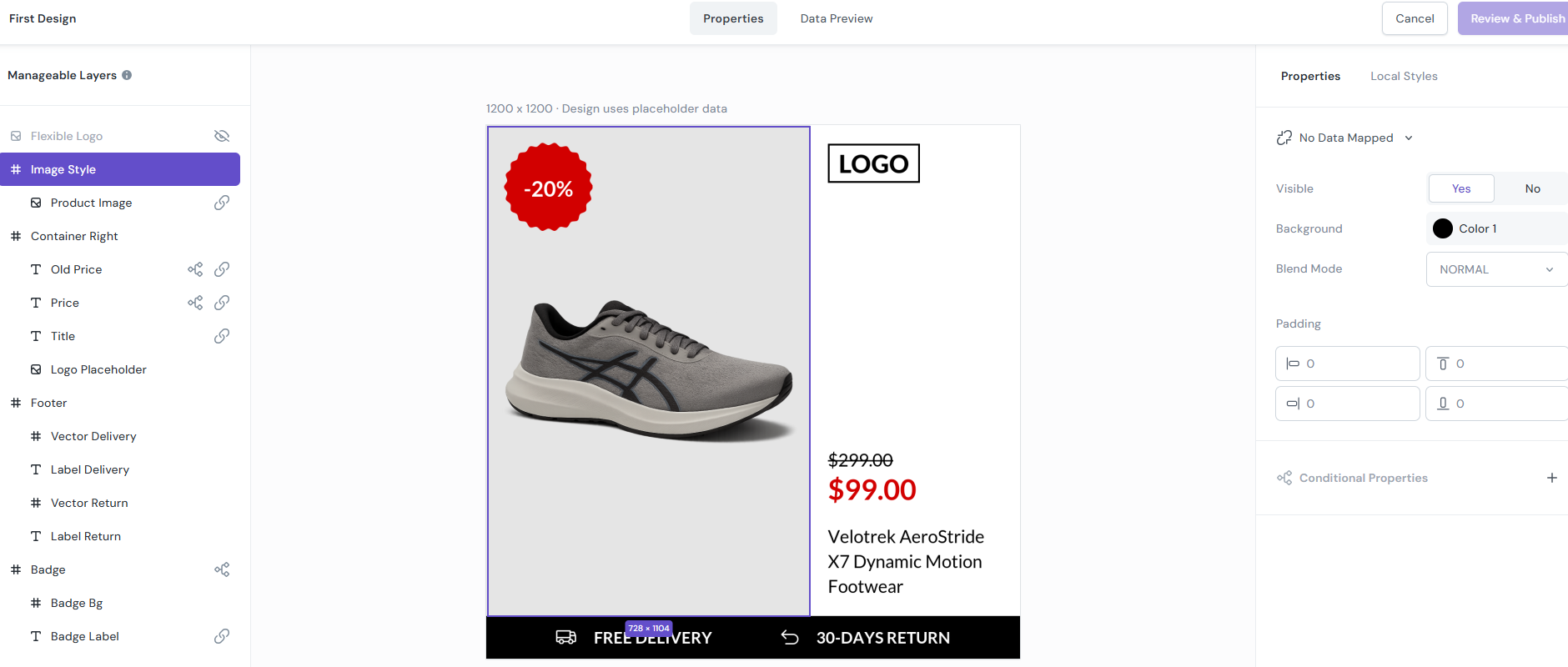
You can decide what to show, what to hide, and how each element should behave based on your product data.
This is where you map fields, apply conditions, and refine your final design to ensure it aligns with your brand.
Step 6. Set up your campaign
Open the Campaigns tab to define how your ads should run.
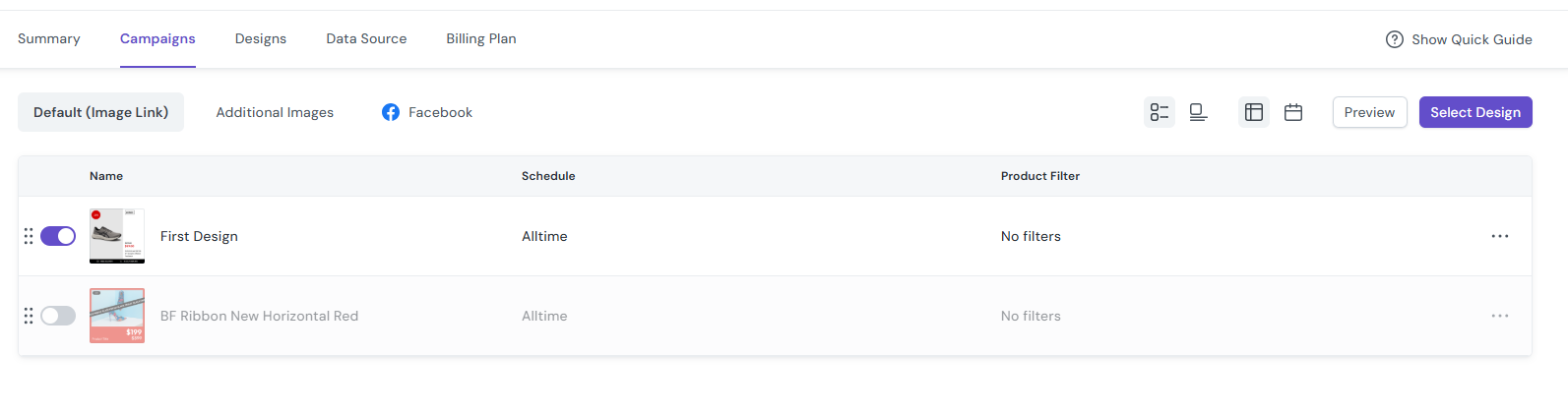
Start by selecting the bright purple Select Design button, then choose the designs you want to use in your campaign.
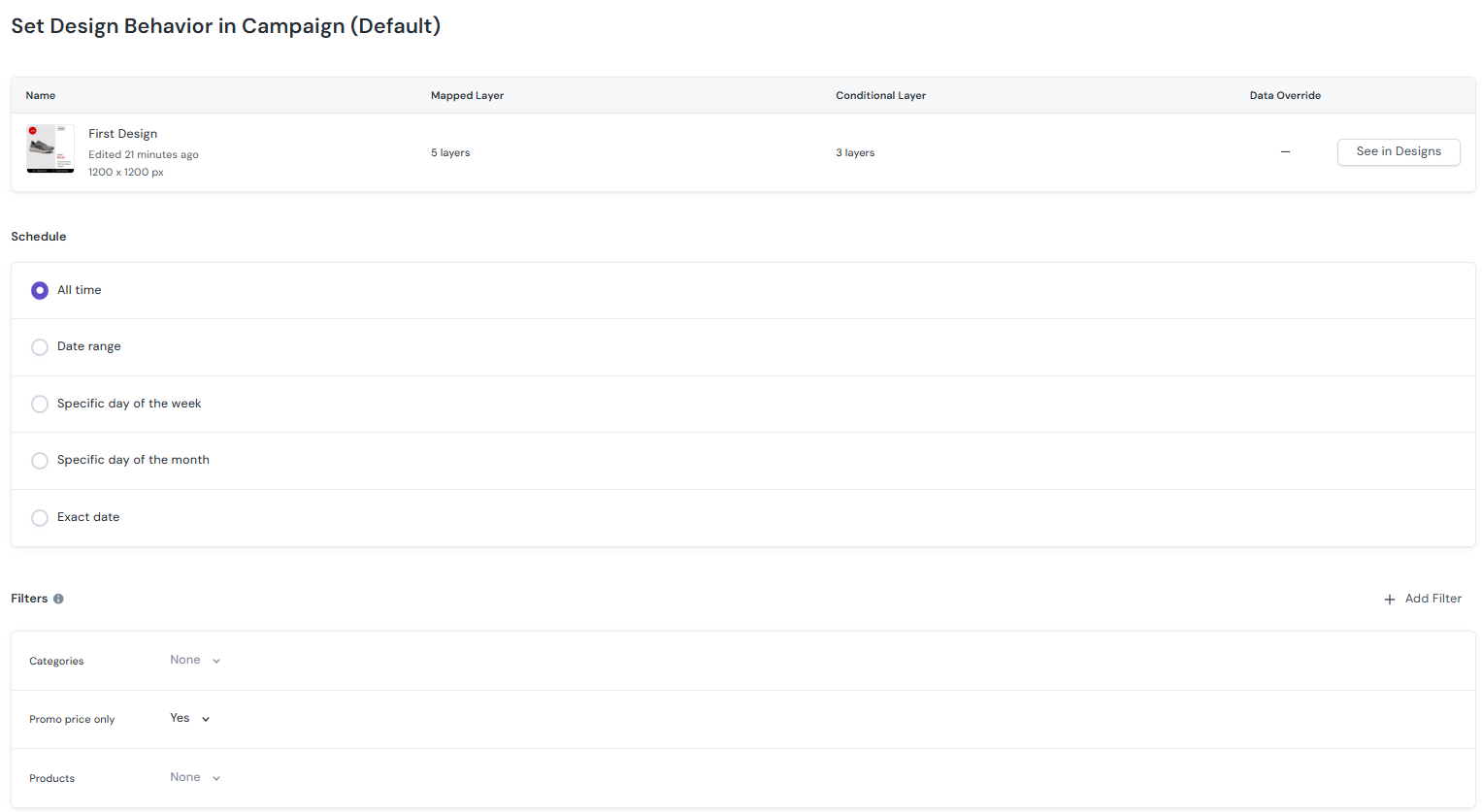
When you click on a design, you can set the schedule, choose your start and end dates, and control the hours your ads will appear. You can also apply filters to focus your campaign on specific products or categories.
These filters use simple and-or logic based on product category, product ID, or promo price.
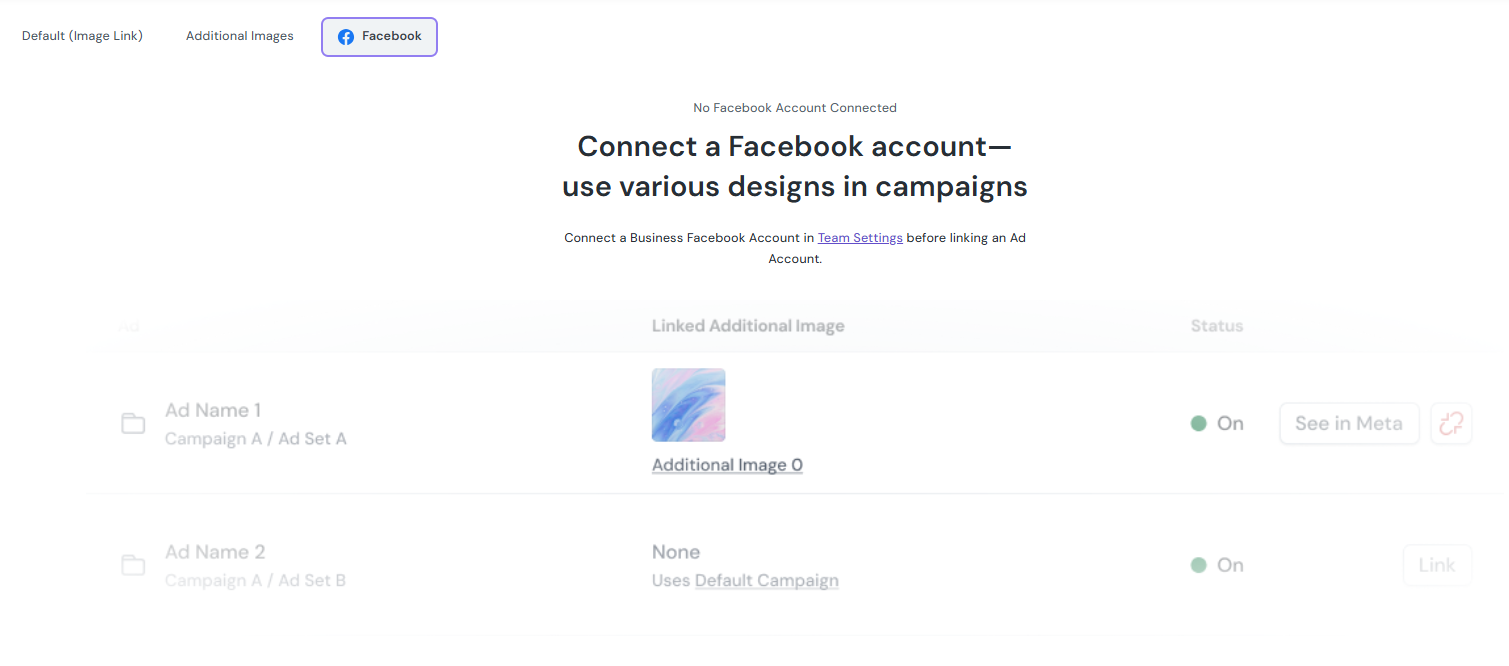
If you advertise on Meta, you can send your catalog ads there directly after connecting your Facebook account in Team Settings.
If you use other platforms, download your enriched catalog from the section shown below.

Step 7. Invite team members and clients
You can bring more people into your workspace by sending an email invite. On the left-hand side, click the three dots next to your team's name and choose ‘invite team members’.
Specify whether they can view only or edit as well.

Step 8. Make sure everything is on-brand
Click your team name on the left side of the dashboard to open the brand tray. This is where you upload your brand colors, fonts, logos, and the styles you want to use across your ads.
Once you add these details, Cropink ensures your designs stay consistent, regardless of the number of products you manage.
Pros and cons of the Cropink Catalog ads platform
Cropink is highly rated on both major review sites. It has a rating of 4.3 on Trustpilot and 4.9 on G2.
However, like any tool, there are advantages and drawbacks that you must keep in mind.
- The interface is clean and not overloaded with unnecessary features
- Catalog integration works smoothly, which saves you from manually updating creatives
- Design changes can be applied across hundreds of ads simultaneously.
- The free plan includes all product features, even those in paid plans.
- Direct Meta integration allows you to push updated feeds without needing to restart campaigns.
- Design previews for every product you want to view before publishing.
- You can plan campaigns in advance and hence save time and move faster during busy seasons.
- The current selection of templates, while functional, can feel limited for those seeking high variety.
- For highly complex or advanced design projects, users still need to rely on external tools and designers.
- No video catalog ads at this time
What users say about Cropink
“Even with little experience in design, I was able to make nice-looking ads using their templates. It’s straightforward, and I didn’t need to watch hours of tutorials to understand it.” — TrustPilot review
“I like the fact that I can not only add designs, but also use different designs on different products by filtering them according to my source data. Also, the interface is very straightforward and similar to other e-commerce tools. Another advantage is that the free plan allows you to explore the whole functionality of the tool.” — G2 review
“I like that I can add overlays directly in Cropink. Meta’s editor doesn’t give me that option, and it makes a big difference when I need to highlight discounts or promotions.” — G2 review
“Cropink cuts our ad design time in half and gives us full creative control. Super easy to sync and launch enriched DPA ads that actually convert. Love it!” — Trust Pilot review
Cropink pricing and plans
Cropink offers a free forever plan for brands with 25 products or fewer. This isn't a trial; it's a full-featured plan with no expiration.
Paid plans start at $39 per month for up to 100 products.
If you need more than that or want custom features, you can contact the sales team for a tailored plan.
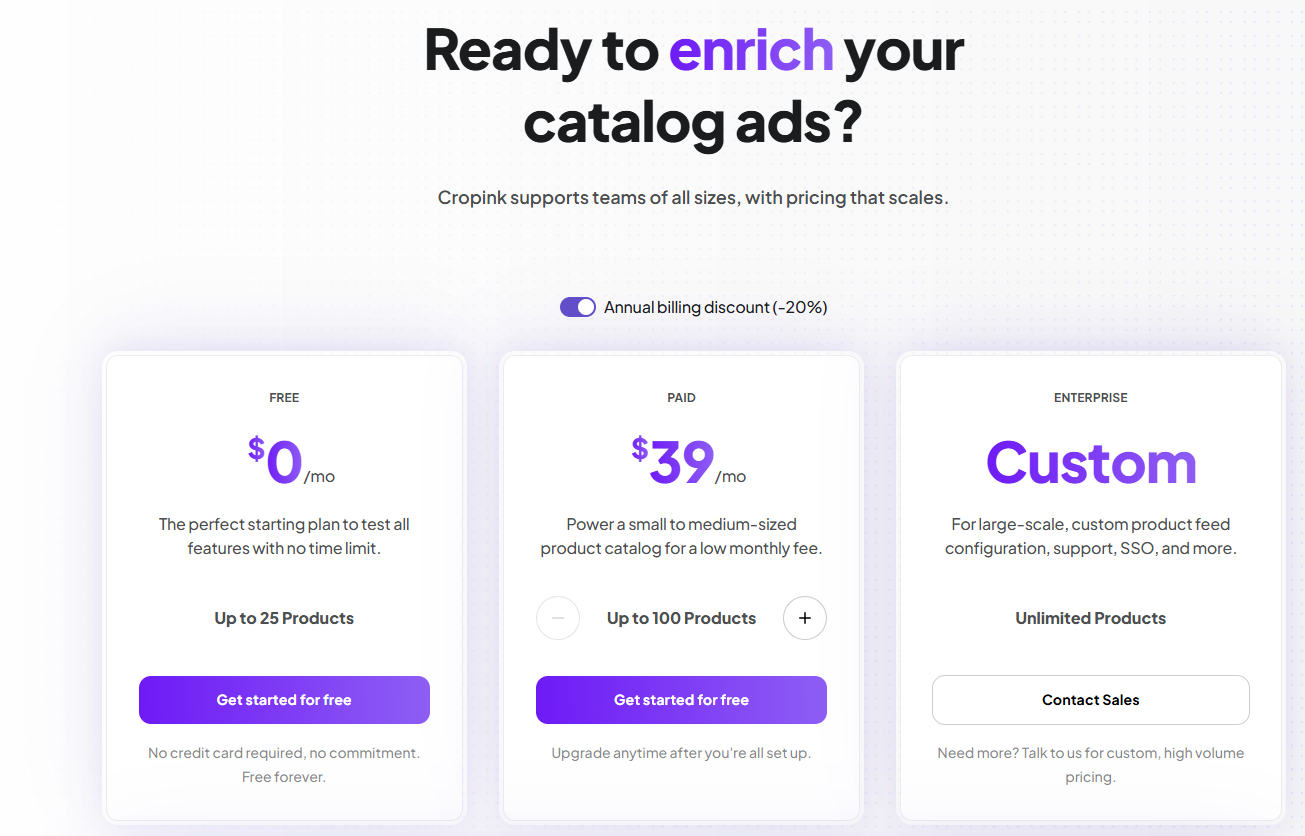
The pricing structure is based on the number of products you modify, not the number of designs or projects you create. You can build as many designs and run as many projects as you need without hitting additional limits.
How does Cropink compare with similar software?
| Feature | Cropink | Marpipe | Hunch Ads | Feedr | Adflow | Confect |
|---|---|---|---|---|---|---|
| Starting price/month | $39 | $399 | $2,000 | €16 | €199 | $239 |
| Free plan | Yes | Yes, but limited | No | No | No | No |
| Products in feed | 500 | 500 | Not specified | 1,000 | 1,000 | 3,000 |
| Enriched catalog ads | Yes | Yes | Yes | Yes | Yes | Yes |
| Dynamic product ads | Yes | Yes | Yes | Yes | Yes | Yes |
| Figma DPA plugin | Yes | No | Yes | No | No | No |
| Ready-to-use templates | Yes | Yes | Yes | Yes | Yes | Yes |
| Advanced product filtering | Yes | Yes | Yes | No | Yes | No |
| Branding & style presets | Yes | Yes | Yes | Yes | Yes | Yes |
| Feed formats supported | XML | CSV, JSON | XML, CSV, JSON | XML, CSV | XML, CSV, JSON | XML |
| User permissions | Yes | Yes | Yes | Yes | No | Yes |
| Automated campaign Scheduling | Yes | No | Yes | Yes | Yes | Yes |
| Video ad creation | No | Yes | Yes | Yes | No | No |
We've gone more in-depth on these comparisons. Check out these guides:
- Cropink vs. Marpipe: Head-to-Head Analysis
- Cropink vs. Hunch Ads: Why Marketers Are Switching to Cropink
- Cropink vs. Feedr: The Smarter Choice for Enriched Catalog Ads
- Cropink vs. Adflow: The Truth About Pricing, Features & Results
- Cropink vs. Confect: Discover Which Ad Creation Tool is Better
Are Cropink’s enriched catalog ads effective?
Performance data suggests that Cropink ads are super effective. Here are two examples from brands using the platform.
Home improvement retailer sees 79% ROAS increase and 353% conversion rate jump
Leroy Merlin is a major home improvement chain across Europe.
The company adopted Cropink in March 2025 and transitioned all social advertising to the platform by April. They used Cropink to build catalog ads and dynamic product ads tied directly to sales performance data.
With over 99,000 products in its catalog and updates running every two hours, Leroy Merlin Poland recorded a 79% year-over-year ROAS improvement in the first complete month.
Conversion rates increased by 353% during the same period.
Consumer electronics retailer achieves 9x ROAS
MediaMarkt is one of Europe's largest retailers of consumer electronics. It stocks a wide range of products across multiple categories.
The retailer chose Cropink to generate enriched catalog ads and dynamic product ads across their full product range.
With this setup, MediaMarkt achieved a 9x ROAS improvement compared to previous benchmarks. Conversion rates rose 3x, showing that the traffic was far more qualified.
The average order value increased 4X compared to the previous campaign averages.
Is Cropink worth it?
If you manage a product catalog that changes frequently and need ads that stay current without constant manual updates, Cropink is an excellent investment.
The value of Cropink comes down to scale and automation.
Small catalogs with infrequent changes might not justify the investment, but brands running hundreds or thousands of products will see immediate time savings.
However, note that Cropink works best when your product feed is clean and well-structured.
Cropink can't fix messy data, but it will multiply the impact of good data across your advertising channels.
For ecommerce brands tired of manually updating ads or restarting campaigns every time pricing changes, Cropink is the answer.
If you're still on the fence, sign up for the free plan and test it with your catalog.
It's instant access, no credit card required, and you'll know within a few hours whether it fits your workflow.
FAQs
Cropink is a creative automation platform that automates the catalog ad design process for ecommerce brands. It connects to your product feed and generates dynamic ads using customizable templates.
Cropink offers a free plan for catalogs with 25 products or fewer, while paid Cropink plans start at $39 per month for up to 100 products.
Cropink accepts product feeds as XML files. It typically supports the Google RSS format and syncs product data in real-time.
While Cropink was built for ecommerce, any business with a structured product catalog can use it effectively. Car dealerships, real estate agencies, travel companies, etc., can use the platform successfully.
Sources
- G2. Cropink Reviews & Product Details
- Trustpilot. Cropink Reviews
- Cropink.com
Damaris is a Digital Marketing Specialist who writes about digital marketing and performance marketing. At Cropink, she creates data-driven content to help businesses run better ad campaigns for better performance and ROI.
Leszek is the Digital Growth Manager at Feedink & Cropink, specializing in organic growth for eCommerce and SaaS companies. His background includes roles at Poland's largest accommodation portal and FT1000 companies, with his work featured in Forbes, Inc., Business Insider, Fast Company, Entrepreneur, BBC, and TechRepublic.
Related Articles


How Can Cropink Help?
Start with Cropink is easy and free
No credit card required