Pinterest Dynamic Product Ads 101: Your Guide To Master Ads in 2026
With over 631 million monthly active users and 46% of weekly Pinners discovering new brands or products, Pinterest has plenty of potential for ecommerce. Learn how to set up Dynamic Product Ads, get your feed and tracking right, retarget shoppers, and create better catalog creatives.


Did you know that Pinterest isn't just a hub for DIY crafts and home décor inspiration?
The platform boasts over 631 million monthly active users, with 46% of weekly Pinners discovering new brands or products on Pinterest.
But the stat we like most is that with Pinterest, you can reach 40% of US households with an annual income over $150K.
If you are an ecommerce business targeting a mostly female audience under 45, Pinterest is a great fit. And yes, they support Dynamic product ads for brands with a product catalog.
Like with most other ad platforms, Pinterest Dynamic Product Ads use your product catalog and Pinterest Tag events to show relevant products to people based on what they viewed, saved, or added to cart.
In this guide, you’ll learn how they work, what your feed needs, and how to improve the creative layer so catalog ads do not look like plain product tiles.
Key takeaways
- Pinterest's Dynamic Product Ads (DPAs) enable advertisers to automatically showcase products to users based on their interests and behaviors.
- A working Pinterest Tag, accurate conversion events, and matching product IDs are essential for dynamic retargeting to work properly.
- The platform offers diverse ad formats, including Standard, Carousel, Collection, and Video DPAs. It allows brands to tailor their approach to different marketing objectives.
- Use several distinct creatives to give Pinterest more options to test and help you discover which creative style performs best.
- Pinterest provides real-time trend data. It enables advertisers to align their product offerings with current user interests for more relevant and timely ads.
What are Dynamic Product Ads?
Pinterest Dynamic Product Ads are Shopping ads that use your product catalog to automatically show relevant products to people based on their activity on Pinterest and your website or app.
Pinterest uses the product data in your catalog and product groups to decide which products to show. You don't need to create additional targeting for Shopping ads.
You may also see these ads referred to as Pinterest dynamic ads, Pinterest catalog ads, or product ads.
When creating these ads, you can choose to retarget people who have previously interacted with your brand or reach entirely new audiences that behave like your target audience.
Pinterest DPA setup checklist
Before creating your dynamic campaign, make sure you have these pieces ready:
- Pinterest business account
- Product catalog connected to Pinterest
- Pinterest Tag installed
- Product groups created
Product catalog requirements
Your catalog contains the products Pinterest can use in your Shopping ads. Pinterest supports CSV, TSV, XML, or Google Sheets format.
At a minimum, your feed should have these sections:
- ID
- Title
- Description
- Link
- Image link
- Price
- Availability
- Item group ID
Pinterest recommends adding as much relevant information as possible.
It’s best practice to also include additional attributes such as product type, sale price, additional images, brand, GTIN, review ratings, color, size, and material.
These will provide Pinterest with more product information to work with when matching products to shoppers.
Your store also needs to meet Pinterest's merchant requirements, the most important of which are contact information, a return policy, and an accessible website with product pages.
Pinterest Tag and conversion tracking
For the dynamic part of a campaign to work effectively, you must have the Pinterest Tag installed on your website.
After installation, make sure to track AddToCart, Checkout, and Purchase, which provide Pinterest with the activity it needs to connect shoppers with the products you’re advertising.
Most importantly, the product IDs sent with your events must match those in your catalog.
If they don't, Pinterest can't reliably connect a shopper's activity with the product they interacted with.
You should also set up the Pinterest Conversions API to send conversion data directly from your server. It’s more reliable than the Pinterest tag, just like the Meta Conversions API is more reliable than the Meta pixel.
How do Pinterest DPAs work?
Imagine Pinterest as a bustling marketplace where every user has unique tastes.
Pinterest DPAs tap into this by using your product catalog and the Pinterest tag to showcase the products a shopper is really interested in.
When a user shows interest in products similar to yours, Pinterest dynamically serves them your relevant ads.
It's like matchmaking for shopping—connecting your products with users who are already in the mood to discover and purchase.
If you have all the requirements we covered above, the next part is easy.
First, make sure you're using Conversions or Catalog Sales as the goal.
Engagement and video views are good for getting attention, but if you're running DPAs to push sales, you want an objective that supports that goal.
Another thing to note is that the Pinterest learning phase can take a little longer than Facebook. Give your ads at least two weeks before you make major changes or decide they're not working.
Next, know that Pinterest and its users reward ads that feel native to the platform.
Yes, definitely invest in standout creatives, but do so within the bounds of Pinterest aesthetics.
Now that we have that out of the way, here’s the process to follow when creating dynamic product ads on Pinterest.
1. Choose your campaign objective
Select Catalog Sales or Conversions. Since you're running a DPA, make sure your product catalog is connected and approved before continuing.
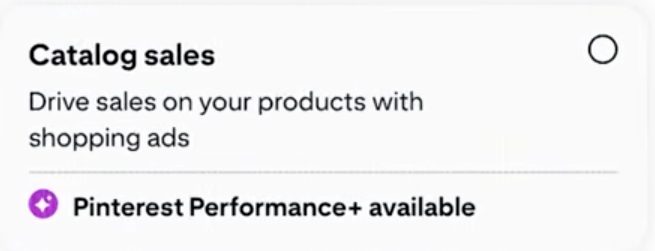
You might also see that Conversion and Catalog sales objectives have now been replaced with Leads and Sales objectives.

If that’s the case for your account, proceed with the Sales objective.
2. Choose your daily budget
Pinterest can be a relatively affordable advertising channel compared with platforms such as Facebook, Instagram, and LinkedIn. The benchmarks below give you a rough idea of how Pinterest costs can compare across platforms. Use these benchmarks to reverse-engineer the minimum you should spend per day to get the results you want.
| Pinterest benchmark | Average cost |
|---|---|
| Cost per click (CPC) | $0.00–$0.10 |
| Cost per conversion | $0.00–$2.00 |
| CPM (cost per 1,000 impressions) | $0.00–$0.50 |
| CPM | $1.01–$1.50 |
3. Choose your product feed or product set
Now decide which products you want your DPA campaign to promote.
You can use your full product feed if you want Pinterest to consider your entire catalog. Or, select a product set if you only want to advertise specific products.
You'll also need to choose your call to action (CTA) at this point.
4. Choose your audience and placements
Pinterest gives you a lot of control over the kind of people you want to target for your Pinterest product ads.
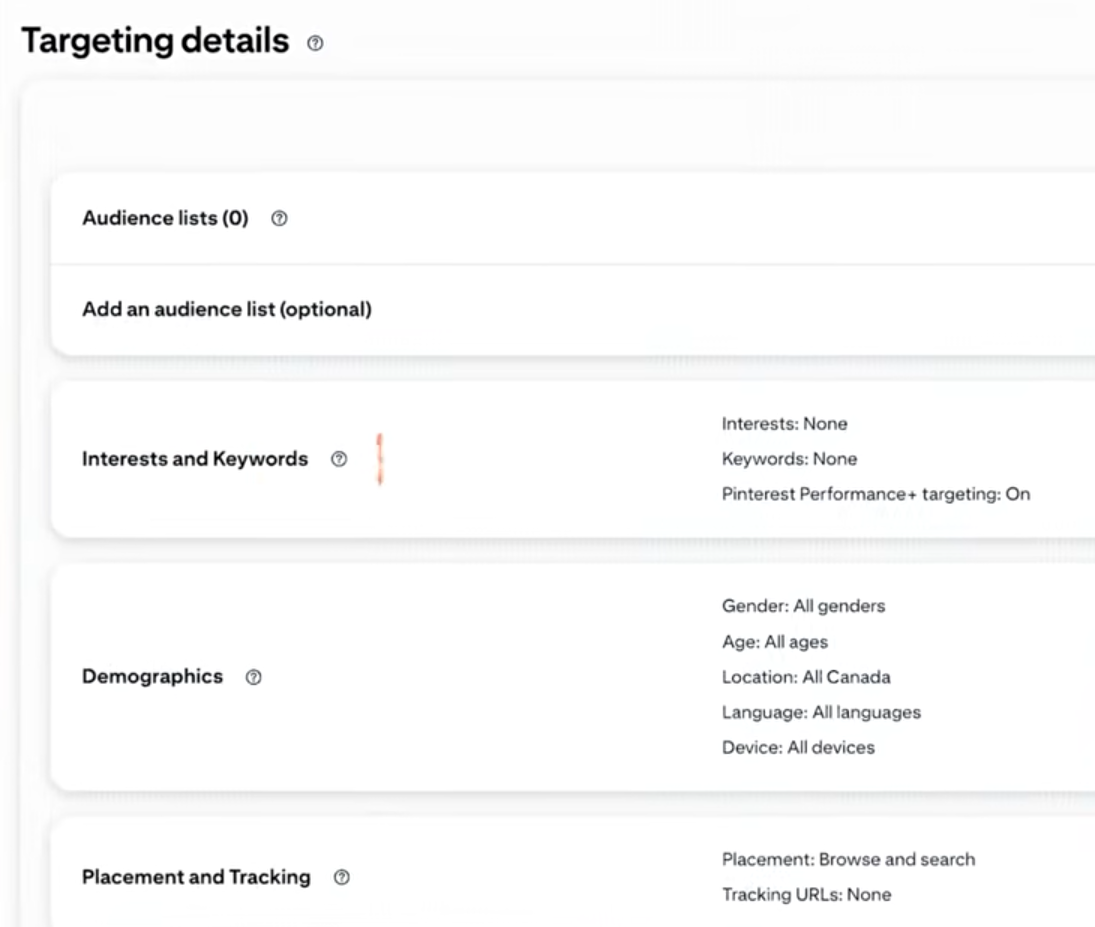
You can choose which region they come from, their age, interests, and behavior.
If you also want to do retargeting in addition to prospecting, you can upload customer lists or create custom audiences from your website visitors or from people who have interacted with your brand on Pinterest organically or in past campaigns.
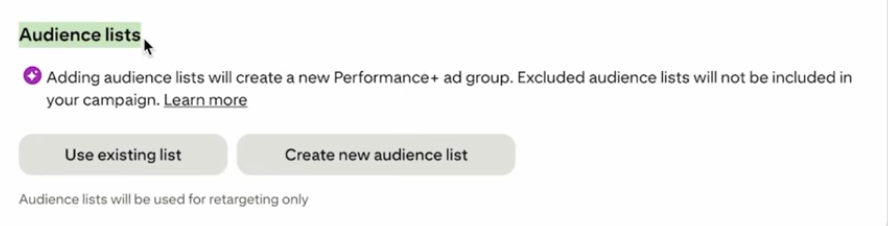
Customer lists can also be from your email marketing activities, app users, and past buyers.

For dynamic retargeting, Pinterest uses activity from your website and catalog.
For example, Shopper views Product A → Pinterest records the product ID → Shopper returns to Pinterest → Pinterest matches the event with your catalog → Product A is served in the DPA.
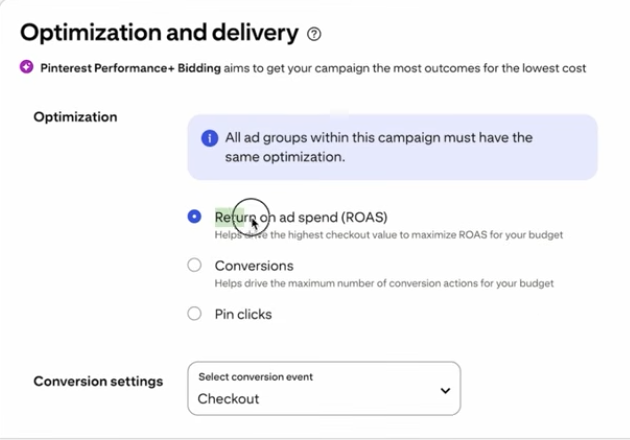
5. Set your optimization and delivery preferences
This is the last part where you tell Pinterest what you want it to optimize for.
Depending on your campaign setup, you can optimize for conversions, ROAS, or Pin Clicks.
If your goal is to increase sales, we recommend choosing Conversions rather than Pin Clicks.
Pin Clicks can help drive traffic, but they don't tell Pinterest to prioritize people who are most likely to convert.
Finally, choose your conversion location and review your campaign settings before publishing the Pinterest product ads.
What about creatives?
If you’ve noticed, we don’t have to manually upload Pins when creating these Pinterest Dynamic Product Ads.
The creative comes from the images in your product feed.
Your feed images will not only be showing what the product looks like, but they’re also doing the job of getting the shopper’s attention and communicating important product information.
This is how a Pinterest DPA typically looks:
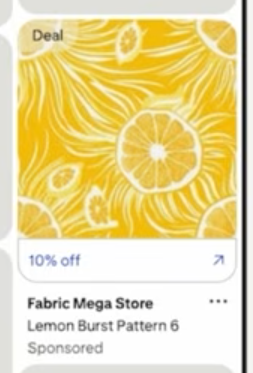
It doesn't really tell the shopper much, and unless they click on the pin, they don't have an outright idea of whether this product is right for them.
The product may be perfectly clear, but there’s nothing helping it stand out or giving the shopper more information at a glance.
Now, put yourself in the shoes of a shopper on Pinterest. Which image will catch their attention in this example below?
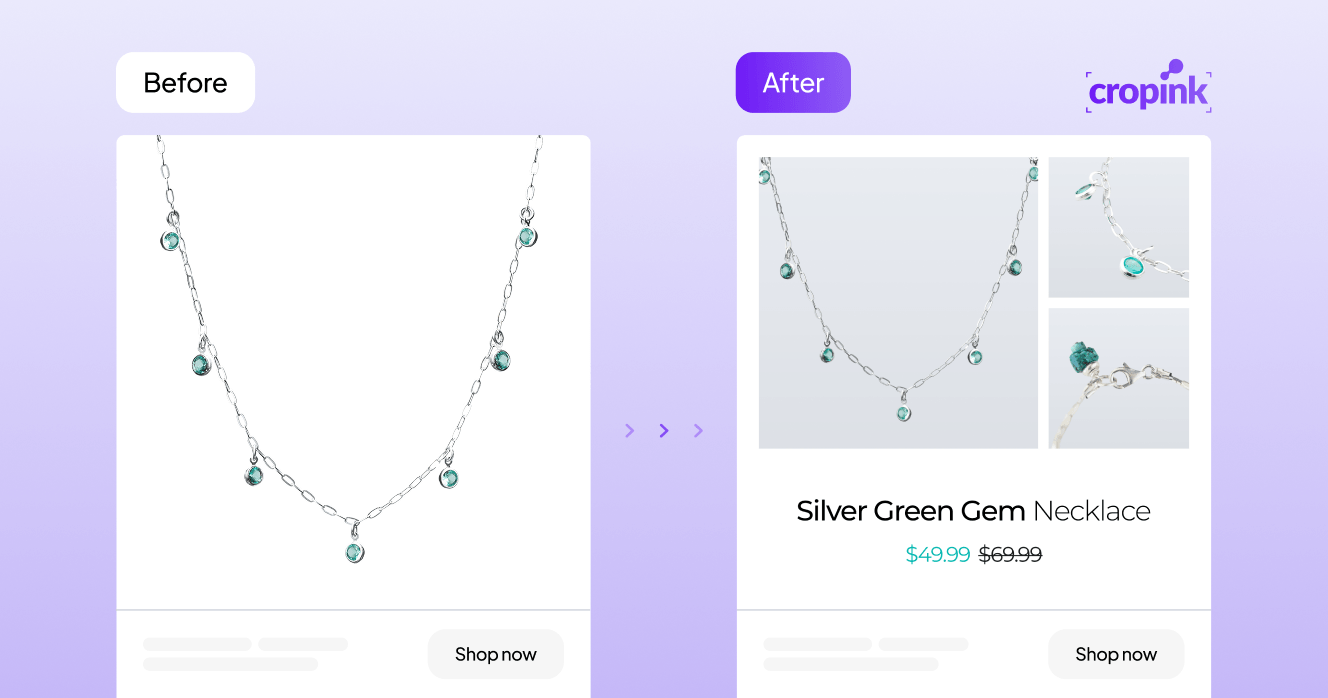
I’d say the second one (AFTER version).
First, I get to see the necklace in close-up angles, the price is right on the image, and I can see that there’s a discount.
Same with this other example. I can tell which brand it is immediately, thanks to the brand logo. I can also see the price clearly.
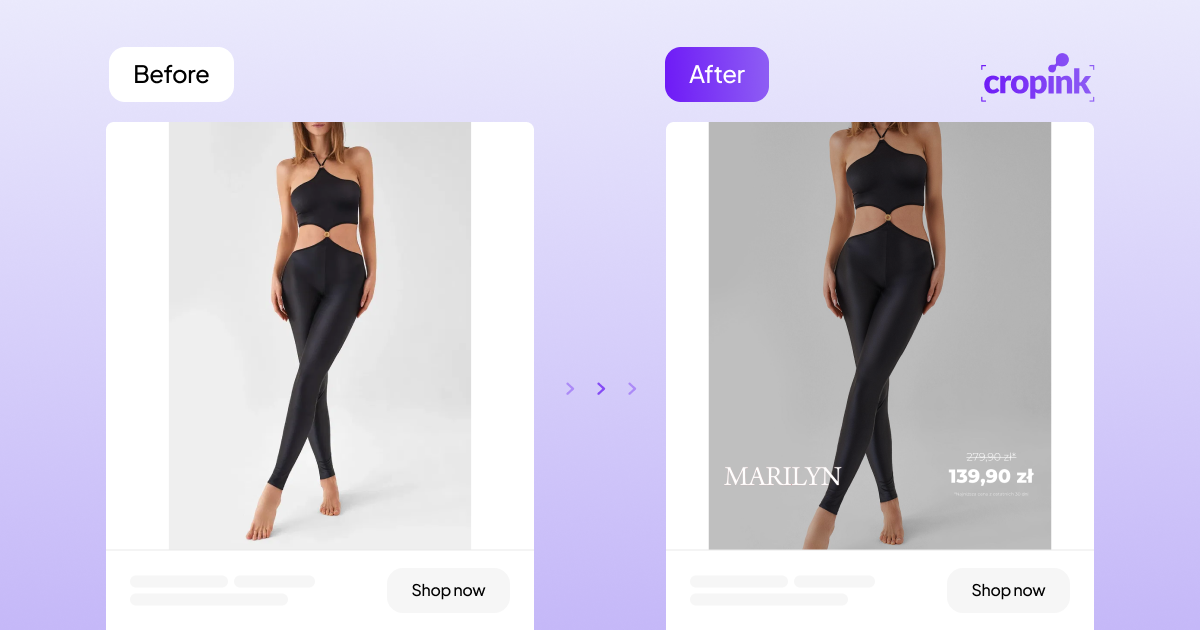
These two AFTER examples are using what we call catalog enrichment.
This is where you customize your product feed images so they’re more helpful, compelling, and on-brand.
And it's easy to do when you're using Cropink, which is a Catalog ads creation platform.
You can:
- Make your brand recognizable by adding your logo or brand colors.
- Show useful product information like price, discount percentages, and omnibus pricing.
- Add multiple images to ensure shoppers have a great look and feel of the product.
- Add custom backgrounds to fit the lifestyle feel that most Pinterest pins have.
With Pinterest DPAs, the product image is your ad creative. So don't treat it as an afterthought.
Learn more about how to design your dynamic catalog ads so they’re more effective for Pinterest advertising.
Pinterest catalog ads work best when the feed and the creative are treated as one system. If the product data is accurate but the visual layer is weak, the campaign still leaves money on the table. The goal is to make every product ad useful, clear, and instantly recognizable as your brand.

CEO at Cropink & Feedink
Types of Pinterest DPA
Pinterest doesn't disappoint in its ad format options. Below are the different types of Pinterest DPAs you can use to engage your audience:
- Standard DPAs:
The classic choice. These ads feature a single image of your product and directly link to your website. Perfect for showcasing individual products with simplicity and elegance.

Pinterest Standard Shopping DPA example.
- Video DPAs:
Bring your products to life with engaging videos that capture attention and demonstrate your product's features in motion. Aim for 6-15 seconds.
- Carousel DPAs:
Why settle for one when you can have multiple? Carousel ads allow users to swipe through a series of images. They’re the best fit when you want to highlight different products or features of a single product.
- Collection DPAs:
Create a curated experience by combining a large hero image or video with several smaller product images. This format is ideal for highlighting a lifestyle and the products that complement it.

Pinterest Collection DPA example.
Expert tips for getting the most out of DPA on Pinterest
- Keep an eye on Pinterest trends and align your ads with current interests to stay relevant and engaging. Pinterest releases a trend report every year, so be sure to stay on top of that. Here’s the latest Pinterest Predict report showing all the trending creative styles and aesthetics you can use.
- Pinterest is a visual playground. Use crisp, eye-catching images that stop pinners mid-scroll.
- Pair your visuals with persuasive SEO-optimized descriptions that tell a story and entice users to learn more.
- Maintain a cohesive look and feel across all ads to build brand recognition and trust. Cropink's Design Ads Tool allows you to create visually appealing ads with customizable templates and an easy-to-use editor.
- Experiment with different ad formats and content to see what clicks with your audience. Analyze performance and tweak accordingly.

Common Pinterest DPA problems and fixes
If you’re not getting the results you had in mind, make sure you’re not making these mistakes.
1. Your product titles and descriptions aren't optimized
Pinterest needs to understand what you're selling to match your products with relevant shoppers. As such, if your product titles and descriptions are vague or missing important keywords, you're giving Pinterest less useful information to work with.
The fix
Review your product titles and descriptions and include relevant keywords naturally. Don't just describe the product. Think about the terms your customers would use to find it.
For example, instead of Floral Dress, a more descriptive title could be Zara Women's Blue Floral Maxi Dress.
There's also some interesting data behind this.
Product titles that include brand keywords have been associated with 28% higher ROAS, while titles using pattern keywords have been associated with 22% higher ROAS.
2. Your product feed is incomplete or outdated
Missing information, outdated prices, incorrect availability, or broken product links will affect how your products are delivered.
The fix
Keep your feed up to date and check it regularly for errors.
If you use a feed URL, make sure Pinterest can access the updated data source when it needs to. In fact, you should make Catalog Diagnostics part of your regular checks. It helps you spot feed errors and changes that could affect the delivery of your DPAs.
3. Your product images are boring or of poor quality
The images in your product feed become the creative for your DPAs. If they're low quality, poorly cropped, or look like generic product listings, they will easily get lost in the Pinterest feed.
The fix
Use clear, high-quality product images. Also, consider a catalog enrichment tool such as Cropink to add branding, pricing, sale information, or other useful details where they make sense.
4. Your Pinterest Tag isn't working properly
If the Pinterest Tag isn't installed correctly, or a website update has affected it, Pinterest may not be receiving the events it needs to track activity and retarget shoppers.
The fix
Check that the Tag is installed correctly and that your PageVisit, AddToCart, Checkout, and Purchase events are working.
If you've recently redesigned your website, changed your checkout, or moved pages around, check your Tag setup again.
5. You're relying on the Pinterest Tag alone
On average, web advertisers using Conversions API alongside the Pinterest Tag saw a 9.0% improvement in average CPA and 23.7% more attributed conversions compared with Tag-only setups.
The fix
If you're currently using only the Tag, consider adding the Conversions API to give Pinterest additional conversion data for measurement and optimization.
6. Your ad group has too few products
A DPA needs enough products to work with. If an ad group contains only a handful of SKUs, Pinterest has less product data to learn from and fewer products it can match to shoppers.
Pinterest recommends at least 500 SKUs in an ad group for large merchants.
The fix
Where possible, give your ad groups a larger pool of relevant products. If you're creating product sets, avoid making them unnecessarily narrow.
Conclusion
As with any other dynamic campaign, the success of your Pinterest dynamic ads will come down to the quality of your feed, targeting, and creatives.
Pinterest will do some of the heavy lifting when it comes to targeting and product matching, but when it comes to creatives, you need to put in a lot more time and effort.
Fortunately, there are tons of creative optimization tools you can use.
Cropink, for one, lets you enrich your product feed images with branding, pricing, badges, and other visual elements to create more compelling Pinterest DPA creatives. With this method, you can create 100s or even 1000s of product ads that are on-brand and still personalized for shoppers, and it will take only a few minutes.
Sign up for the free trial and see how it can work with your product feed.
FAQs
How often should I update my product catalog for Pinterest DPAs?
Regular updates are key! Aim to refresh your catalog whenever you have new products or changes to existing ones to keep your ads accurate.
Can small businesses benefit from Pinterest DPAs?
Absolutely! DPAs level the playing field, allowing businesses of all sizes to reach targeted audiences with personalized content.
Are there specific industries that perform best with Pinterest DPAs?
While fashion, home decor, and food are natural on Pinterest, any industry with visually appealing products can shine with the right strategy.
How do I measure the success of my Pinterest DPA campaigns?
Keep an eye on metrics like click-through rates, conversions, and return on ad spend to gauge performance and inform future decisions.
What budget should I allocate for Pinterest DPAs?
Start with a budget that aligns with your marketing goals and scale as you see positive results. Pinterest offers flexibility to accommodate various budget sizes.
Why are my Pinterest products not showing in ads?
Check your product feed first. Missing or outdated product information, catalog errors, or product IDs that don't match your website events can prevent Pinterest from delivering the right products.
How does Pinterest dynamic retargeting work?
Pinterest uses activity from your website, such as product views or AddToCart events, to understand what a shopper is interested in. It can then show that shopper the relevant product or another product from your catalog when they're back on Pinterest.
Are Pinterest Dynamic Product Ads the same as Pinterest catalog ads?
Pinterest catalog ads use products from your catalog, while Dynamic Product Ads use your catalog together with shopper activity and other signals to automatically show relevant products to people.
How does Pinterest's algorithm affect DPAs?
Pinterest's smart algorithm ensures your ads are shown to users whose behaviors and interests align with your products, increasing the likelihood of engagement.
Can Cropink help with Pinterest catalog ad creatives?
Yes, because Cropink lets you customize the product images in your Pinterest catalog with elements like branding, pricing, badges, and other visual details.
Sources
- Pinterest. Pinterest Audience
- WebFX. How Much Does Pinterest Advertising Cost?
- Pinterest. Get started with retail catalogs
- Pinterest. 5 best practices for better shopping performance on Pinterest
Manisha is a Data-Driven Marketing Expert who turns numbers into narratives and ad clicks into conversions. With a passion for performance marketing and a sharp eye for analytics, she helps brands cut through the noise and maximize their impact in the digital space.
Damaris is a Digital Marketing Specialist who writes about digital marketing and performance marketing. At Cropink, she creates data-driven content to help businesses run better ad campaigns for better performance and ROI.
Related Articles


How Can Cropink Help?
Start with Cropink is easy and free
No credit card required