Dynamic Creative Optimization on Meta: Dynamic Creative & Flexible Ads Explained
From Dynamic Creative to Flexible Ad Format and Advantage+ Creative, Meta continues to push advertisers toward automation. This guide explains how these tools work, when to use them, and where they fit within a broader creative optimization strategy.


When you launch a new Meta campaign, you rarely know in advance which version of your ad will perform best.
If you upload several variations of your creative instead of just one, you give Meta more material to test, so it can find the combination that converts best and serve that one more often. This is the idea behind Dynamic Creative, the feature Meta introduced in 2017.
With Dynamic Creative, advertisers could upload multiple images, headlines, and calls to action at the ad set level, and Meta would automatically combine them to serve different variations to different people.
In this guide, we will show you how to apply that same principle, known as dynamic creative optimization, to get more out of your ad budget.
All you need to know about Dynamic Creative Optimization (DCO) on Meta
Dynamic creative automation is one of Meta's advertising features, where an advertiser could input multiple variations of an ad's elements, such as images and headlines, and Meta would remix them to match the person seeing the ad.
The exact variations a viewer saw depended on which creative elements and placements you had selected.
However, as of June 2024, you can no longer turn on dynamic creative when creating a new ad set in Ads Manager. Meta has, in the last two years, been steering advertisers toward a feature called Flexible Ad Format instead.
Flexible Ad Format works on a similar principle.
You give Meta a set of creative assets, and it automatically puts together and serves the combination it predicts will perform best. It is not simply a renamed version of dynamic creative, though. It works differently in a few important ways, which we will cover later in this guide.
DCO vs Dynamic Creative vs Advantage+ Creative vs Dynamic Product Ads: What’s the difference?
| Type | How It Works | Best For |
|---|---|---|
| Dynamic Creative Optimization (DCO) | A category of technologies that use automation to personalize and optimize advertising. | Improving ad performance through automated creative optimization. |
| Dynamic Creative | Combines multiple advertiser-supplied images, videos, headlines, copy variations, and CTAs to find effective combinations. | Testing creative concepts for a single product, service, or offer. |
| Advantage+ Creative | Automatically enhances creative assets by adjusting formats, layouts, visuals, and other creative elements. | Advertisers who want Meta to optimize creative presentation automatically. |
| Dynamic Product Ads (DPA) | Uses product feed data and shopper behavior to dynamically select and display relevant products. | Brands with multiple products, large catalogs, or retargeting campaigns. |
Dynamic creative optimization, or DCO, is the broader idea.
We can define it as using automation to test and serve different versions of an ad to find out what performs best, instead of guessing or manually splitting your budget across separate ads. DCO is a goal and a category of technology, not one specific Meta feature.
Dynamic Creative is Meta's own implementation of that idea. You upload several images, headlines, body copy, and CTAs, and Meta mixes them at the ad set level to find out which combination each person responds to. It has no connection to your product catalog and no awareness of what a specific person previously browsed on your site.
Advantage+ Creative is another Meta automation feature, but it works differently from Dynamic Creative. Advantage+ Creative automatically enhances an ad by generating variations and adjustments.
Depending on the placement and person viewing the ad, Meta may crop images differently, adjust brightness, add labels, reformat creative for different placements, or make other visual and text-based enhancements intended to improve performance.
Advantage+ Creative is not primarily focused on testing combinations of advertiser-supplied assets. It concentrates more on automatically optimizing and adapting the creative itself after it has been uploaded.
Catalog ads, specifically Dynamic Ads or Dynamic Product Ads (DPA), solve a different problem entirely. Rather than mixing creative assets provided by advertisers, they pull from your product feed and combine it with behavioral signals from the Meta Pixel or Conversions API, things like which product page someone viewed or which item they added to a cart, to decide which specific product to show that person.
So Dynamic Creative answers 'which combination of generic creative works best.' Dynamic Catalog ads answer 'which product should this specific person see.'
Both fall under the umbrella of dynamic creative optimization, since both use automation to personalize what gets shown, but they run on different inputs.
What changed when Flexible Ad Format replaced Dynamic Creative?
Although Dynamic Creative and Flexible Ads work pretty much the same way, there are a few things that changed, as you can see below:
- CTA buttons. Dynamic Creative lets you test up to five CTA button options. But, Flexible Ad Format doesn't support that; you pick one CTA, and it stays fixed across every generated variation.
- Setup. Dynamic Creative functioned at the ad set level, while Flexible Ad Format works at the individual ad level. With Dynamic Creative, you toggle it once for the whole ad set, but with Flexible Ad Format, you choose it as a format on a per-ad basis, so you could run several ads in the same ad set with different settings.
- Carousel generation. Flexible ads can generate carousel variations based on the images you provide, which wasn't something Dynamic Creative did. Dynamic Creative mixed your assets into single image or video combinations. Flexible Ad Format, however, can assemble a carousel out of static images on its own.
A note on Flexible Ad Format availability
Meta announced that starting in March 2026, Flexible Ad Format would no longer be available as a standalone option in Ad setup for newly supported ad accounts.
That said, many advertisers can still access and use Flexible Ad Format today, and the rollout has not happened uniformly across all accounts.
If you do not see Flexible Ad Format in your account, Meta may have already transitioned you to its newer creative automation workflows.
Based on Meta's recent product direction, creative automation features have increasingly been consolidated under Advantage+ Creative and other automated enhancements.
While Meta has not publicly confirmed the long-term replacement for Flexible Ad Format, advertisers should expect more automated creative optimization with fewer manual controls over how variations are assembled and delivered.
How to Create Dynamic Creatives with Flexible Ad Format
If Flexible Ad Format is still available in your account, you can create a campaign that allows Meta to assemble and test different creative variations automatically.
Follow this guide to set up your campaigns with Flexible Ads.
1. Create a new campaign
Start a new campaign in Ads Manager and choose an objective that supports Flexible Ad Format, such as Traffic, Engagement, Sales, or App Promotion.
2. Configure your ad set
Complete your audience targeting, budget, and optimization settings.
Depending on the objective you selected, you may also need to choose a conversion location, such as a website, app, or messaging destination.
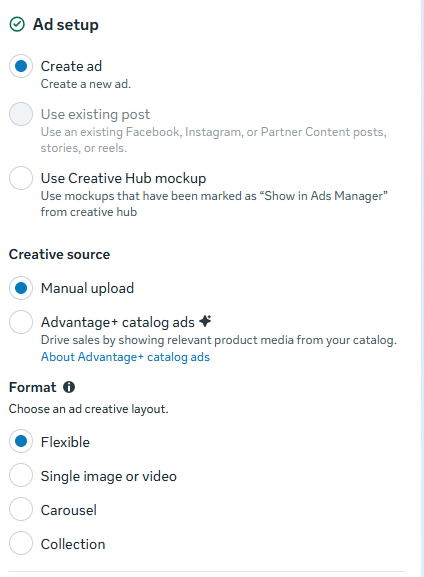
3. Choose manual upload
At the ad level, select Manual Upload as your creative source.
Flexible Ad Format is not available when using catalog-based creative sources.
4. Select flexible ad format
In the Ad Setup section, choose Flexible as the ad format. If you do not immediately see the option, check the additional format settings available within the ad setup menu.
5. Upload multiple creative assets
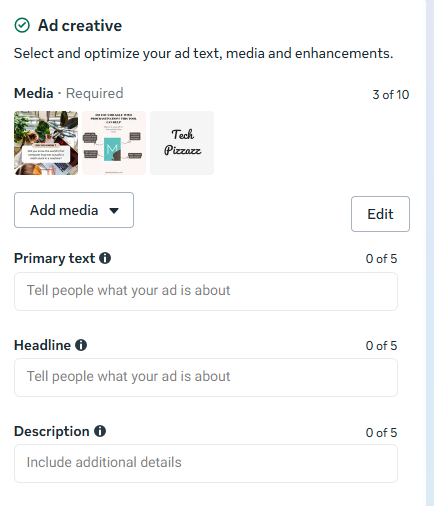
Add a mix of images or videos that you want Meta to test.
Unlike traditional ads, Flexible Ad Format allows Meta to evaluate different creative combinations and determine which versions are most likely to drive results.
6. Add your ad copy
Enter your primary text, headline, description, and destination URL.
These elements give Meta additional assets it can use when assembling ad variations. Meta allows up to 10 images or videos, and 5 headlines, primary text, and descriptions.
7. Review creative variations
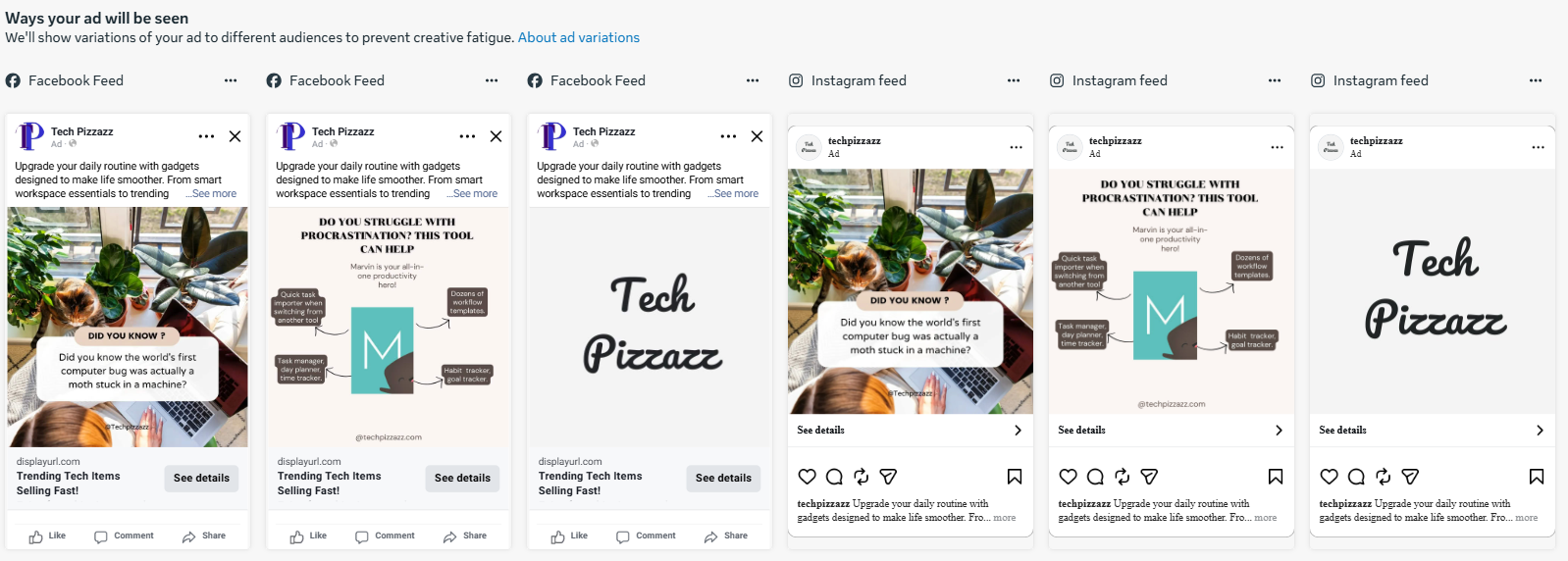
Use the preview tools to review how your ad may appear across placements and formats.
Pay special attention to image crops, layouts, and generated carousel variations.
8. Publish your campaign
When everything looks correct, complete the remaining campaign settings and publish your ad.
Meta will then begin testing and serving the combinations it predicts will perform best for different users.
Meta’s automation can only optimize what you give it. If every product ad starts from a plain feed image and a generic headline, the algorithm has very little to work with. The advantage comes from giving Meta better creative inputs: clear prices, promotions, product context, ratings, and brand elements that can be tested at scale.

CEO at Cropink & Feedink
Dynamic Product Ads: The next evolution of DCO
Dynamic Creative and Flexible Ad Format can be powerful tools for testing creative variations. If you're promoting a single product, a lead generation offer, or a small set of products, they can help Meta identify which combinations of images, videos, headlines, and copy resonate most with your audience.
But ecommerce advertisers often face a different challenge.
Instead of deciding which headline or image works best, they need to decide which product each shopper should see.
A fashion retailer may have hundreds of SKUs. A furniture brand may have thousands. Creating and maintaining individual ads for every product quickly becomes impossible.
This is where Dynamic Product Ads (DPA) come in.
Rather than relying on a fixed set of manually uploaded creative assets, Dynamic Product Ads pull directly from your product catalog. Meta then combines that catalog data with data from the Meta Pixel or Conversions API to determine which products are most relevant to each shopper.
As a result, advertisers can personalize ads at the product level instead of simply testing creative variations.
Why Dynamic Product Ads Work Better for Large Catalogs
The Dynamic Creative feature required advertisers to upload and test a limited set of assets manually.
Dynamic Product Ads, on the other hand, let advertisers automatically advertise hundreds or thousands of products without building each ad individually.
This makes it possible to:
- Show different products based on a shopper's browsing behavior.
- Retarget visitors with products they recently viewed or added to cart.
- Highlight new arrivals for one audience and sale items for another.
- Display products that are currently in stock and available for fast delivery.
- Automatically update ads when prices, discounts, or promotions change.
The larger your catalog becomes, the more valuable this automation gets.
Turning catalog data into better creative
Standard Dynamic Product Ads are effective because they automate product selection. However, many advertisers run into the same limitation.
The ads often look generic.
A running shoe designed for marathon training may have completely different selling points than a casual lifestyle sneaker. Yet, standard catalog ads often present both products in nearly identical ways.
Feed-based creative automation can solve this problem.
Now, instead of displaying only product images and pricing, advertisers can enrich their product feeds with additional creative elements such as product benefits, promotional messaging, urgency triggers, ratings, seasonal messaging, and category-specific selling points.
This allows creative personalization to happen at scale while still pulling data directly from the catalog.
And it’s pretty easy to do this when you’re using an automated platform like Cropink.
Cropink can help your brand transform product feeds into on-brand Dynamic Product Ads, and you don’t have to design creatives for every SKU manually.
Using feed-based automation, advertisers can dynamically incorporate product attributes, promotional messaging, pricing information, and product-specific selling points directly into their creative templates.
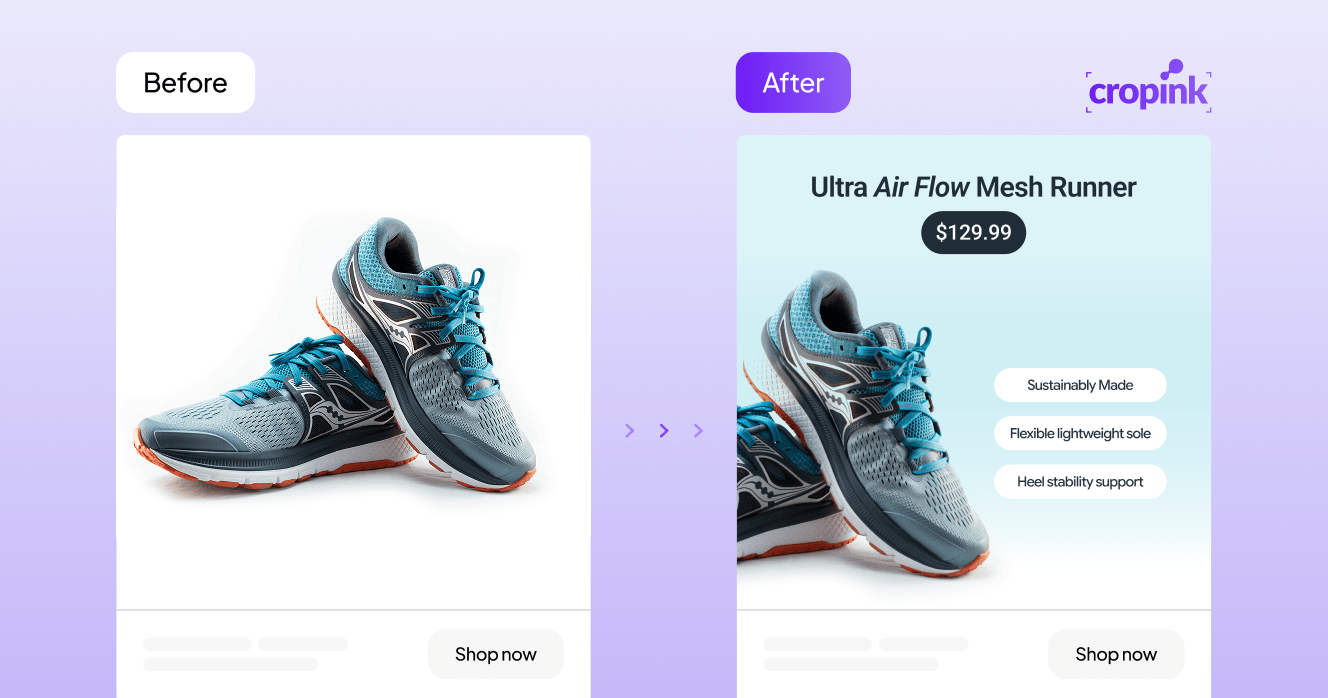
See this running shoe ad example below. The left image is a simple catalog image, while the right has been enhanced to highlight product-specific benefits such as:
- Lightweight sole
- Stability support
- Sustainability
Similarly, a retargeting campaign for a leather bag could automatically display the exact product a shopper recently viewed, while dynamically incorporating a limited-time discount or promotional offer pulled directly from the product feed.

Because the creative is connected to catalog data, updates can happen automatically across thousands of products every time inventory, pricing, or promotions change.
In the end, you get a more personalized shopping experience, better creative relevance, and a scalable way to apply dynamic creative optimization across an entire product catalog.
Learn more about making better DPAs with this DPA design framework and examples guide.
When to use the Flexible Ad format (Dynamic Creative), and when not to
Flexible Ad Format works best when:
- Promoting a single product, service, or offer.
- Launching a campaign with several creative variations.
- Giving Meta more creative options to work with.
- Prioritizing performance over manual optimization.
However, it is not always the right choice for these three situations.
- If your goal is to get clean split-testing data, a traditional A/B test may be a better option.
While Flexible Ad Format can improve performance, it also gives Meta significant control over how assets are combined and delivered, making it harder to isolate the impact of individual creative elements.
- It may also be less effective when promoting many products with different value propositions.
A campaign that includes running shoes, backpacks, and jackets may require different messaging for each product category. In these cases, finding the best creative combination is often less important than matching the right product and message to the right audience.
- Finally, advertisers who require strict control over creative presentation may find the Flexible Ad Format limiting.
Meta can automatically generate different layouts and creative variations, which means the final ad experience may not always appear exactly as originally designed.
How to analyze Dynamic Creative performance
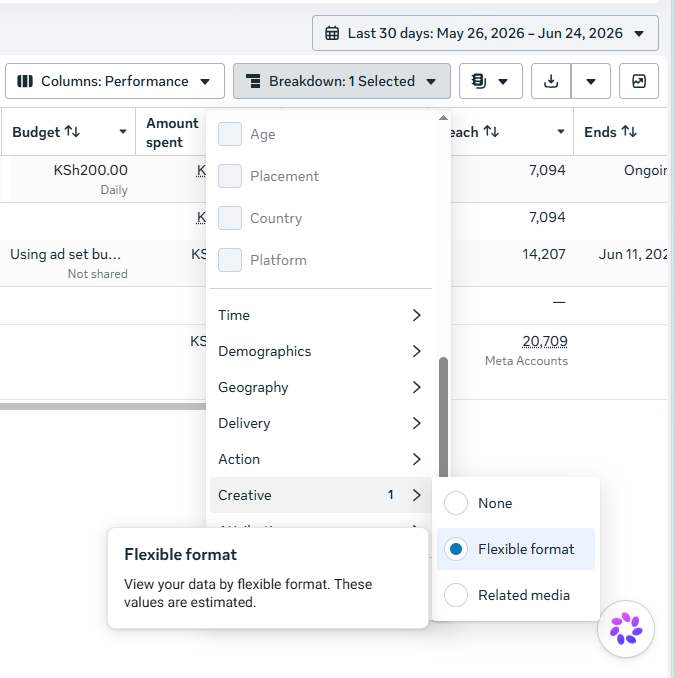
To review the performance of dynamic creatives made via the Flexible Ad Format:
- Open Ads Manager and navigate to a campaign that uses Flexible Ad Format.
- Access the reporting breakdown options available above your campaign results.
- Look for the Flexible Format reporting view within the creative breakdown settings.
- Review performance metrics for the generated ad variations, including results such as conversions and other campaign objectives.
This reporting can provide useful insights into how Meta distributed and optimized your creative assets. However, the figures should be treated as estimates rather than precise measurements.
If your goal is to identify a definitive creative winner, a dedicated A/B test will generally provide clearer conclusions.
Wrapping up on Dynamic Creative Optimization
Dynamic creative optimization has its place, especially when the goal is advertising a single product, service, or offer. By providing Meta with multiple creative assets, advertisers can give the platform more opportunities to find combinations that resonate with different audiences.
However, if you have multiple products or services to promote, Dynamic Product Ads are often the better option because they allow Meta to personalize not only the creative but also the specific product shown to each viewer.
Whichever approach you choose, creative quality is still a priority.
When creating dynamic ads, Cropink can help you generate enriched, on-brand creatives at scale using product feed data. If your feed contains prices, sale labels, ratings, delivery details, product benefits, or seasonal promotions, those fields can become part of the creative and update dynamically for each viewer.
The same principle can also be applied to campaigns promoting a single product or service. Creative assets generated with Cropink can be used within Flexible Ad Format campaigns, which gives Meta better creative variations to optimize and combine.
Check out our templates to get started with your next campaign quickly.
FAQs
How many creative variants should I upload?
We recommend the 3:2:2 structure. That is, three images or videos, two headline variations, and two primary text variations. This gives Meta enough variation to optimize without overwhelming the algorithm with too many combinations.
What is dynamic creative optimization in Meta ads?
Dynamic creative optimization (DCO) is the practice of using automation to personalize and optimize ads to improve ad relevance and results. In Meta, this can include features like Dynamic Creative (now Flexible Ad format), Advantage+ Creative, and Dynamic Product Ads.
Is Dynamic Creative the same as Advantage+ Creative?
No. Dynamic Creative tests different combinations of advertiser-supplied assets such as images, headlines, and copy, while Advantage+ Creative automatically enhances and adapts the creative after it has been uploaded.
Is Dynamic Creative the same as Dynamic Product Ads?
No. Dynamic Creative helps Meta find the best combination of creative assets, while Dynamic Product Ads determine which products to show each person based on catalog data and shopper behavior.
When should I use Dynamic Creative instead of a normal A/B test?
Use Dynamic Creative when you want Meta to optimize combinations of assets automatically and prioritize performance. If your goal is to isolate variables and identify clear winners, an A/B test will provide more reliable insights.
How do I measure Dynamic Creative performance?
You can review performance in Meta Ads Manager using the Flexible Format breakdown available for campaigns that use Flexible Ad Format.
Can Cropink help with Dynamic Creative Optimization?
Yes. Cropink can generate on-brand creative variations that can be used in Flexible Ad Format campaigns, while also helping brands create enriched Dynamic Product Ads using product feed data. This gives Meta better creative inputs to optimize, whether you're promoting a single offer or an entire product catalog.
Sources
- Facebook. About dynamic creative in Meta Ads Manager
- Jon Loomer. Dynamic Creative is Going Away
- Facebook. About the flexible ad format
Damaris is a Digital Marketing Specialist who writes about digital marketing and performance marketing. At Cropink, she creates data-driven content to help businesses run better ad campaigns for better performance and ROI.
Leszek is the Digital Growth Manager at Feedink & Cropink, specializing in organic growth for eCommerce and SaaS companies. His background includes roles at Poland's largest accommodation portal and FT1000 companies, with his work featured in Forbes, Inc., Business Insider, Fast Company, Entrepreneur, BBC, and TechRepublic.
Related Articles


How Can Cropink Help?
Start with Cropink is easy and free
No credit card required