Facebook Retargeting Ads for Ecommerce [Setup Guide, Tips & Examples]
Win back more shoppers with Facebook retargeting. Learn how to set up your campaigns and create dynamic product ads that improve conversions. With 77% of marketers using Meta for retargeting and campaigns delivering up to 3x better performance than cold audiences, it's a strategy every ecommerce business should be using.


![Facebook Retargeting Ads for Ecommerce [Setup Guide, Tips & Examples]](https://wnxauwvbrdwyuejkukje.storage.supabase.co/storage/v1/object/public/media/produ_b7bb843f96-1.jpg)
Here’s the sad reality of being in the e-commerce business: 79% of shoppers who add items to cart will abandon them.
Of course, you can’t sit back and say, “Welp, doesn’t look like they’re interested”.
In one way or another, you have to get in front of these customers again, and this time, prompt them to buy.
One way you can do that is with Facebook retargeting ads.
And in today’s guide, we’re getting into the nitty-gritty of how you can set them up and how to improve your ad results when using this ad strategy.
What Is Facebook Retargeting?
Facebook retargeting ads are a technique that enables marketers to reach users who have previously interacted with a brand. These users may have visited their e-commerce website, browsed the online catalog, engaged with other ads, or interacted with the brand's Facebook page.
It's also one of the most widely used retargeting strategies. According to industry data, 77% of marketers use Facebook and Instagram for retargeting, compared to 69% who use Google Ads.
Facebook provides a ton of ways for you to customize your ads to the users you’re retargeting.
One of them is dynamic ads, which allow you to advertise to shoppers items they’ve previously engaged with or products they’ll find super relevant.
Businesses commonly use Facebook retargeting to:
- Recover abandoned carts
- Encourage shoppers to revisit products they viewed
- Promote complementary products
- And bring past customers back for another purchase.
These ads are effective at that.
According to WordStream, FB retargeting ads can generate up to 300% more engagement than ads shown to new audiences.
Facebook retargeting vs. Facebook remarketing
In everyday marketing, people often use retargeting and remarketing interchangeably. In Meta Ads, both usually refer to reaching people who’ve shown interest in your brand.
So, they are pretty much the same thing.
Remarketing, however, is more commonly used in Google Ads, while retargeting is usually the de facto term in the Meta ecosystem.
How does Facebook ads retargeting work?
In the most basic sense, Facebook retargeting works like this:
- You place a piece of code (Meta Pixel) on your website that allows Facebook to collect visitor data.
- That data can include people who visited a product page, added an item to their cart, started checkout, or completed another action on your website.
- You use that data to build a Custom Audience of people who have already interacted with your business.
- When you create a retargeting campaign, you select that Custom Audience.
- Facebook then shows your ads to those people as they browse Facebook, Instagram, and other Meta platforms.
- They see ads that remind them of your brand or the products they're interested in, and, in the best-case scenario, complete a purchase.
How to create retargeting ads on Facebook
Follow this guide to set up your FB retargeting ads.
1. Install the Meta Pixel
Before you can run Facebook retargeting ads, you need a way to track what people do on your website. That's what the Meta Pixel does.
The Meta Pixel is a small piece of code that you add to your website. Once installed, it tells Meta whenever someone takes an important action on your site.
Meta refers to these actions as events.
Common events include:
- Viewing a product
- Adding an item to their cart
- Starting checkout
- Completing a purchase
- Filling out a lead form
This data enables Meta to build retargeting audiences and show relevant ads to people who have already interacted with your business.
If you haven't installed the Meta Pixel yet, follow our guide on how to install the Meta Pixel.
Make sure the events you care about are firing correctly. There's little point in running retargeting campaigns if Meta isn't receiving accurate data.
2. Set up the Conversions API
Meta recommends using the Conversions API (CAPI) alongside the Pixel.
While the Pixel tracks actions through a visitor's browser, the Conversions API sends the same event data directly from your server to Meta. This reduces data loss caused by browser restrictions, cookie limitations, and ad blockers.
Using both together is considered best practice because it gives Meta a more complete picture of how people interact with your website. That means:
- More accurate conversion tracking
- Better audience building for retargeting
- Improved campaign optimization
- More reliable reporting
3. Create your retargeting audiences
If your Pixel is set up properly, Meta will start receiving data from your website. The next step is deciding who you want to show your ads to.
In Meta Ads Manager, you can create Custom Audiences based on the actions people have already taken.
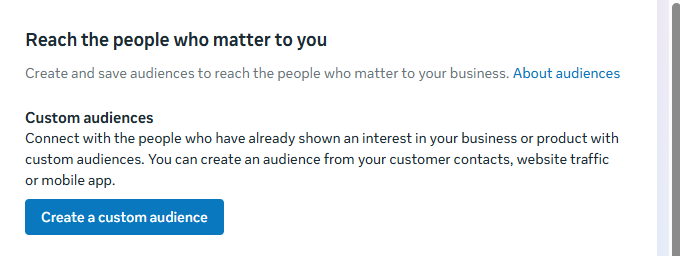
- Go to audiences and choose Custom Audience to get started.
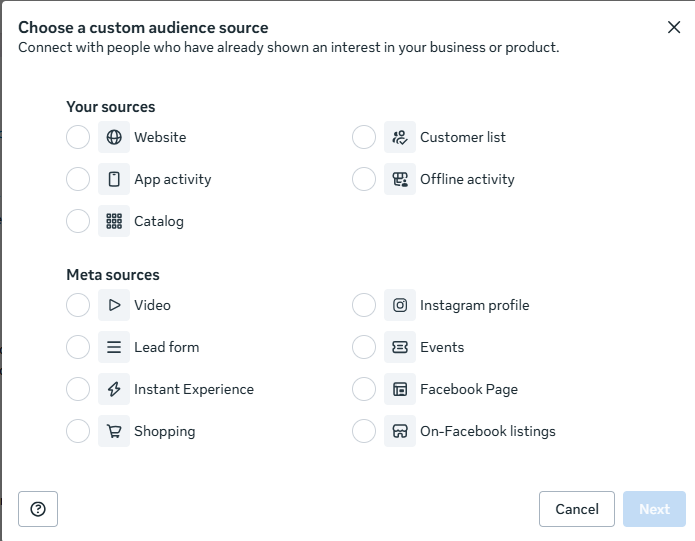
- Choose whether you want to use your website data, upload a custom list or app activity.
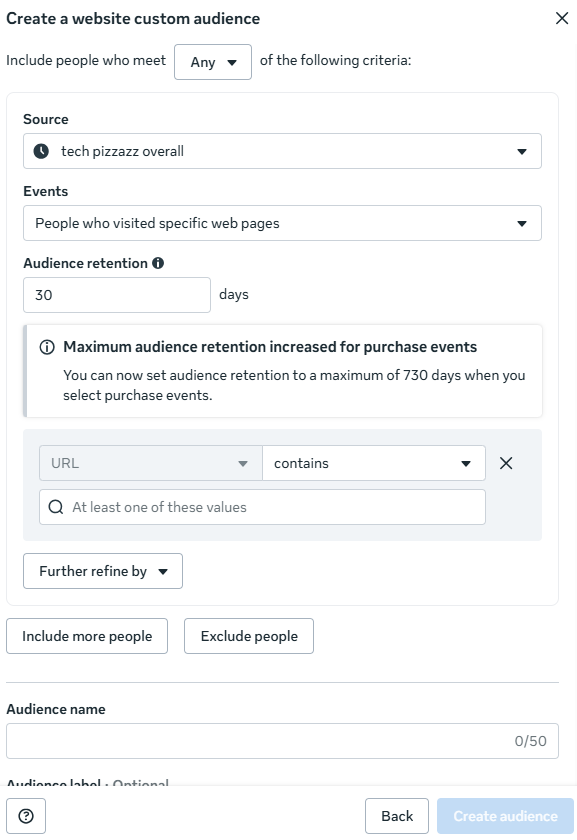
- Select the correct pixel and choose events you’d like to measure.
Some of the most common retargeting audiences include:
- Website visitors
- People who viewed specific products
- Cart abandoners
- Checkout abandoners
- Existing customers
- People who engaged with your Facebook or Instagram content
You can also upload a customer list containing email addresses or phone numbers. Meta will match this information to user accounts, allowing you to reconnect with existing customers, newsletter subscribers, or leads with relevant ads.
4. Create exclusion audiences
When retargeting, you must think about who to show your ads to, but even more carefully, decide who shouldn’t see those ads.
For example, there's usually no reason to keep showing the same purchase ad to someone who has already bought the product.
Create exclusion audiences to remove people such as:
- Recent purchasers
- People who have already submitted a lead form
- Customers who have already completed the action you're advertising
- People who have moved into a higher-intent audience
Excluding these audiences helps reduce wasted ad spend, prevents ad fatigue, and ensures people see ads that match where they are in the customer journey.
5. Choose the right campaign objective
When creating your campaign, choose the objective that matches the action you want people to take.
For example, you can optimize for:
- Purchases
- Leads
- Bookings
- App events
In most cases, however, the Sales objective is the best choice for ecommerce retargeting. It allows Meta to optimize your ads for conversions, making it easier to bring shoppers back to complete a purchase.
If you're planning to use catalog ads as part of your retargeting strategy, read our guide on Facebook Catalog Ads to learn how they work and when to use them.
6. Keep an eye on ad frequency and audience size
Before increasing your budget, check how often people are seeing your ads and how large your audience is.
If your audience is too small, the same people may see your ads repeatedly. This can lead to ad fatigue, where people begin to ignore your ads or become frustrated by seeing them too often.
Review your campaign regularly and monitor metrics such as frequency, reach, and impressions. If frequency starts climbing while results decline, it may be time to refresh your creatives or expand your audience.
7. Make your retargeting ads more compelling
If you run an ecommerce store, Meta's Dynamic Product Ads (DPAs) are one of the most effective ways to retarget shoppers. Why?
Rather than showing everyone the same ad, Meta automatically displays products people have already viewed, added to their cart, or are most likely to buy based on your product catalog.
While this makes your ads relevant, many brands stop there. Their dynamic ads only pull in a product image, title, price, and a Shop Now button.
That's a missed opportunity.
A shopper who abandoned their cart often needs an extra reason to come back. Your creative, if well-designed, can provide that extra push.
Don’t only show the product, you can also:
- Highlight a discount or sale price to create urgency.
- Add trust signals such as Free Shipping, 100% Organic, or Sustainably Made.
- Display promotional badges like 30% OFF, Limited Time, or Best Seller.
- Use layouts that give product titles, pricing, and key selling points more visual emphasis.
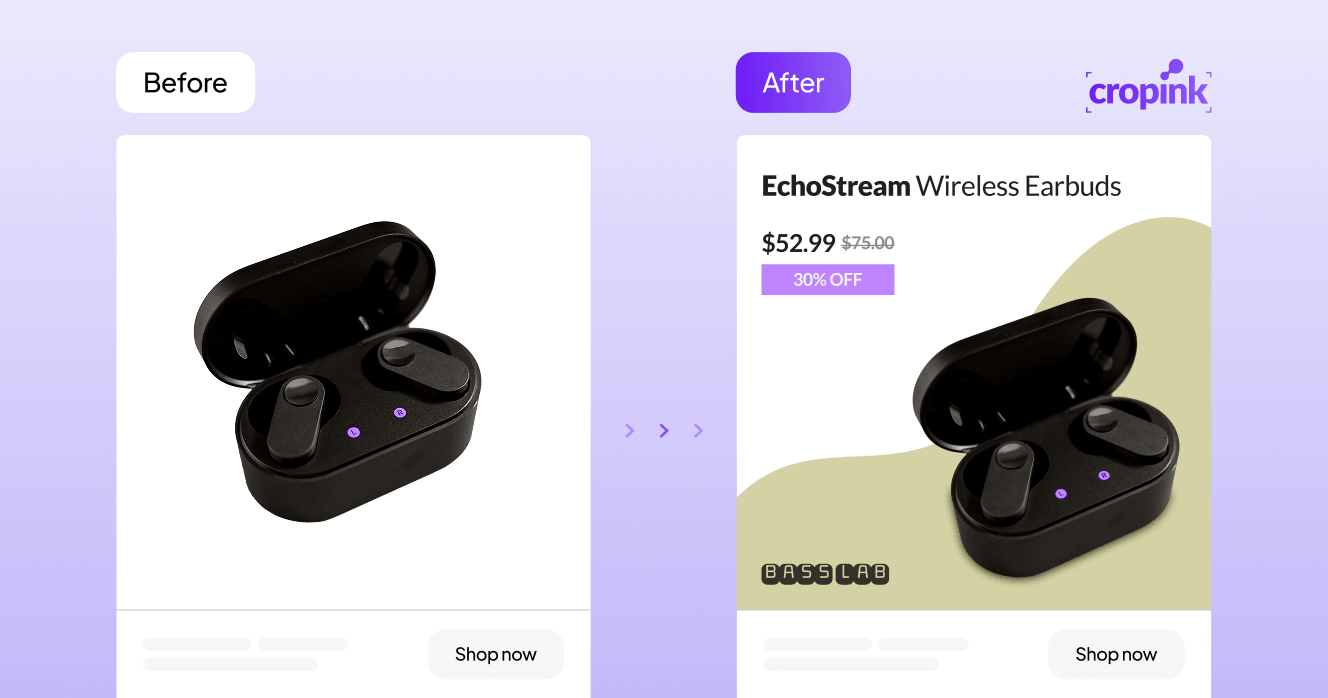
Creative showing a prominent discount offer.
Creative showing a product's USPs.
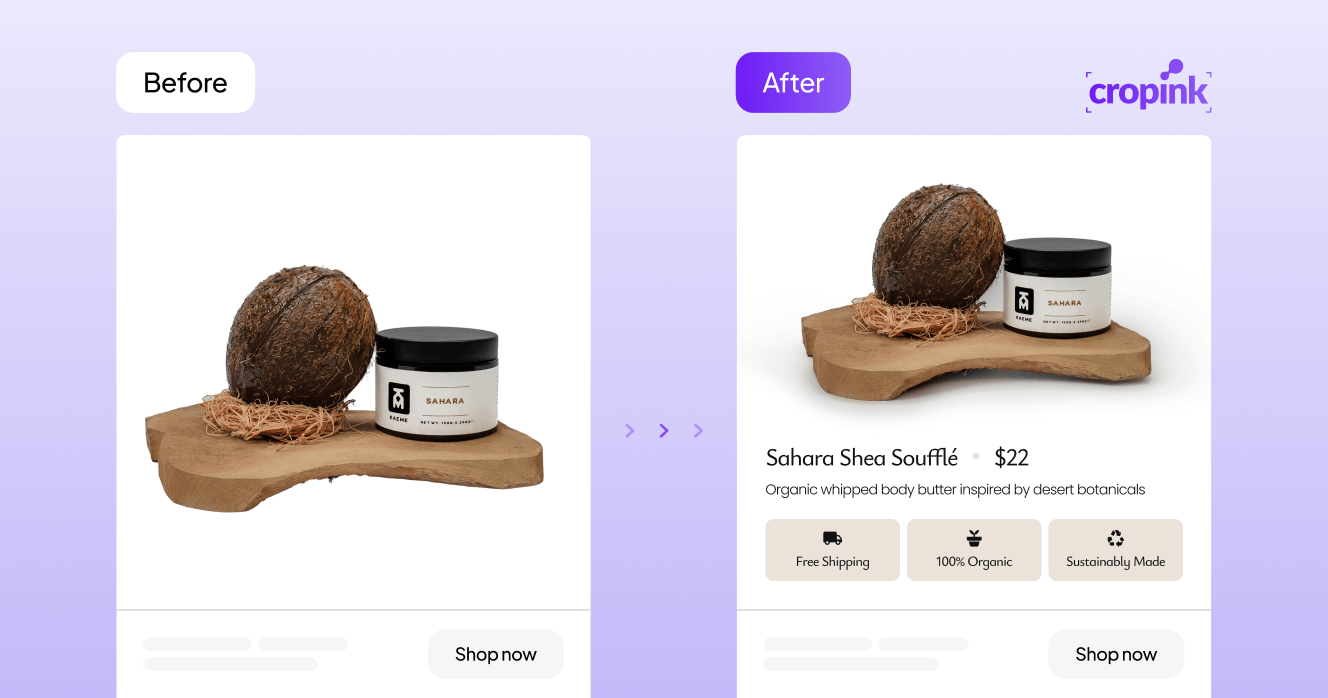
Looking at the examples above. Do you notice the difference between the before and after images?
The original ads contain little more than a product image.
The redesigned versions communicate more (compelling) information.
The shopper can quickly see the product name, current price, previous price, discount, or unique selling points. That makes the ad more informative and more likely to capture attention while someone is scrolling.
Turn your product catalog into better dynamic retargeting ads
Want your retargeting ads to look as good as the examples above? Use Cropink.
To get started, connect your product feed and sync your Meta catalog, and Cropink will take it from there. It will automatically pull in your product titles, prices, images, and discounts, then drop them into your template in a way that still looks like your brand.
The bigger win is that your ads stay accurate.
If a price changes or a product goes on sale, your creative updates automatically. No digging back into old ad sets to swap out images and fix outdated prices.
You can also set rules so your ads automatically react to your catalog. A product on sale can show a '30% off' badge. A bestseller can get a 'Bestseller' tag. Free shipping items can display that too. You're not building these variations one by one. Cropink handles it across your whole catalog.
Put together, this means your retargeting is working on two levels at once.
Meta decides which shopper sees which product, but Cropink makes sure the product is presented with the right price, offer, and details to actually convert them.
Facebook retargeting ad examples
Below are a few examples of retargeting ads I received after interacting with different brands.
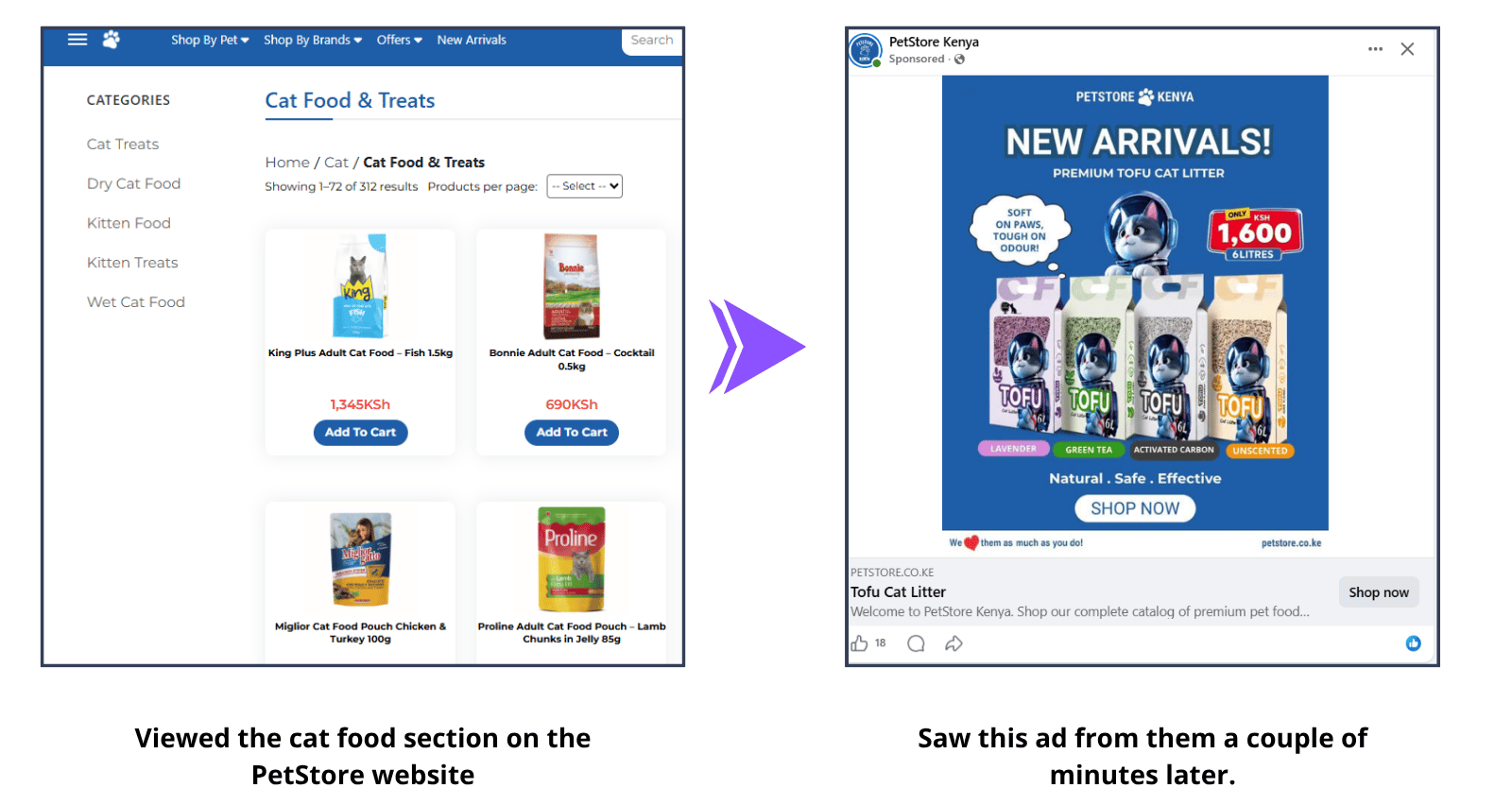
This PetStore ad appeared after I visited the store's website a few minutes earlier. Rather than introducing a new product, it's reminding me about products I'd already shown interest in.
The ad doesn't try to explain the brand or tell a long story. It simply brings the products back into view, making it easy for me to return and continue shopping.
Such an ad will keep your brand top of mind after someone leaves the website without making a purchase.
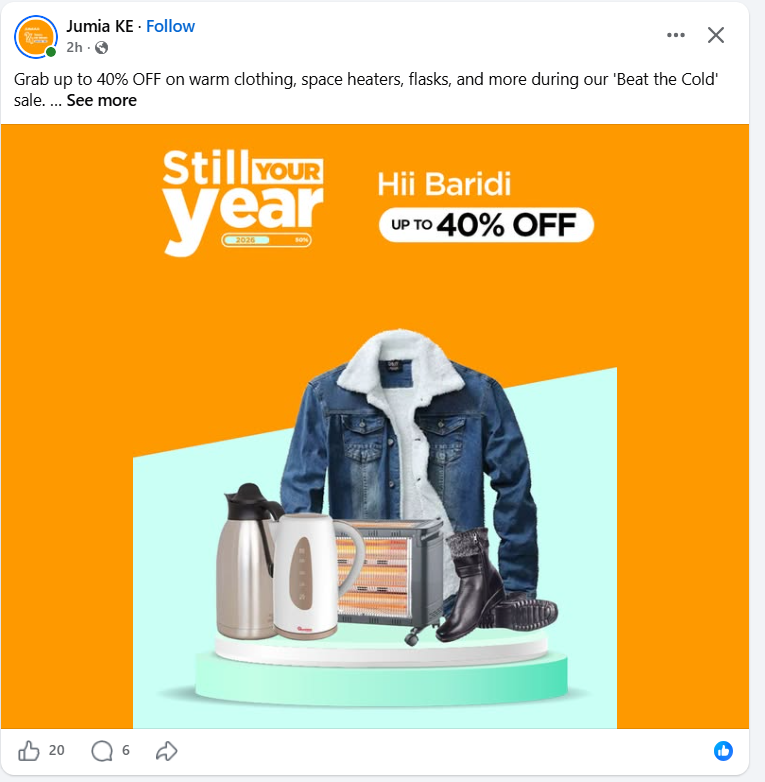
I received this ad a few days after visiting the store's website. Although I had already left without buying anything, the brand stayed visible by reminding me about the products I'd viewed.
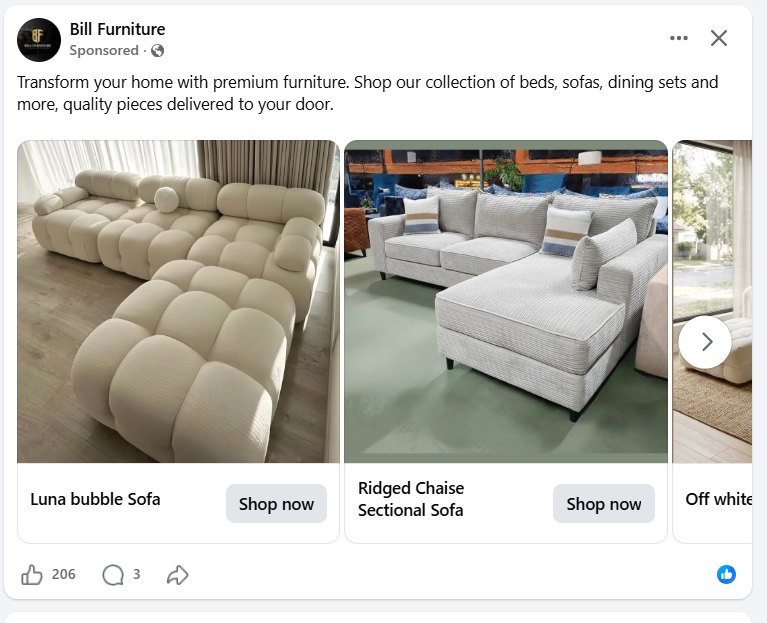
For this one, I had previously interacted with the Bill Furniture brand while searching for bubble couches on another social media site. Since Meta recognized that engagement, it later showed me a retargeting ad featuring products from the same brand.
This is an excellent example of how Facebook retargeting works.
You don't have to visit a company's website to be retargeted.
Watching a video, engaging with an Instagram post, or interacting with a Facebook ad can also allow businesses to reconnect with you later using more relevant ads.
Benefits of Facebook Retargeting campaigns
As mentioned above, Meta's data-rich, comprehensive ecosystem offers multiple benefits for companies.
More precise targeting
Meta lets you build highly targeted audiences based on how people have interacted with your business. You can target website visitors, product viewers, cart abandoners, past customers, or people who engaged with your Facebook or Instagram content.
The only limitation is that Meta can only use data it has access to. If an interaction isn't tracked or shared, it can't be used for retargeting.
Better ROI
Because you're advertising to people who have already expressed interest in your business, your budget is spent more efficiently than it would be on cold audiences.
In fact, retargeting campaigns can deliver up to 3x better campaign performance than campaigns targeting new audiences.
Stronger brand recall
Most shoppers won’t click buy the first time they discover a product.
With retargeting, you can keep your brand visible after someone leaves your website, increasing the chances they'll return when they're ready to buy. Even if they don't convert immediately, repeated exposure helps keep your business top of mind.
Best practices for Facebook retargeting campaigns
Facebook retargeting is powerful, but it isn't enough to simply launch a campaign and hope for the best.
These best practices will help you get more from your ad spend.
Be super-specific with your target audiences
Segment your audience by their actions and tailor your messaging accordingly. A cart abandoner, for example, should see a different ad from someone who only viewed a product once.
The more you segment these audiences, the more personalized your ads can be. And users expect that segmentation too. In fact, studies also show that 63% of consumers stop buying from brands that don't offer personalized experiences.
Also, don't assume the most obvious audience is always the right one.
For example, Old Spice often targets women in some of its campaigns because they're frequently the ones buying grooming products for their partners. Keep your overall marketing strategy in mind when building your retargeting audiences.
Have a sales funnel ready
Retargeting works best when it supports your customer journey.
Think about where each audience is in the buying process and create ads that move them to the next step.
Keep an eye on ROI
A good return on investment starts with getting the right results. Rather than focusing solely on clicks and impressions, measure whether your retargeting campaigns drive purchases or generate leads.
The following benchmarks can help you measure Facebook retargeting performance:
- Average Facebook retargeting CTR: 0.9%
- Dynamic product ads recover: 10 to 25% of abandoned carts
- Messenger retargeting messages achieve: 60 to 80% open rates
- Carousel retargeting ads can improve CTR by 25 to 45%
Use these figures as reference points. Your results will vary depending on your audience, industry, offer, and ad creative.
Maintain consistent messaging
Your retargeting ads should be a natural extension of your website, emails, and other marketing channels.
Using consistent branding, offers, and messaging helps build trust and creates a smoother customer experience.
Exclude people who have already converted
Don't continue showing the same purchase ad to someone who has already bought the product. Exclude recent buyers from your retargeting audience and move them into a different campaign, such as cross-selling, upselling, or customer retention.
Monitor, analyze, optimize
Review your results regularly and look for opportunities to improve.
Test different audiences, creatives, offers, and calls to action, then invest more in what delivers the best results.
If you're using Dynamic Product Ads, Cropink makes testing much easier because you can generate dynamic creatives at scale while keeping every ad consistent with your brand.
In short, you can test different layouts, promotions, and messaging across your product catalog and not have to make hundreds of designs manually.
Best Facebook retargeting audiences
Not everyone in your retargeting audience is at the same point in the buying journey. Someone who viewed a product once shouldn't necessarily see the same ad as someone who abandoned their cart yesterday.
Tailor your offer to how much interest the shopper has already shown. For example:
- Website visitors: Introduce your brand or highlight your best-selling products.
- Product viewers: Remind them of the product they viewed and highlight its benefits.
- Cart abandoners: Encourage them to complete their purchase with free shipping, a limited-time discount, or another incentive.
- Existing customers: Promote complementary products, new arrivals, or products they may be interested in based on previous purchases
And here are some messaging suggestions for those audiences.
| Audience | Suggested message | What to Include in the Ad |
|---|---|---|
| Cart abandoners | Still thinking it over? Your cart is waiting. | Show the product image, current price, delivery information, and a low-friction CTA such as Complete Your Purchase or Return to Cart. |
| Product viewers | You viewed this product. Here's why customers choose it. | Highlight the product image, review score, key product benefits, and current price. |
| Category browsers | Popular picks from the category you checked. | Use a carousel or dynamic catalog ad featuring several related products from the same category. |
| Past buyers | Complete the set with products that match the items in your last order. | Recommend complementary products rather than advertising the same item they've already purchased. |
Craving more Facebook ads insights? Check out these resources:
- Facebook Dynamic Ads Best Practices
- How to Create Good Facebook Ads
- Facebook Dynamic Product Ads
- How to Customize Your Facebook Dynamic Product Ads
- Meta DPA Guide
Common Facebook retargeting mistakes
The biggest mistake in retargeting is treating every warm user the same. A cart abandoner, a product viewer, and a past buyer need different messages. Feed-based creatives make that easier because the ad can change with the product and the audience.

CEO at Cropink & Feedink
Be wary of these other three mistakes as well.
1. Retargeting people for too long
A shopper who viewed a product six months ago is much less likely to convert than someone who visited yesterday.
As such, don’t keep people in the same audience indefinitely; use shorter audience windows based on buying intent. For example, cart abandoners might only stay in your audience for 7 to 14 days, while product viewers could remain for 30 days.
2. Sending everyone back to the same landing page
If someone clicks on a specific product, they should land on that product page. If they abandoned checkout, take them back to their cart whenever possible. Reducing unnecessary steps makes it easier to convert.
3. Treating your product catalog as set and forget
Dynamic Product Ads are only as good as the product data used.
Outdated prices, missing images, incorrect availability, or incomplete product titles can all reduce performance.
To avoid that, keep your catalog up to date so shoppers always see the latest information in your retargeting ads.
Summary
Facebook retargeting is highly effective, but you'll need to be smart about how you use it.
If there's one takeaway from this article, it's this:
Your audience setup and your creatives will have the biggest impact on the ROI you achieve.
Set up your Meta Pixel and Conversions API correctly, target the right audiences, and ensure you exclude users who are no longer relevant to the campaign.
More importantly, use dynamic, enriched catalog ads that show shoppers relevant, personalized content based on their interests.
As we mentioned, Cropink can help with the creative side of Facebook retargeting.
Explore our dynamic templates to see how you can create more compelling retargeting ads using enriched product creatives.
FAQs
What is Facebook retargeting?
Facebook retargeting is a marketing strategy where advertisers show ads to people who have already interacted with their business.
Is Facebook retargeting the same as remarketing?
You can use the two terms interchangeably. Retargeting is more common on Meta, while remarketing is used more often in Google Ads.
How does Facebook retargeting work?
Facebook retargeting uses the Meta Pixel and other tracking tools to collect data about website visitors. You can then create Custom Audiences and display ads to those people as they browse Facebook, Instagram, and other Meta platforms.
How do I set up retargeting ads on Facebook?
Start by installing the Meta Pixel and the Conversions API. Then create a Custom Audience, choose your campaign objective, and you’re ready to launch your retargeting campaign.
Do Facebook retargeting ads still work?
Yes. Facebook retargeting is a simple way to reach warm audiences because you're advertising to people who have already shown interest in your business.
What are the best Facebook retargeting audiences?
Some of the best audiences include cart abandoners, product viewers, checkout abandoners, website visitors, past customers, and people who have engaged with your Facebook or Instagram content.
What is dynamic retargeting on Facebook?
Dynamic retargeting automatically shows shoppers the products they viewed or are most likely to buy. It uses your product catalog to display relevant products as ads.
How much should I spend on Facebook retargeting?
There's no fixed budget, but you’ll need at least $5 per ad set.
How often should people see retargeting ads?
Aim to stay visible without becoming repetitive. If the same people see your ads too often, refresh your creatives or expand your audience to avoid ad fatigue.
Should I exclude customers from retargeting campaigns?
Yes. People who have already completed the action you're advertising should usually be excluded. You can move them into campaigns for repeat purchases, cross-selling, or upselling.
Sources
Damaris is a Digital Marketing Specialist who writes about digital marketing and performance marketing. At Cropink, she creates data-driven content to help businesses run better ad campaigns for better performance and ROI.
Leszek is the Digital Growth Manager at Feedink & Cropink, specializing in organic growth for eCommerce and SaaS companies. His background includes roles at Poland's largest accommodation portal and FT1000 companies, with his work featured in Forbes, Inc., Business Insider, Fast Company, Entrepreneur, BBC, and TechRepublic.
Related Articles


How Can Cropink Help?
Start with Cropink is easy and free
No credit card required