Maximize Sales with Snapchat Dynamic Product Ads in 2026
Snapchat Dynamic Product Ads can automate your ecommerce advertising, but only if your product feed, tracking, and creative work together. Learn how to get every piece right in this complete guide.


If Snapchat doesn’t top your list when you think about running ads, that’s a huge missed opportunity. This platform has 956 million monthly users, according to the latest data, with 90% under 35.
If you are in ecommerce, you can take advantage of Snapchat's Dynamic Product Ads (DPAs) to reach their highly engaged audience.
Snapchat Dynamic Product Ads use your product catalog and Snap Pixel events to show relevant products to people who viewed or bought from your store.
To launch them well, you need three things: an up-to-date product feed, correctly configured pixel events, and product creatives that work in Snapchat’s vertical, fast-moving environment.
This guide will walk you through the essentials of Snapchat DPAs, their benefits, and how to set them up effectively.
Key takeaways
- Snapchat Dynamic Product Ads automatically promote products from your catalog based on shoppers' browsing and purchase behavior. They're ideal for ecommerce prospecting and retargeting.
- A successful DPA campaign starts with a healthy product catalog. Ensure your product IDs, images, prices, availability, and links are accurate and kept up to date.
- Your Snap Pixel is just as important as your catalog. Configure the required events and make sure the item_id passed by the Pixel matches the Product ID in your feed.
- Creative still influences the performance of Snapchat Dynamic product ads. Snapchat automates product selection and delivery, but branded, high-quality catalog creatives help your products attract more attention and clicks.
What are Snapchat Dynamic Product Ads?
Snapchat Dynamic Product Ads are automated, personalized ads that showcase products from your catalog to users based on their interactions with your website or app.
You can integrate your product catalog with Snapchat and utilize the Snap Pixel to deliver real-time, relevant ads to potential customers. It directly enhances the likelihood of conversion.
How are they different from the usual Snap ads and collection ads?
| Feature | Snap Ads | Collection Ads | Snapchat Dynamic Product Ads |
|---|---|---|---|
| Format | One full-screen video, image, or GIF with an optional swipe-up link | One main image or video with four product tiles below it | Automatically created single-image, carousel, or collection ads using your product catalog |
| Control | You choose the creative, headline, and CTA yourself | You choose the products yourself or pull them from a product feed | Snapchat automatically chooses which products to show each shopper |
| Best for | Brand awareness, promotions, and driving traffic to a landing page | Showing a specific product collection or category | Large ecommerce stores and retargeting shoppers who viewed or added products to their cart |
Snap ads
These are vertical full-screen videos, images, or GIFs with an optional swipe-up attachment, such as a website link or an app install.
You have full control over Snap ads because you manually select the creative, headline, and CTA. These ads are best for brand awareness, simple promotions, or driving traffic to a specific website landing page.
Collection Ads
As the name suggests, collection ads feature a main hero image or video, with a row of four product tiles below.
You can create them manually by picking specific items/SKUs, or partly dynamically by pulling items from a feed. They are a great fit for ecommerce brands that want to show their products in a specific category.
Snapchat DPA, as we've already explained, is an automated version of single images, carousels, or collection formats. They are powered entirely by an uploaded product catalog or data feed.
Snapchat's system automatically matches and displays relevant products from your inventory to matching users based on their browsing or shopping behavior.
They are the best fit for large-scale e-commerce catalogs and retargeting users who have already viewed or added items to a cart on your website.
Snapchat DPA requirements checklist
You can not successfully run Snapchat dynamic ads without these requirements:
- A Snapchat business account and an ad account.
- An up-to-date and accurate product catalog following Snapchat’s catalog specs. Every product in the catalog must have a unique product ID, product image URL, product landing page URL, Price, and availability.
- Install the Snap Pixel (or app events) and configure it to track Page View, View Content, Add to Cart, and Purchase events.
- If you want to run automated product ads, you'll also need your Snap Pixel to identify at least 1,000 unique Snapchat users who visit your website and interact with your products.
The perks of Snapchat dynamic ads
DPAs on Snapchat give you a lot of benefits, to name a few:
- Personalized ads at scale. Snapchat automatically matches products from your catalog to each shopper based on their interests and shopping behavior.
- Less manual work. Rather than creating individual ads for every product, Snapchat automatically generates and updates ads using your product feed.
- Prospecting and retargeting in one campaign strategy. Reach new shoppers who haven't visited your website yet, then re-engage people who viewed products or abandoned their cart to encourage them to complete their purchase.
- Continuous optimization. Snapchat automatically optimizes delivery based on your campaign goal, whether that's driving more purchases, clicks, or another conversion event.
- Always up-to-date products. Your ads automatically reflect the latest product prices, availability, and other catalog information, reducing the risk of promoting outdated inventory.
Types of Snapchat Dynamic Product Ads
Snapchat offers various DPA formats to cater to different marketing needs:
- Dynamic Single Image Ads
With these ads, you can display individual products from your catalog, add on-image text, and show pricing. When Snapchatters click on Dynamic Single Image Ads, they’re taken to your website or the product’s landing page.
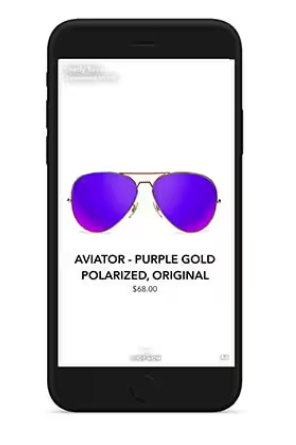
Example of a Single Image Ad on Snapchat.
- Dynamic Collection Ads
For Collection Ads, you get a hero image or video related to your product, and underneath it, four other products displayed as square tiles.
These tiles are clickable and lead to the product page.
Note that the tiles will also be dynamically generated from your Snapchat product feed. They’re also based on the product set you selected and the type of audience you chose to target.
As with Single Image Dynamic Ads, you can also include creative elements such as the sale price and product title on the hero image of your collection ad.
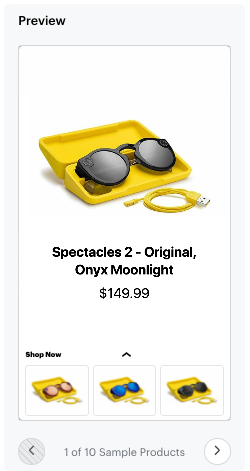
Example of a Snapchat Dynamic Collection Ad.
- Dynamic story ads
These are ads that display as tiles in Snapchat’s Discover section.
When someone taps a tile, they're taken to a series of product-focused Story snaps that they can swipe through, with each snap linking directly to a product page.
You can create the first Story snap manually using your own branded image or video. Snapchat will automatically generate the remaining 3-10 product snaps from your product catalog.
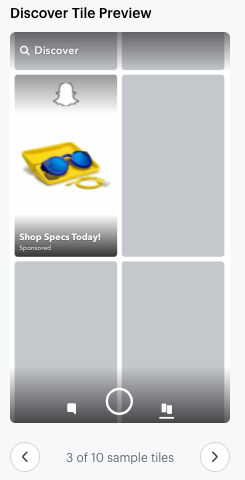
Example of a Snapchat Dynamic Story Ad.
- Multi-segment DPA
It’s pretty much an enhanced variation of a Dynamic Collection Ad.
The difference between Multi-segment DPAs and Dynamic Collection Ads is how they're presented.
Dynamic Collection Ads display the hero creative and product tiles together in one view, while Multi-segment DPAs split the experience into two parts:
- A branded hero image or video first
- Followed by a separate segment with dynamic product recommendations.
It's best used when launching new collections, seasonal campaigns, featured brands, or promotions where a branded message should come before product recommendations.
Snapchat product feed checklist
Your product feed (also called a Snapchat product catalog) is the data source Snapchat uses to build and update your Dynamic Product Ads. Before uploading your feed, make sure every product includes the required information as we've outlined below.
- Product ID: This must match the item_id sent by your Snap Pixel.
- Title: Snapchat recommends keeping it under 40 characters to avoid truncation.
- Description: An optimized, keyword-rich (but natural) description of your product.
- Product URL (link): The landing page where shoppers go after clicking the ad.
- Image URL: Images must be JPEG, PNG, or WebP, and at least 200 × 200 pixels. GIFs aren't supported.
- Availability: Snapchat automatically excludes out-of-stock products from ads.
- Price: The current product price, including the currency if it's not USD.
- Brand, GTIN, or MPN: You must provide at least one of these product identifiers.
These other fields aren't required, but they can improve catalog quality and help Snapchat show more relevant products.
- Google Product Category
- Product type
- Color
- Material
- Size
- Gender
- Additional product images
- Sale price and sale dates
- Custom labels for grouping products
Setting up Snapchat Dynamic Product Ads
To launch a successful DPA campaign on Snapchat, follow these steps:
Step 1: Create your campaign
- Log in to Snap Ads Manager and click Create Ads.
- Select Catalogue Sales as your campaign objective.
- Choose the product catalog you want to use. Snapchat will automatically pull products from this catalog to create your ads.
- Review the attachment diagnostics to make sure your catalog supports your preferred attachment type. If any requirements are missing, update your catalog before continuing.
Step 2: Configure your ad set
Next, configure how Snapchat will deliver your ads.
- Choose the Product Set you want to advertise. You can use all products, select an existing product set, or create a new one.
- Review the estimated audience size generated by Snapchat.
- Select your ad format:
- Single Image Ad
- Collection Ad
- Choose your attachment type:
- Web View to send users to your website.
- App Install to drive app downloads.
- Deep Link to send existing app users to a specific screen in your app.
Collection Ads currently support Web View and Deep Link attachments only.
Step 3: Create your ad
The final step depends on the Dynamic Product Ad format you choose.
Dynamic Single Image Ads
- Enter your ad name, brand name, and headline.
- Choose a creative template manually or let Snapchat rotate templates automatically.
- Select which catalog fields to display, such as Title, Price, or two custom fields.
- Choose a background color.
- Optionally add a logo, frame, or text overlay while keeping graphics outside Snapchat's safe zones.
Dynamic Collection Ads
- Enter your ad name, brand name, headline, and CTA.
- Choose whether to display 3 or 4 dynamic product thumbnails.
- Select your Top Snap:
- Use images from your product catalog for a fully automated ad, or
- Upload your own hero image or video.
- Customize the Top Snap with optional captions, dynamic fields, logos, frame overlays, background colors, or price badges.
Fully automated Collection Ads require at least five products in your catalog, although Snapchat recommends much larger product sets for better performance.
Step 4: Review and publish
Before publishing your campaign, confirm that:
- Your catalog contains the correct products.
- Attachment diagnostics show no missing requirements.
- Your product set is correct.
- Your Snap Pixel events are firing properly.
- Your ad previews look as expected.
If everything checks out, review your campaign settings and publish your Dynamic Product Ads.
Required Snap Pixel events for Snapchat DPAs
To run Dynamic Ads, the following events must be configured in your pixel:
| Event Type | Description | Example | Requirement |
|---|---|---|---|
| PURCHASE | Track Purchases | snaptr('track','PURCHASE') | Highly Recommended |
| ADD_CART | Track add to cart events of specific items | snaptr('track','ADD_CART') | Highly Recommended |
| VIEW_CONTENT | Track content view events | snaptr('track', 'VIEW_CONTENT') | Required if not tracking Page_View |
| PAGE_VIEW | Track webview pages | snaptr('track','PAGE_VIEW') | Required if not tracking View_Content |
Page View and View Content tell Snapchat which products someone browsed. Add Cart flags shoppers with confirmed purchase intent, while Purchase confirms who converted.
For accurate reporting, purchase events should also pass the price, currency, and transaction_id with each completed transaction.
Creative examples for Snapchat DPAs
- Product-only retargeting (Hibbett Sports)
Hibbett Sports used Snapchat Dynamic Product Ads to automatically show shoppers products from its catalog based on Snap Pixel data. They tested catalog strategies and DPA creative formats, including Collection Ads and animated templates.
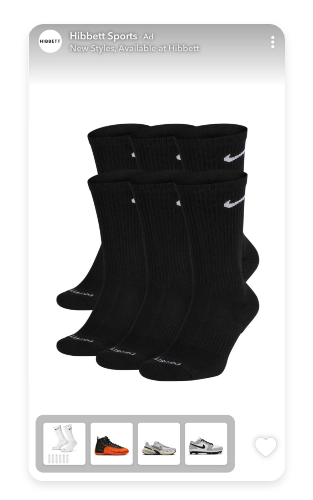
One of Hibbett’s Snapchat Collection Ads.
- Collection Ad with a celebrity campaign (Tommy Hilfiger)
Tommy Hilfiger combined Collection Ads, Story Ads, and Snapchat Ads to promote its Spring 2023 collection featuring Shawn Mendes.
The collection ad example below paired a hero creative with shoppable products and used retargeting and Lookalike Audiences to reach fashion shoppers.
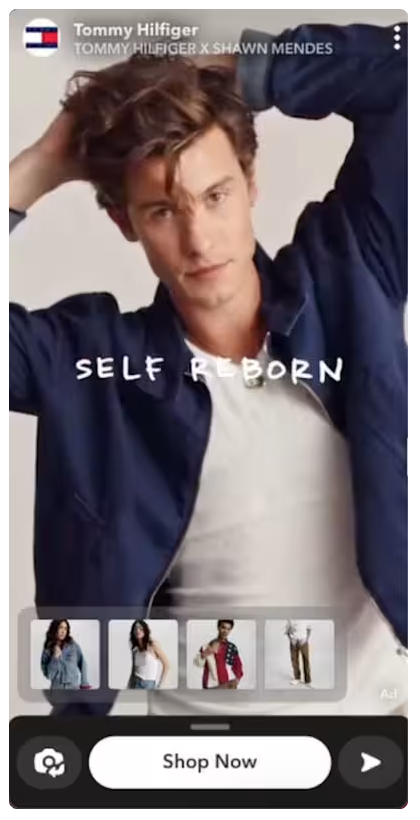
Tommy Hilfiger Snapchat Collection Ad example
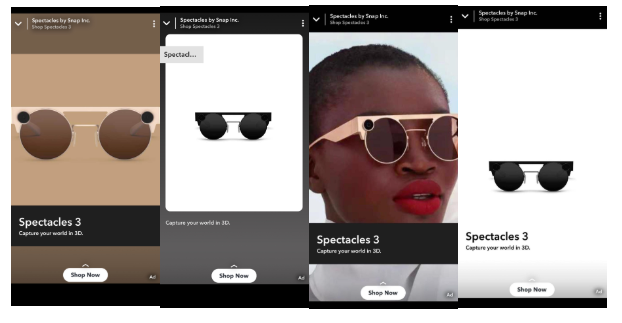
Here’s another example for Dynamic Single Image Ads on Snapchat.
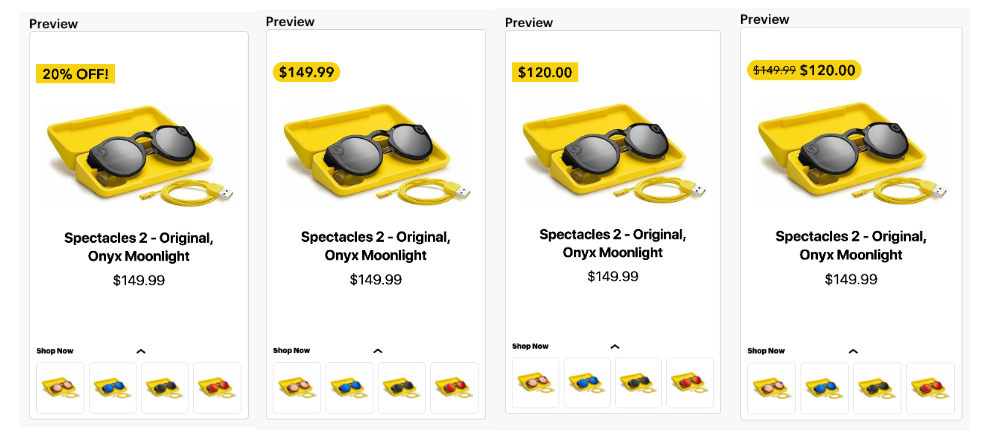
Examples of Snapchat’s Dynamic Collection Ads templates.
But as you can see from these examples, the hero images are pretty bland. If you want to command attention on Snapchat, you can not just rely on Snap’s automated text-on-image recommendations; you have to put in some work on your creative.
We’ll explain how you can achieve this with Cropink in just a few minutes.
Dynamic Product Ads are only as good as the data and creative system behind them. A clean feed helps the platform choose the right product. A strong template helps the shopper understand why that product is worth clicking.

CEO at Cropink & Feedink
Best practices for Snapchat DPAs
- The first and most important practice you need to use is high-quality visuals. It is to ensure your product images are clear and appealing to capture user attention. If you're using catalog images for Collection or Story Ads, aim for images of at least 1000 × 1000 pixels for the best quality.
- Design for a vertical-first experience since Snapchat is a full-screen platform. Keep important text, logos, and product details within the safe area and use large, readable fonts.
- Make prices and promotions easy to spot. If you're running a sale, don't make shoppers search for the discount. Use conspicuous price overlays, sale badges, or percentage-off labels that stand out without covering the product.
- Write concise and persuasive copy that highlights product benefits and includes strong calls to action.
- Regularly analyze metrics such as click-through and conversion rates to refine your strategy and improve results.
- Also, gain deeper insights into Snapchat's audience, the latest stats, and trends to inform DPA strategies.
Upgrade your Snapchat catalog ads with Cropink
Snapchat automatically creates Dynamic Product Ads from your product catalog, but all advertisers have access to the same layouts.
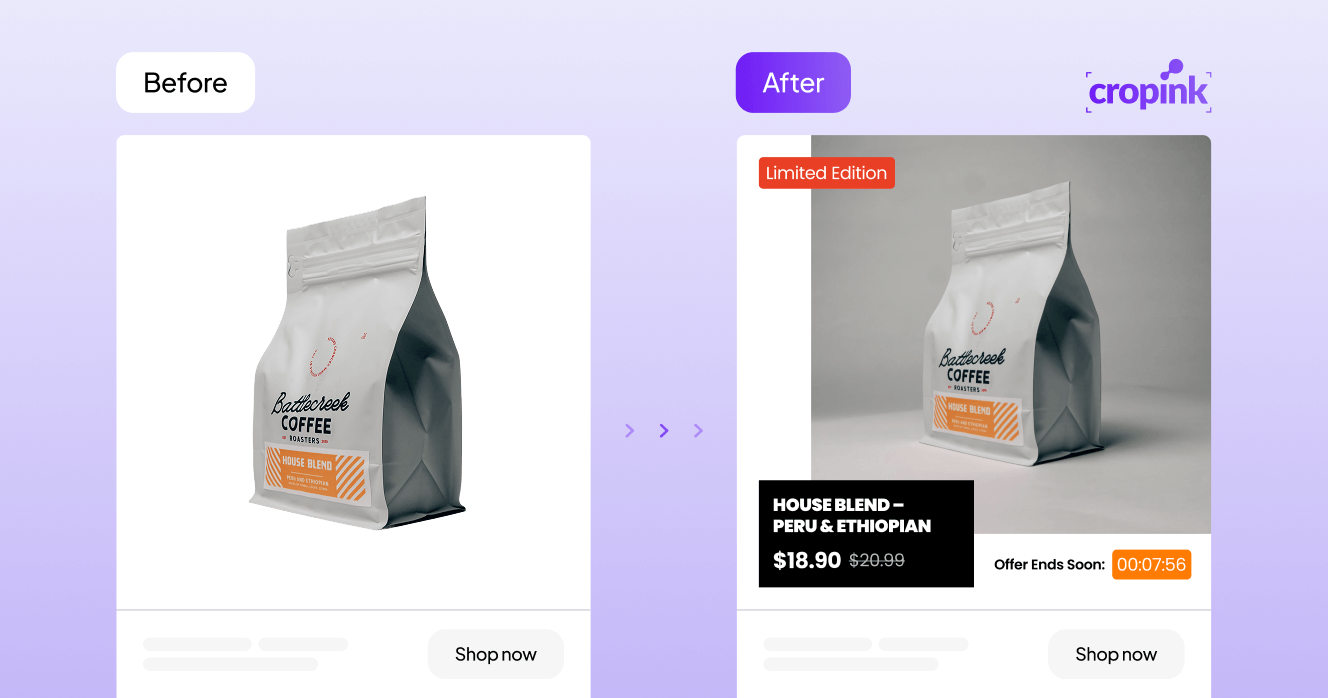
Cropink gives you more creative control by enriching your product feed with branded backgrounds, custom fonts, review badges, promotional labels, delivery information, and other dynamic design elements.
You still benefit from Snapchat's automated targeting and optimization, while creating product ads that better reflect your brand and stand out in the feed.
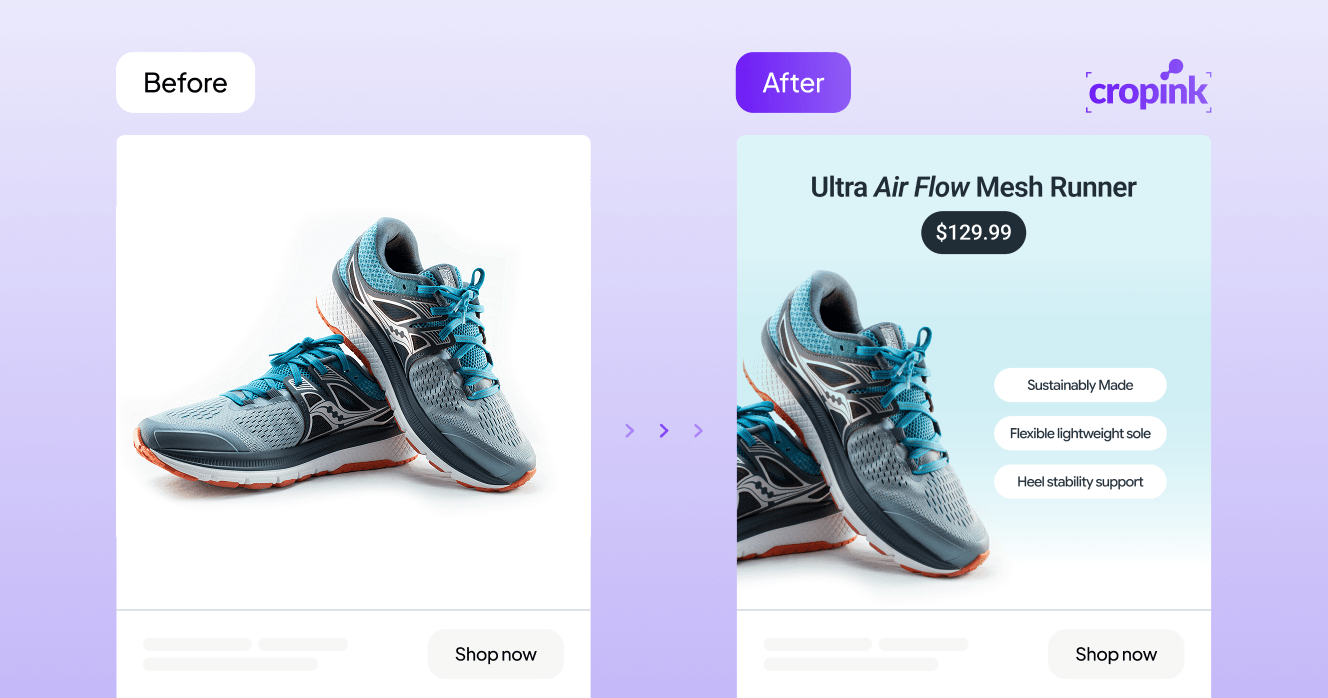
See, instead of the bland image on the left, you can create something unique and on-brand with Cropink for your Snapchat DPAs. And this is just one example.
You can be as creative as you want with Cropink because it lets you include your brand colors, sale price, discount badges, multiple images, text on images, ratings & reviews, and urgency tactics, just like this other example.
If you don’t have a catalog ads tool like Cropink, you're often forced to trade creative quality for automation.
Cropink removes that compromise. You’ll still have the real-time performance, retargeting, and budget optimization of Snapchat's backend algorithm. You’ll also finally get 100% control over the fonts, colors, and messaging that represent your ecommerce brand.
Common Snapchat DPA mistakes
- Product IDs don't match your Snap Pixel
Your product catalog and Snap Pixel must use the same product IDs (item_id).
If they don't match exactly, Snapchat can't link user actions to the correct products, and it reduces the effectiveness of your Dynamic Product Ads.
- Letting your product feed become outdated
Dynamic Product Ads rely entirely on your product catalog. If prices, availability, product links, or images aren't updated regularly, shoppers may click on out-of-stock items or outdated offers.
- Incomplete or incorrect event tracking
Your Page View, View Content, Add Cart, and Purchase events must fire correctly and pass the required parameters. Missing events, duplicate Purchase events, or incorrect values will prevent Snapchat from building accurate audiences and optimizing ad delivery.
Wrapping up
Snapchat Dynamic Product Ads aren't a set-it-and-forget-it solution.
Their success depends on always maintaining an up-to-date product catalog, accurate Snap Pixel tracking, and creative that encourages shoppers to stop and learn more.
If those foundations are in place, Snapchat can automate product selection and campaign optimization while you concentrate on improving the shopping experience.
If you want the efficiency of automated catalog ads without sacrificing your brand's visual identity, try Cropink. It helps you turn standard product feeds into branded, high-converting creatives while keeping all the automation that makes DPAs so effective.
FAQs
What are Snapchat Dynamic Product Ads?
Snapchat Dynamic Product Ads are automated ads that use your product catalog and Snap Pixel data to show relevant products to buyers based on their interactions with your website or app.
How can I ensure my product images stand out in Snapchat DPAs?
To make your product images stand out, use high-quality visuals that are crisp, well-lit, and showcase your products effectively.
What product feed fields do Snapchat DPAs need?
At a minimum, your product feed should include a unique Product ID, title, description, product URL, image URL, availability, price, and at least one product identifier. Your Product ID must match the item_id sent by your Snap Pixel.
What are common mistakes to avoid when setting up Snapchat DPAs?
Common pitfalls include poor data feed management, neglect of creative testing, and ignoring audience segmentation. To avoid these issues, make sure your Snapchat catalog is accurate, regularly test different ad creatives, and utilize Snapchat’s targeting options.
How often should I update my product catalog for Snapchat DPAs?
Update your Snapchat product catalog daily to ensure your Dynamic Product Ads reflect the latest product information. You can automate this process by setting up scheduled data feed ingestion or integrating directly with platforms like Shopify.
Can Snapchat DPAs be effective for small businesses?
Yes, Snapchat DPAs can be effective for businesses of all sizes. They allow small businesses to reach targeted audiences with personalized content, potentially leading to increased engagement and conversions.
How do I measure the success of my Snapchat DPA campaigns?
To measure the success of Snapchat DPA campaigns, monitor performance indicators such as click-through rates, conversion rates, and return on ad spend.
Are there specific industries that benefit more from Snapchat DPAs?
Industries targeting younger demographics, such as fashion, beauty, and technology, often see significant benefits due to Snapchat's user base. However, with appropriate strategies, various industries can effectively utilize DPAs.
How do Snapchat DPAs use the Snap Pixel?
The Snap Pixel tracks actions like Page View, View Content, Add to Cart, and Purchase. Snapchat uses these events to match shoppers with products from your catalog, measure conversions, and optimize ad delivery.
Can I use the same product feed for Meta, TikTok, and Snapchat?
As long as your feed meets each platform's catalog requirements, you can use one feed. Keep product IDs, prices, availability, images, and links accurate, and ensure your tracking matches the product IDs in your catalog.
How can I make Snapchat catalog ads look better?
Use high-quality product images, design for a vertical layout, and make prices and promotions easy to spot. If you want more creative control, you can use a feed enrichment tool like Cropink to add branded backgrounds, custom fonts, review badges, and other dynamic design elements.
Sources
- Snapchat. Investor Relations
- Snapchat. About Dynamic Ads
- Snapchat. What's Required to Run Dynamic Ads?
- Snapchat. Dynamic Ads on Snapchat: How to Set Up Dynamic Ads
Manisha is a Data-Driven Marketing Expert who turns numbers into narratives and ad clicks into conversions. With a passion for performance marketing and a sharp eye for analytics, she helps brands cut through the noise and maximize their impact in the digital space.
Damaris is a Digital Marketing Specialist who writes about digital marketing and performance marketing. At Cropink, she creates data-driven content to help businesses run better ad campaigns for better performance and ROI.
Related Articles


How Can Cropink Help?
Start with Cropink is easy and free
No credit card required