Instagram Catalog Ads Explained: A Guide for eCommerce Brands
84% of social users are on Instagram, making it a top channel for eCommerce growth. This guide explains how Instagram Catalog Ads use product feeds and Meta Advantage+ automation to deliver personalized ads, improve ROAS, and convert scrollers into buyers at scale.



You’re here because you’re wondering how you can advertise all your products at scale with the least amount of resources, right?
Well, Instagram catalog ads are a perfect use case for that.
In the simplest terms, Instagram catalog ads are product ads that pull items from your Meta product catalog and show them across Instagram placements such as Feed, Stories, Explore, and Reels.
You won’t have to build one ad for each product you sell because once you connect your product feed, Meta can dynamically show relevant products to shoppers based on behavior, audience data, and your campaign settings.
Read on to learn more about how Instagram catalog ads can transform casual social media scrollers into paying customers, automatically and at scale.
Key takeaways
- To run Instagram catalog ads, you need a Meta product catalog, a product feed, a connected ad account, and a campaign that uses the catalog as the creative source.
- Instagram Catalog Ads use automation to turn Instagram’s massive audience (84% of social users) into customers by showing the right product to the right person at the right time.
- Your product feed is the foundation—accurate images, prices, availability, and clean data are critical for successful catalog ad delivery.
- Meta Advantage+ helps scale catalog ads with automated targeting and placements, combining personalization with minimal manual effort.
What are Instagram catalog ads?
Instagram isn’t just a photo-sharing app anymore. It is now an established shopping platform.
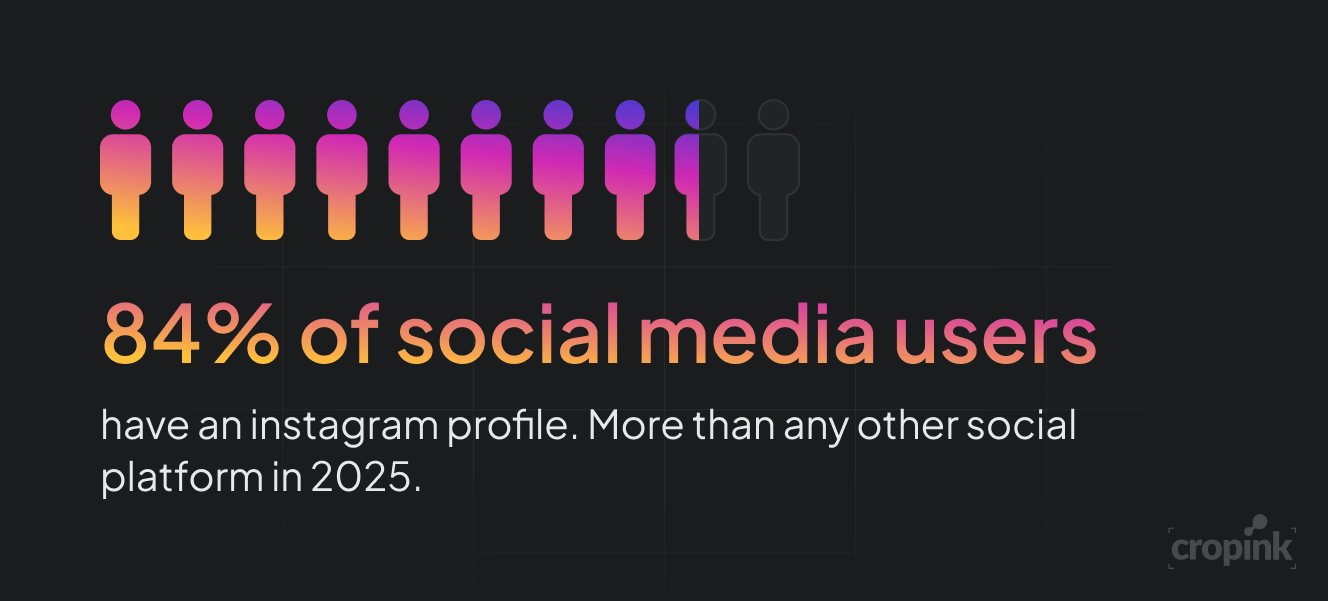
And here’s why that matters: 84% of social users have an Instagram profile, more than any other social network.
For eCommerce brands, that’s a large audience you can compel to try your products. But most businesses still don’t know how to turn that traffic into real sales.
That’s where Instagram Catalog Ads come in.
They allow you to automatically promote items from your product catalog, directly inside Instagram.
Instead of creating ads one by one, Instagram pulls data from your product feed, such as titles, prices, images, and stock status, and dynamically displays them as an ad across the feed, explore, and reels.

Here’s an example of an Instagram Catalog ad in the format of a Collection Ad.
It’s a catalog ad because:
- Multiple products are displayed within the same ad.
- Product thumbnails appear beneath the main creative, allowing shoppers to browse items.
- Products are pulled from a product catalog rather than being manually created as separate ad creatives.
- Shoppers can view and explore different products directly from the ad.
Catalog ads are created to scale your product marketing without scaling your ad team. You design the framework once, and Instagram does the rest in real-time.
Why does this matter? Because automation, personalization, and speed aren’t optional anymore; they’re required.
Shoppers want relevance, convenience, and minimal friction in their discovery experiences. Catalog ads deliver all three. They’re the modern answer to “how do I market thousands of products without burning out?”
Instagram catalog ads vs. Instagram Shop vs. product tags
An Instagram Shop is your storefront on Instagram. It gives shoppers a place to browse your products, explore collections, and learn more about what you sell.
Product tags, meanwhile, let you bring those products into your regular Instagram content. For example, you can tag a pair of shoes in a post or Reel, allowing someone to tap the tag and view that product.
Instagram Catalog Ads, however, are a form of paid advertising. They use the products in your catalog as the source for your ads, allowing Meta to select and display relevant products to different shoppers dynamically.
Meta Advantage+ catalog ads explained
Meta’s Advantage+ catalog ads take the base catalog ad system and level it up.
They use even more automation to optimize delivery, placements, and creatives without constant manual input.
Here’s the breakdown:
Traditional catalog ads let you define more details manually — like placements, creative structure, and overlays.
Advantage+ removes much of that setup and lets Meta’s AI optimize for performance.
With Advantage+, you can reach custom audiences, like people who visited your site or added items to their cart, without building complex retargeting lists.
That makes it easier to show the right product to the right person at the right time.
This is how the process typically works when you’ve turned on Advantage+.
Your store → Customer views/carts/buys → Meta Pixel/CAPI sends event + product ID → Meta connects the ID to your catalog → Meta gathers activity from many shoppers → Meta detects patterns → Advantage+ predicts which product is relevant → Shopper sees that product → More interactions happen → Meta receives more data → Meta keeps improving its predictions to ensure that shoppers are seeing product ads most relevant to them.
Instagram supports Advantage+ catalog ads on:
- Feed
- Stories
- Explore
Just upload your catalog, choose your campaign objective (like Sales or Engagement), and toggle Advantage+ on.
Meta handles the rest, including automated placement optimization and default creative setup.
A few limitations you need to know about Meta Advantage+:
- You can’t use all features in Stories, like videos from the catalog or map cards
- Some creative tools and overlays won’t show on Instagram when pulling from Facebook feeds
- Instagram Advantage+ catalog ads do accumulate likes and comments. However, because the creative dynamically changes for each user, these comments will not appear on a single, static grid post. They must be managed directly via Meta Business Suite or the Page Inbox, where they may display system placeholders instead of the specific product the user saw.
Still, the trade-off is worth it: more automation, less micromanagement, and better use of your time.
Instagram catalog ad placements
In 2026, your Instagram catalog ads can appear in more places than ever before.
These placements are designed to blend into the user experience while promoting your products.
Here’s where your catalog ads can show:
- Instagram Feed – The main scroll. Ads appear like regular posts. This is a high-value placement and should be a baseline for each Instagram catalog campaign you run. Lean more on either 1:1 or 4:5 formats.
- Instagram Stories – Full-screen vertical ads with swipe-up features. Stories are also a great reengagement placement. You can use them when you have limited-time offers. Make sure your product ad can be converted to a 9:16 aspect ratio without cropping relevant information.
- Instagram Explore – Appears while users browse related content. The explore placement is a good fit for brand discovery and top-of-the-funnel audiences. You can use either 1:1, 4:5, or even vertical videos when advertising on the explore feed.
- Instagram Reels – Short-form vertical video format, optimized for mobile. It’s a great option when you have product-level videos or lifestyle videos. Aim for a 9:16 vertical format.
- Facebook Feed & Marketplace – Via Advantage+ cross-platform delivery. These two are not optimal placements, but they typically have lower conversion costs. If using advantage+, Meta will have them enabled by default. But if you discover they don't drive qualified traffic, you can switch to manual placements.
Each placement supports dynamic product delivery, meaning Instagram will show the right product to the right user — automatically.
Important: Not all formats support all creative elements
For example, overlays, product tags, and template features may behave differently in Stories or Reels.
If you want to maximize coverage, you need to create mobile-first templates that adapt well across all placements.
Think clean, vertical-friendly, and text-light.
Instagram will also test different placements in real-time to see where your catalog ads perform best.
Let the system run — and trust the algorithm.
How to set up Instagram catalog ads
To run Instagram ads, you must have a couple of things in place:
- An Instagram business account and a Meta Business portfolio.
- Your product feed uploaded to the Meta Commerce Manager either as a CSV, TSV, Excel (XLSX), Google Sheets, or XML.
- A complete, accurate, and up-to-date product feed that includes titles, product IDs, description, price, availability, and image links.
- Meta Pixel and also the Conversions API (not required but highly recommended).
- And of course, your Meta ads manager.
Setting up Instagram Catalog Ads may seem technical, but it’s actually pretty simple.
Here’s your step-by-step setup using Meta Business Manager and Commerce Manager.
Step 1: Prepare your product feed
Use a clean, up-to-date product catalog. Include product titles, images, prices, availability, and links. Your feed can be uploaded manually or synced with Shopify or WooCommerce.
Step 2: Upload to Commerce Manager
Go to Meta’s Commerce Manager, connect your store, and upload your catalog. This becomes your product source for all Instagram catalog ads.
Step 3: Create a campaign in Ads Manager
Choose your objective — Sales or Engagement is best. Set your audience, budget, and schedule as you would for any other campaign.
Step 4: Select the catalog as your ad source
Under Ad Creative, choose Use Catalog. Pick the catalog you uploaded in Step 2.
Step 5: Choose your ad format
Use a carousel, single image, or collection. Dynamic templates will auto-populate with product details.
Step 6: Publish and monitor
Your campaign will go live using dynamic creatives from your product feed. Meta will start optimizing delivery immediately.
Tip: Keep your catalog updated. Any change in inventory or pricing will reflect in real time.
No need to pause ads or re-create them.
Product feed requirements for Instagram ads
| Feed layer | Product fields to include | Why they matter |
|---|---|---|
| Required for eligibility | Product ID, title, description, availability, condition, price, link, image link, brand, | Core product information Meta uses to identify, validate, display, and connect products in your catalog. |
| Useful for delivery | Description, brand, category, availability, price, sale price, additional image links, custom labels, GTIN/MPN | Gives Meta more product information to organize products and make better delivery and matching decisions. |
| Useful for creative overlays | Title, price, sale price, brand, custom labels, promotional information, additional images | Gives catalog ads more product information and assets to use in supported creative treatments. |
Your product feed is the backbone of every Instagram catalog ad. It powers everything from creative rendering to dynamic delivery.
If your feed is incomplete or messy, your ads will break or underperform. You can’t scale good results from bad data.
Here’s what your catalog must include:
- Product ID – A unique SKU or code for each item. Meta uses this to track and serve correctly.
- Name – Keep product titles short and clear, and don’t overstuff keywords.
- Description – Required on Facebook, optional on Instagram. Still useful for context.
- Image URL – Use high-resolution images (minimum 600×600 px). Blurry photos kill conversions.
- Availability – Tag items correctly as “in stock,” “out of stock,” or “preorder.”
- Price – Must match your website pricing exactly.
- Link – Direct product page URLs. No redirects or broken links.
Optional fields that improve delivery and performance:
- Brand name – Helps build trust in feeds with multiple brands.
- Sale price – If running promotions, add this to show discounts.
- Additional image URLs – For multiple views or angles.
- Custom labels – Segment by season, sale, or audience ("Clearance," "New Arrival").
Before you launch, validate your feed in the Commerce Manager. Check for missing data, invalid URLs, or disapproved items.
Think of your feed as your creative fuel. Clean fuel gets you further, faster. And just like gas, dirty data clogs your engine.

Example of an optimized product feed on Meta.
Catalog ads are not only a media-buying format. They are a creative system. When the product feed, template and offer logic work together, a brand can update thousands of ads without redesigning every asset by hand.

CEO at Cropink & Feedink
How to customize Instagram catalog ads
With Instagram catalog ads, you’re not locked into boring templates. You can fully customize them to reflect your brand.
Customization isn’t just for looks. It boosts brand recognition, click-throughs, and conversions.
What can you add to an Instagram catalog ad template?
When you’re advertising your catalog ads, Instagram uses the image creatives in your product feed. These images come from your ecommerce store and are, in most cases, plain images that work great for your website but are not effective for your ads.
However, there are tools that can help you enhance your creatives and make them more compelling for Instagram audiences.
Cropink is a good example of such a platform. As a catalog ad creation tool, it gives you plenty of design options to add product field elements directly on your product images.
Here are a couple of things you can do to enrich your ads with Cropink's help.
- Add product information directly to your creatives. Pull fields such as product name, price, sale price, or custom labels from your feed and display them as text or badges on your product images.
- Add dynamic promotional badges. Use custom labels to automatically display messages such as Bestseller, New Arrival, or Eco on the relevant products.
- Show discounts dynamically. You can display discount percentages, the lowest price from the last 30 days, or change how sale prices appear.
- Change creative elements based on product data. For example, you can change a background based on a product attribute, hide a sale badge when there is no sale price, or switch the information shown in a badge depending on the product.
- Create multiple creative variations from one template. Cropink can generate different visual sizes and use additional product images, making it easier to adapt your catalog creatives across placements.
Bottom line: customized ads look better, sell better, and feel native to the platform.
Instagram catalog ad examples: 4 template ideas
- Use multiple images to show different colors and fabric fit.

- Add custom fonts and text on your image ads.
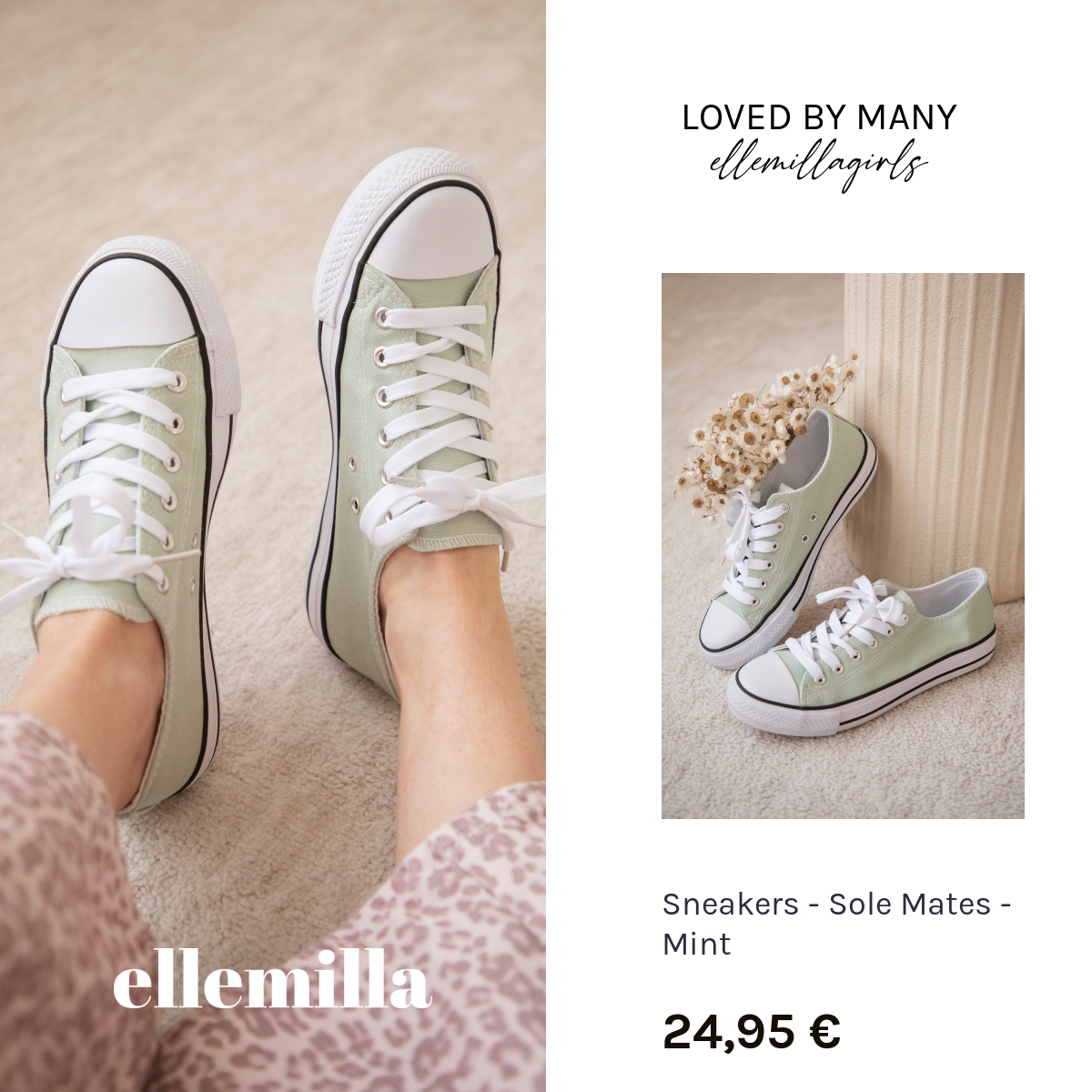
- You can also add your brand colors and logo to make your ads instantly recognizable.
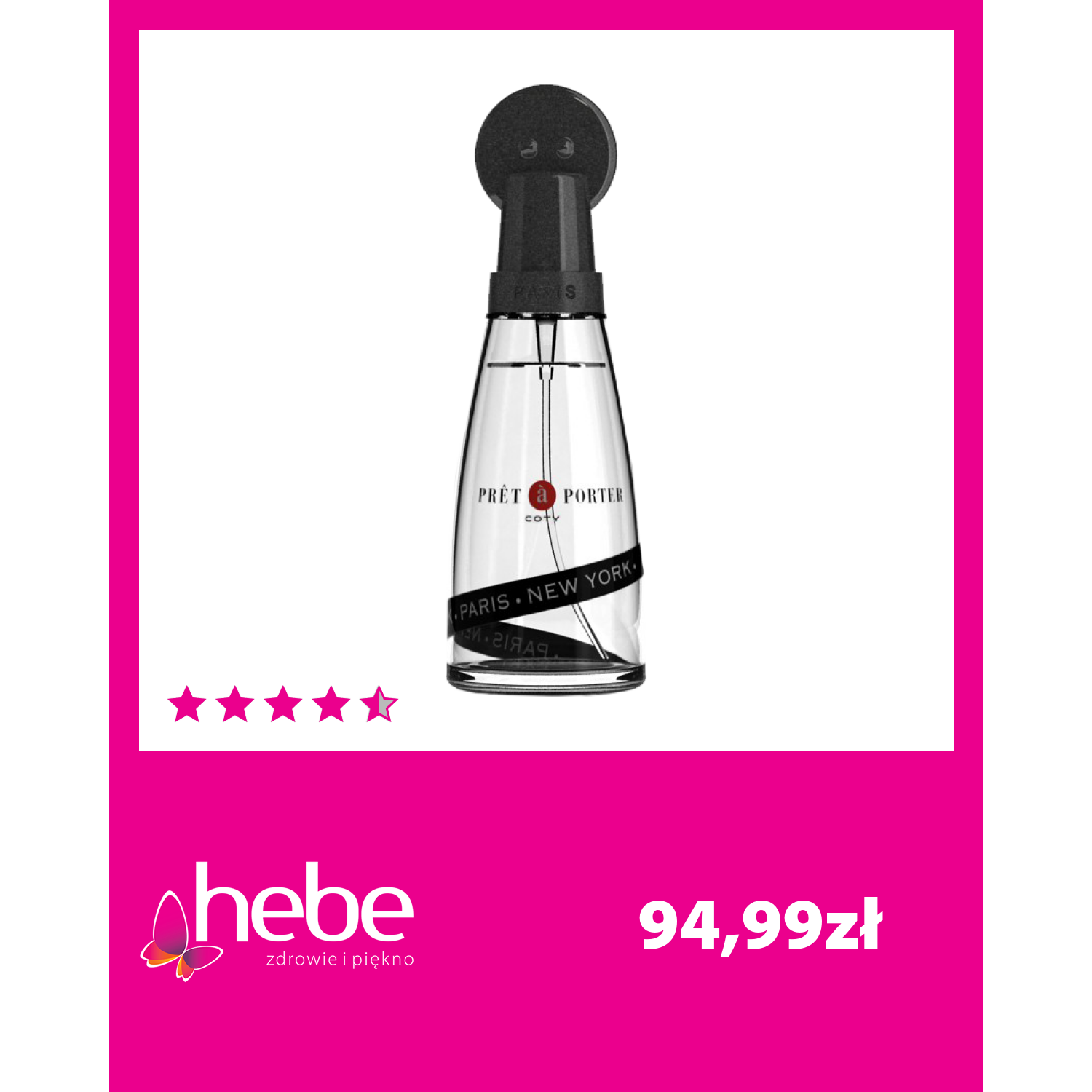
- Display discounts and prices, and also delivery information on your ads.

- Add customer testimonials and star ratings.
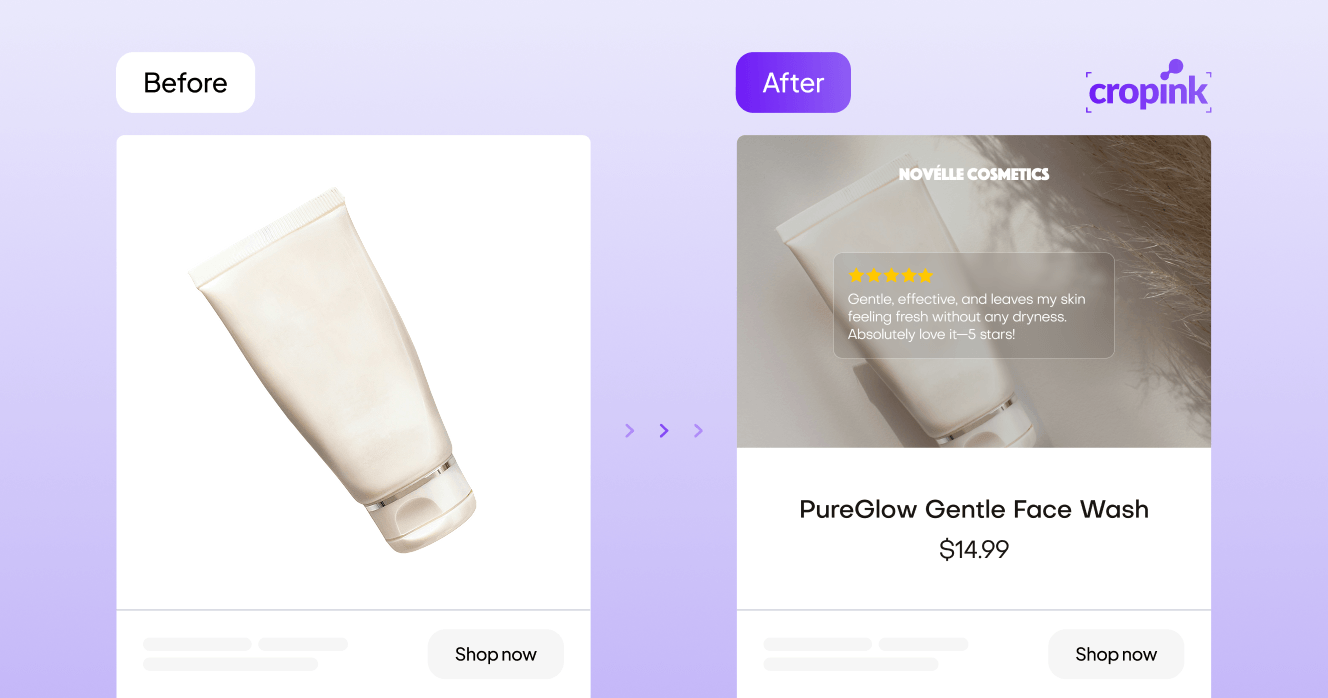
See more examples of enriched catalog ads made with Cropink.
How to optimize Instagram catalog ads
Launching your catalog ad is just the start. To drive consistent results, you need to optimize regularly.
Step 1: Target Smarter
Refine your audience to improve relevance and reduce wasted spend. Here’s how:
- Custom Audiences – Retarget users who visited your site, viewed products, or added to cart.
- Lookalike Audiences – Find new shoppers similar to your best customers.
- Interest-Based Targeting – Reach cold audiences based on behaviors and preferences.
Avoid broad, generic targeting. Smaller, more relevant groups often deliver higher ROAS.
Learn more about Facebook Ads Targeting Strategies, Tips, and Examples.
Step 2: Test Creative Variations
Catalog ads support dynamic templates, so testing is simple and scalable.
Run side-by-side tests like:
- Overlay vs. no overlay
- Price visible vs. hidden
- Static image vs. dynamic motion
- Shop Now vs. View Product CTA button
Check creative performance weekly and rotate underperforming creatives to make the most of your ads.
Step 3: Analyze Placement Results
Instagram supports catalog ads in Feed, Stories, Explore, and Reels. Performance varies by audience and format.
For example, younger shoppers may engage more in Reels, while others prefer Feed. Let performance data decide where to scale or cut back.
Optimization is ongoing. Successful marketers don’t set and forget — they adjust weekly based on what’s working.
Key metrics for Instagram catalog ad performance
To improve your campaign, track what actually impacts sales. Ignore vanity metrics and focus on performance indicators.
Make sure to monitor these metrics.
- Click-Through Rate (CTR) – Shows how often people click your ad. If you’re experiencing low CTR, there’s most likely an issue with your ad creative. Either it’s not resonating with your audience, or it's been overused to the point that users are experiencing ad fatigue.
- Return on Ad Spend (ROAS) – The most important number. If it’s below 1x, you’re losing money. To improve your ROAS, use product sets to prioritize high-margin, best-selling products and shift your budget toward those that deliver the best returns. You should also retarget shoppers who viewed products or added them to their cart but didn’t complete the purchase, as they are more likely to convert.
- Purchases – Track how many direct conversions came from your catalog ad.
- Product-Level Performance – See which SKUs convert best and which underperform.
- Add to Cart Rate – A good early sign of product interest, even without purchases.
- View Content – Measures how many users viewed your product detail page from the ad.
Track these metrics in Meta Ads Manager, filtered by audience, placement, and product. Use the data to:
- Pause poor-performing items
- Scale top SKUs
- Adjust creative for underperforming segments
A weekly reporting habit will keep your campaign healthy.
Common Instagram catalog ad mistakes
Even smart teams make catalog ad mistakes that kill performance. Avoid these to keep your campaigns on track.
| Mistake | Why It Hurts Your Performance | What to Do Instead |
|---|---|---|
| 1. Messy Product Feed | Missing images, duplicate SKUs, or incorrect pricing will break your ad delivery and lower trust. | Clean and verify your product feed before launch. Keep it updated regularly. |
| 2. Generic Creative | Ads that look like everyone else’s get ignored. Users scroll past them without a second thought. | Use custom layouts, branded overlays, and strong CTAs to stand out. |
| 3. Ignoring Mobile Optimization | Instagram is a mobile-first platform. Small text or poorly cropped images hurt clarity and engagement. | Design mobile-first. Test how your ad looks on different devices and orientations. |
| 4. Skipping Tests | Without testing, you miss easy wins and waste budget on underperforming creative. | Run A/B tests for overlays, CTAs, images, and messaging. Iterate weekly. |
| 5. Overloading Templates | Cramming too much into one ad creates clutter and confusion. | Focus on one clear message per frame. Keep layouts clean and readable. |
| 6. Targeting Everyone the Same | One-size-fits-all targeting leads to irrelevant ads that don’t convert. | Segment audiences (e.g., new vs. returning users) to personalize ads and boost relevance. |
Advanced strategies for catalog ad success
Already comfortable with catalog ads? Here’s how to take your campaigns to the next level.
1. Feed Segmentation
Split your catalog into logical categories. Examples:
- Seasonal collections
- Clearance items
- New arrivals
- Top sellers
Run different campaigns for each group. Use tailored messaging and overlays to match the context, like “Back to School Deals” or “Spring Essentials.”
2. Seasonal Campaigns
Plan campaigns around major sales periods:
- Black Friday / Cyber Monday
- Holiday Season
- Valentine’s Day
- Summer Sales
Use time-sensitive creative such as “Ends Tonight” or “Limited Stock” to create urgency. Update overlays, colors, and copy to match each event.
3. Advantage+ Retargeting
With Advantage+ catalog ads, Meta handles the retargeting logic for you. It automatically shows the right product to users who interact with your site or app.
This reduces setup time and keeps your ads relevant. Perfect for abandoned carts, product viewers, and warm leads.
4. Dynamic Video Variants
Create motion-based ads using your existing feed. Add movement to still images with pans, zooms, or simple animations.
Videos perform well in Reels and Stories — especially when product visuals move. No need for professional production. Just keep it clean and quick.
5. Rule-Based Creative Logic
Add automation by setting rules within your template. Examples:
- Items under $30 → add “Great Deal” badge
- Out-of-stock products → auto-remove from ad rotation
- Sale items → auto-highlight discount
This keeps your creative accurate and high-performing without manual edits. It also makes it easier to run always-on campaigns that stay fresh.
Final thoughts
Instagram Catalog Ads are no longer optional. They’re a must-have for eCommerce brands that want to stay competitive this year. They let you automate product delivery, personalize the shopping experience, and scale your marketing without scaling your workload.
But success isn’t just about launching. It’s about setting your product feed up right, customizing your creatives, optimizing your campaigns, and tracking the right data.
If you're ready to turn catalog ads into consistent revenue drivers, Cropink can help. From strategy to execution, we make it easier to run smarter, more effective Instagram Catalog Ad campaigns.
Connect your product feed, and Cropink can automatically turn hundreds of product images into branded, ready-to-run ad creatives as your catalog changes.
Let your products speak for themselves. Let Cropink help them reach the right people. Try it out today.
FAQs
How to run catalog ads on Instagram?
To run catalog ads on Instagram, you need to upload your product catalog to Meta Commerce Manager, then create a dynamic ad campaign in Meta Ads Manager. From there, link your catalog, choose your audience and placements, and publish. Instagram will automatically display relevant products to the right users.
What is an Instagram catalog?
An Instagram catalog is a list of your products—including images, titles, prices, availability, and links that you upload to Meta Commerce Manager. It powers catalog ads by dynamically inserting product info into ad templates shown on Instagram.
How to make a catalogue on Instagram?
To make a catalogue on Instagram, go to Meta Commerce Manager, select “Add Catalog,” and choose your product source. You can upload your products manually, connect your eCommerce platform, or use a data feed. Once added, your catalog can be used for Instagram shopping and catalog ads.
What are Instagram catalog ads?
Catalog ads are product ads that pull real-time data from your catalog to show the most relevant products to each user. They appear across Instagram placements like Feed, Stories, Reels, and Explore, and they update automatically based on availability, price, and user behavior.
How do I add products to an Instagram catalog?
Upload your product feed to Meta Commerce Manager, or connect your ecommerce platform, such as Shopify or WooCommerce. Make sure the feed includes accurate product information such as titles, images, prices, availability, and links.
What is the difference between Instagram catalog ads and Instagram Shopping?
Instagram Shopping gives shoppers a place to browse your products on Instagram. Catalog ads are paid ads that use your catalog to automatically show relevant products to different shoppers.
Do Instagram catalog ads work in Reels and Stories?
Catalog ads can appear in Feed, Stories, Explore, and Reels. Just make sure your creative templates are designed to adapt to each placement, especially vertical formats.
What product feed fields do Instagram catalog ads need?
At the very least, include product IDs, titles, descriptions, availability, prices, links, and image links. Fields such as brand, sale price, additional images, custom labels, and GTIN/MPN can provide more information for delivery and creative.
Can I customize Instagram catalog ads?
You can add branded layouts, product information, prices, discounts, badges, logos, and other creative elements. Tools such as Cropink can apply these elements across your catalog automatically.
Are Instagram catalog ads the same as dynamic product ads?
They are essentially the same type of product advertising, with Meta using your catalog and product data to dynamically show relevant products. The current setup also includes newer automation features through Advantage+.
How can I improve low CTR on Instagram catalog ads?
Start by checking your creative. Test different images, overlays, product information, and CTAs, then compare the results and refresh ads that aren't getting enough engagement.
Source
- Sproutsocial. 26 Instagram stats you need to know
Ansherina helps brands create powerful digital marketing and performance marketing strategies. With a passion for ad design and audience engagement, she is dedicated to making brands more visible and impactful.
Damaris is a Digital Marketing Specialist who writes about digital marketing and performance marketing. At Cropink, she creates data-driven content to help businesses run better ad campaigns for better performance and ROI.
Related Articles

How Can Cropink Help?
Start with Cropink is easy and free
No credit card required