What Are PMax Campaigns? How Google Ads Automation Works
PMax campaigns are fully automated Google Ads campaigns running across Search, Shopping, YouTube, Display, Gmail and Maps. Advertisers report up to 39% more conversions, 75% lower CPA and 70% less manual setup time.


Running Google Ads can feel like juggling five campaigns at once and still dropping the ball.
If you're tired of guessing where your ads are showing or why your results aren't improving, you're not alone.
PMax campaigns, short for Performance Max, are Google's solution to ad overwhelm. They use AI to manage targeting, bidding, and placements across all Google channels automatically.
In this guide, you'll learn what PMax campaigns are, how they work, and why they could be your smartest digital move.
Key takeaways
- Performance Max (PMax) campaigns are fully automated Google Ads campaigns that run across Search, Shopping, YouTube, Gmail, Discover, Maps, and Display using one unified setup.
- PMax simplifies campaign management by automating targeting, bidding, placements, and ad creation, which can reduce manual setup time by up to 70 percent.
- Advertisers using PMax have seen significant performance improvements, including up to 20 percent more conversions, 75 percent lower CPA, and a 4.7 percent average conversion rate.
- PMax works best for businesses focused on scale and automation, especially ecommerce or lead generation brands with strong creative assets and conversion tracking in place.
What is a PMax campaign in Google Ads
Performance Max campaigns (PMax) are goal-based campaigns in Google Ads that let you advertise across Search, Shopping, YouTube, Gmail, Discover, and Maps, all from one campaign.
Instead of setting up separate campaigns, you set your goal, add creative assets, and Google’s AI handles targeting, bidding, placements, and optimization. This can cut down manual setup by up to 70 percent.
PMax replaced Smart Shopping and Local campaigns and often outperforms them. Advertisers report up to 20 percent more conversions and 75 percent lower CPA.
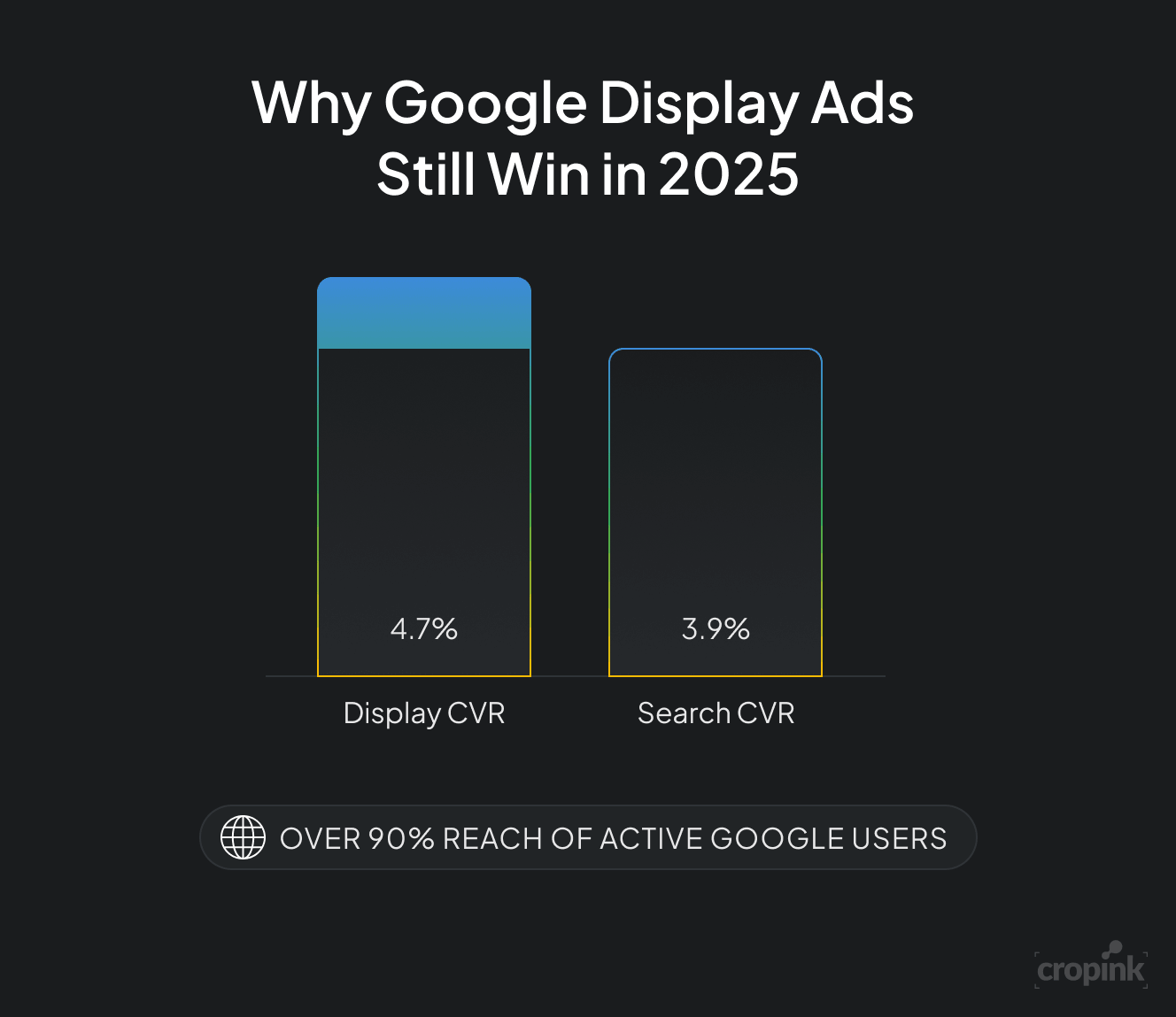
It also reaches over 90 percent of active Google users, boosts conversion rates by 39 percent compared to Search campaigns, and averages a 4.7 percent conversion rate, higher than Search’s 3.9 percent.
In short, PMax makes Google Ads simpler and more effective, especially if you want better results with less hands-on management.
How Performance Max campaigns work
Performance Max campaigns simplify Google Ads by automating targeting, bidding, placements, and ad creation using machine learning. Instead of managing multiple campaign types, you set your goal and upload assets, and Google does the rest across all its platforms.
Here is how a PMax campaign works from start to finish:
1. You choose your campaign goal
The first step in creating a PMax campaign is choosing your marketing objective. This tells Google what to optimize for.
You can select from goals like:
- Sales
- Leads
- Website traffic
- Local store visits
For example, if your goal is to generate leads, Google will focus on serving your ads to users most likely to submit a form or call your business. This goal acts as the foundation for all of Google’s automation decisions throughout the campaign.
Choosing the right goal ensures that Google’s machine learning focuses on what matters most to your business.
2. You upload your creative assets
Next, you provide your ads’ creative components inside what Google calls an Asset Group. This includes:
- Headlines and long headlines
- Descriptions
- Logos and images
- A video (optional, but recommended)
- A final URL and call-to-action
These assets are automatically mixed and matched by Google to create ads for different placements like YouTube videos, Gmail promotions, Google Search results, or Shopping listings.
If no video is provided, Google will create one from your existing images and text, but these auto-generated videos may not perform as well as custom content.
This step alone reduces the need for multiple ad formats and helps cut down manual setup time by up to 70 percent.
3. Google builds and serves your ads across all platforms
Once your assets are uploaded, Google uses them to build ads and serve them across its entire network. This includes:
- Google Search
- Google Shopping
- YouTube
- Gmail
- Discover feed
- Google Maps
- Google Display Network
You do not need to set up separate campaigns for each channel. Google automatically chooses where to show your ads based on your goal and the likelihood of conversion.
For instance, a customer might watch your product video on YouTube, receive a follow-up ad in Gmail, and then complete the purchase through a Shopping ad in Google Search.
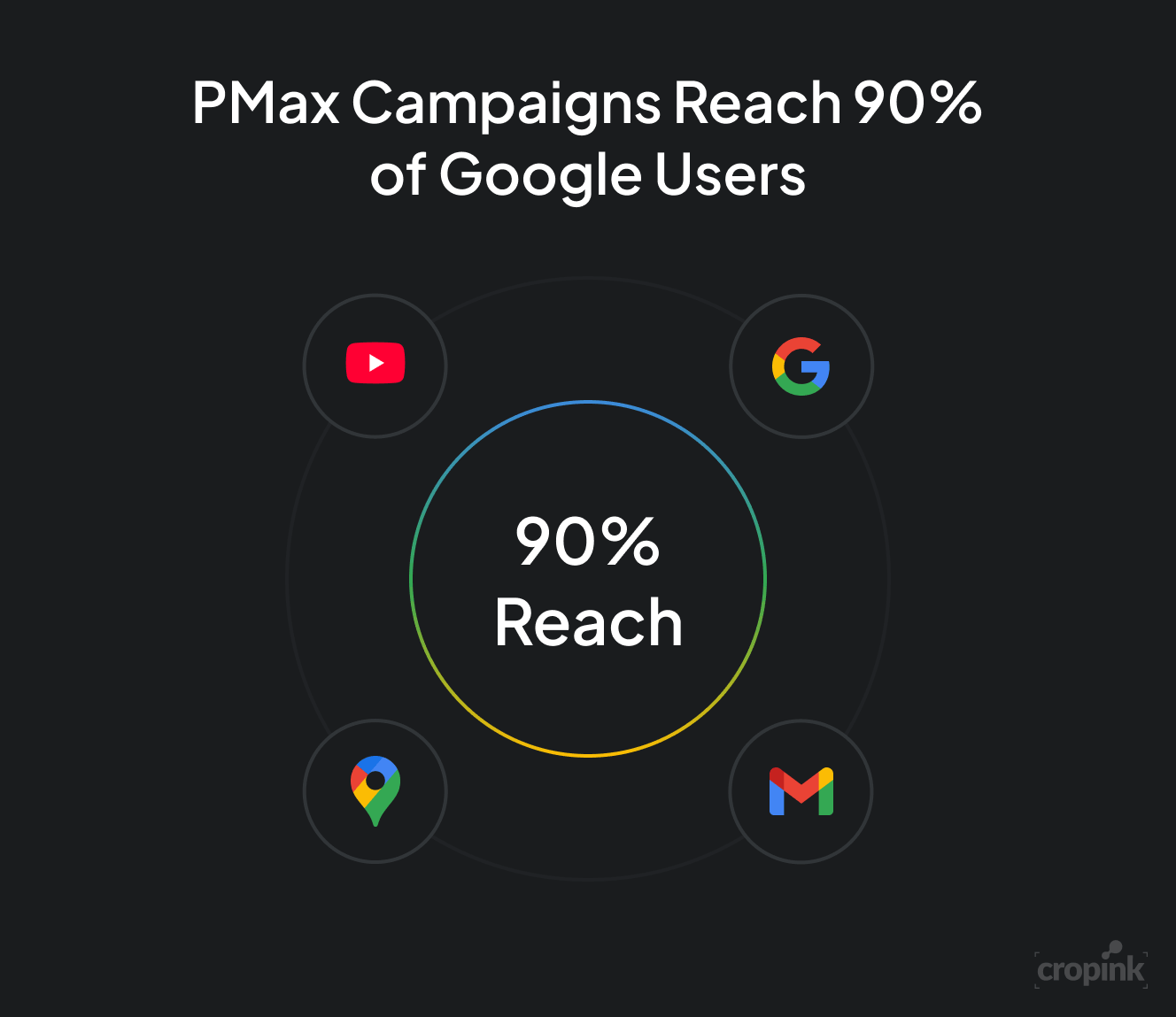
PMax campaigns provide access to over 90 percent of active Google users, making them ideal for advertisers who want wide exposure across channels.
4. Google’s machine learning optimizes in real time
Once your campaign is live, Google’s machine learning continuously tests and improves performance by analyzing:
- Which assets perform best
- Which channels drive the most conversions
- Who your best audiences are
- What times and devices work best
The system adjusts bids and placements automatically, in real time, to focus on what works. This constant optimization helps advertisers see better results without constant manual tweaking.
On average, PMax campaigns achieve a 4.7 percent conversion rate, which is higher than the 3.9 percent average for Search campaigns.
5. You monitor performance while Google keeps improving
While PMax is automated, you can still access valuable insights to help guide your marketing decisions. Google provides data on:
- Top-performing headlines, images, and videos
- Audience segments that are converting
- Location and device performance
You won’t see individual keywords or placements like in Search campaigns, but you will get enough reporting to understand what’s driving results.
Advertisers who use PMax in place of Search campaigns alone have seen a 39 percent increase in conversions and up to 75 percent lower CPA, thanks to better optimization and broader inventory access.
Key features of a Performance Max campaign
Performance Max campaigns are powerful because they combine several tools and technologies into one automated system. Below are the core features that make PMax different from traditional Google Ads campaigns.
Each plays a role in helping the campaign perform better with less manual setup.
a. Asset groups
An asset group is the creative foundation of your PMax campaign. This is where you upload all the content Google uses to build your ads. It includes:
- Headlines
- Long headlines
- Descriptions
- Images
- Logos
- Call-to-action buttons
- Videos (optional but recommended)
- Final URL or product feed
Google uses these assets to automatically create ad variations for different placements across Search, YouTube, Gmail, Display, and more. The system tests combinations to find which ones perform best for your goal.
If you don’t upload a video, Google will generate one using your images and text. These videos are basic and often less effective, so adding your own video is a smart move.
Asset groups help streamline ad creation and ensure your message reaches users in many different formats without needing multiple campaigns.
b. Audience signals
Audience signals help Google understand who your ideal customers are. These signals do not directly control who sees your ads. Instead, they act as suggestions to guide the machine learning algorithm in the right direction, especially during the early learning phase.
You can add:
- First-party data such as customer email lists
- Custom audience segments
- Website visitors or past converters
- In-market and interest-based audiences
For example, if you upload a list of past customers, Google will look for new users with similar behaviors and interests. This helps speed up optimization and improves campaign performance from the start.
Audience signals are optional, but using them is strongly recommended.
c. Conversion goals
In PMax campaigns, everything centers around the conversion goal you choose. This could be:
- Purchases
- Leads
- Store visits
- Phone calls
- Sign-ups
Google uses this goal to guide its bidding, targeting, and ad placement decisions. If you are tracking multiple conversions, you can set one as the primary goal and others as secondary.
Aligning your goal with your business objectives ensures that the campaign focuses on the outcomes that matter most.
d. Budget and bidding strategies
PMax uses smart bidding to automate how much you pay for each ad interaction. You can choose from several bidding strategies, including:
- Maximize conversions for driving the most leads or sales
- Maximize conversion value for focusing on revenue, not just volume
- Target CPA to keep costs predictable for each conversion
- Target ROAS to get the most return for every dollar spent
If you're focused on revenue, you can set a Target ROAS to tell Google what return you expect for every dollar spent.
These strategies use real-time data to adjust bids based on user intent, device, time of day, and many other factors. Google’s system is constantly learning and improving to hit your target more efficiently.
Smart bidding helps eliminate guesswork and ensures that your budget is used where it has the most impact.
What makes PMax different from other Google Ads campaigns
If you're used to building separate campaigns for Search, Display, or YouTube, Performance Max is a completely different experience.
Instead of giving you control over every setting, PMax focuses on automation, simplicity, and cross-channel reach. That means less hands-on work, but also less manual control.
Here’s how PMax compares to traditional Google Ads campaigns:
| Feature | Performance Max (PMax) | Traditional Google Ads Campaigns |
|---|---|---|
| Campaign structure | One unified campaign across all Google channels | Separate campaigns for Search, Display, YouTube, etc. |
| Ad channels supported | Search, Shopping, Display, YouTube, Gmail, Discover, Maps | Depends on campaign type |
| Setup complexity | Simple and fast setup | Requires manual setup for each channel |
| Bidding strategy | Smart bidding only (Maximize Conversions, Target ROAS, etc.) | Manual and automated options available |
| Keyword targeting | No keyword control | Full control over keywords (in Search campaigns) |
| Placement targeting | No control over placements | Can target or exclude placements (Display, YouTube) |
| Audience control | Guided with audience signals only | Direct audience targeting available |
| Asset creation | Uses asset groups to create dynamic ads | Separate creatives required per campaign |
| Automation level | Fully automated | Partially automated or fully manual |
| Optimization | Real-time machine learning optimization | Requires manual testing and adjustments |
| Reporting detail | High-level performance insights | Detailed keyword and placement reporting |
| Best for | Advertisers seeking scale and simplicity | Advertisers needing granular control |
| Common use cases | Ecommerce, lead generation, local campaigns | Branded search, retargeting, niche targeting |
PMax gives you reach and results, but it takes away control. If you’re the kind of advertiser who likes to see exactly which keywords triggered your ad, Performance Max will frustrate you.
But if you want to scale fast, simplify campaign management, and let AI do the heavy lifting, PMax delivers.
Pros and cons of using Performance Max
Performance Max campaigns offer powerful automation, but they’re not a perfect fit for everyone. To decide if they’re right for your business, let’s look at what they do well — and where they fall short.
Pros of Performance Max
Why do so many advertisers love PMax?
Because it simplifies your workload while helping you reach more people, faster — and often with better results.
- Easy to set up and manage
You only need one campaign to run across Google Search, Shopping, YouTube, Display, Gmail, Maps, and Discover. This saves time and simplifies your ad strategy.
- Broad reach across all Google channels
PMax can reach over 90 percent of active Google users, increasing exposure without running multiple campaigns.
- Smart bidding and automation
PMax uses real-time machine learning to adjust bids, placements, and ad combinations, often leading to better performance with less effort.
- Improved conversion performance
Advertisers using PMax have seen:
- 4.7 percent average conversion rate
- Up to 20 percent more conversions than Smart Shopping
- 39 percent higher conversion rate than Search campaigns
- Up to 75 percent lower CPA
- Great for scaling
If you have strong creative assets and a clear goal, PMax is ideal for growing quickly without micromanaging every setting.
Cons of Performance Max
For all its power, PMax takes away some control and visibility, which can be frustrating for hands-on advertisers.
- Limited control over targeting
You cannot select specific keywords, placements, or audiences. Google decides where your ads appear based on its algorithm.
PMax campaigns appear across Search, Shopping, Gmail, Maps, YouTube, and Display ads, making them a versatile option for full-funnel marketing.
- Less transparent reporting
There is no access to search term data, and reporting is high-level. You can’t see exactly what’s driving performance like you can in Search campaigns.
- Risk of branded search cannibalization
PMax can compete with or override your branded search campaigns, causing inflated cost-per-click if not carefully managed.
- Auto-generated assets may underperform
If you don’t upload your own videos, Google will create them — and the results are often low quality or off-brand.
- Not ideal for very specific targeting
PMax doesn’t let you control audience targeting directly, but it does use signals to guide its machine learning toward the right users based on targeted advertising principles.
Quick tip: If you want the performance benefits of PMax but still need control in some areas, run it alongside traditional Search or Display campaigns for a balanced strategy.
Who should use PMax campaigns
Performance Max isn’t for everyone, but for many businesses, it offers a faster, simpler path to better ad performance. Whether you’re running an online store or managing lead generation, PMax can help — if the fit is right.
Here’s how to know when to use it and when to look for alternatives.
When Performance Max is a good fit
PMax works especially well for advertisers who want to scale quickly while simplifying campaign management.
If any of the points below sound like your business, you’re likely to benefit from using it.
- You run an ecommerce business with a quality product feed
PMax is built to connect with Google Merchant Center and works best when your product titles, images, and descriptions are well optimized.
- You want to generate leads across multiple Google channels
If your goal is to get sign-ups, form submissions, or phone calls, PMax can reach potential customers through Search, YouTube, Display, Gmail, and more — all in one campaign.
- You have strong creative assets and conversion tracking
The more high-quality images, videos, and tracking data you provide, the faster Google’s machine learning can improve results.
- You need wide visibility without managing separate campaigns
PMax automatically covers Search, Shopping, Display, Gmail, Discover, and YouTube, which is ideal for businesses that want broad exposure with less manual effort.
- You prefer automation over daily hands-on management
If you don’t want to adjust bids, keywords, or placements every day, PMax is designed to handle all of that for you using smart bidding and real-time optimization.
When Performance Max may not be the right choice
While PMax offers strong automation, it isn’t built for advertisers who need tight control over every aspect of their campaigns.
If you rely on precision, custom targeting, or detailed insights, these limitations could become a problem.
- You need to control keywords and placements
PMax doesn’t allow manual keyword selection or placement exclusions, which can be a deal-breaker for highly targeted campaigns.
- You run branded search campaigns that need separation
Because PMax can overlap with branded terms, it may unintentionally compete with or cannibalize performance from your brand-focused Search ads.
- You depend on detailed reporting and attribution
PMax limits what you can see in your reports. If you rely on keyword-level data or granular attribution models, this could be frustrating.
- You don’t have high-quality creative assets
Without strong visuals and messaging, your ads may underperform. Relying on Google’s auto-generated videos and layouts can lower engagement and conversions.
- Your business targets a very specific niche or audience
If your strategy depends on tightly defined demographics, interests, or placements, traditional Search or Display campaigns may offer more control and precision.
FAQs
The purpose of PMax, or Performance Max, is to help advertisers drive more conversions by using Google’s machine learning to run ads across all of Google’s networks in one campaign. It simplifies ad management and automatically optimizes performance based on your marketing goals, such as sales, leads, or store visits.
A PMax campaign automatically creates and delivers ads across Google Search, Shopping, YouTube, Display, Gmail, Discover, and Maps using the assets and data you provide. It manages targeting, bidding, placements, and creative optimization to get the best possible results for your selected conversion goal.
The difference between PMax and Shopping campaigns is that PMax includes Shopping ads but also runs across other Google channels like YouTube, Display, Gmail, and Search. PMax is fully automated, uses machine learning to optimize in real time, and replaces Smart Shopping campaigns, while standard Shopping campaigns offer more manual control and only show in Shopping-related placements.
The difference between a Search and PMax campaign is that Search campaigns show text ads based on specific keywords you choose, while PMax campaigns do not use keywords and instead use audience signals and automation to show ads across multiple Google platforms. PMax covers more channels and is fully automated, while Search gives you more control over targeting and reporting.
Final thoughts
Performance Max campaigns are a smart way to scale your advertising across Google’s entire network, but they only work as well as the assets and strategy you put into them.
If your goal is to get better results with less manual work, PMax offers automation, reach, and performance — especially when supported by strong creative. Advertisers using enriched visuals and clear offers see significantly better outcomes, from higher click-through rates to lower CPAs.
This is exactly where Cropink comes in.
With Cropink, you can create high-performing catalog ads at scale that stand out across channels — not just on Google, but across Meta, TikTok, and more. Whether you’re using Performance Max, Dynamic Product Ads, or always-on campaigns, Cropink helps you turn your product feed into scroll-stopping creatives in minutes.
If you’re ready to make the most of Performance Max or improve your catalog ads across any platform, Cropink can help you do it faster, easier, and more effectively.
Sources
- Heads on pillows. Performance Max (PMAX) Overview for All Marketers
- Web codeless website. Web Marketing Insights
- SEO Design Chicago. Performance Max Campaign Statistics: 25 Data Points That Prove PMax Works
Ansherina helps brands create powerful digital marketing and performance marketing strategies. With a passion for ad design and audience engagement, she is dedicated to making brands more visible and impactful.
Leszek is the Digital Growth Manager at Feedink & Cropink, specializing in organic growth for eCommerce and SaaS companies. His background includes roles at Poland's largest accommodation portal and FT1000 companies, with his work featured in Forbes, Inc., Business Insider, Fast Company, Entrepreneur, BBC, and TechRepublic.
Related Articles

How Can Cropink Help?
Start with Cropink is easy and free
No credit card required