How Does Instagram Advertising Work? [2026 Guide]
Instagram advertising lets you reach 2 billion monthly users through six ad formats. We’ll walk you through how Instagram ads work, the setup process for both boosted posts and Meta Ads Manager campaigns, and the costs you can expect.


![How Does Instagram Advertising Work? [2026 Guide]](https://honest-garden-2954e8e7e9.media.strapiapp.com/how_does_instagram_advertising_work_thumbnail_c5ad100b39.png)
Instagram has become a powerhouse for advertising, much like Facebook. The platform gives you access to billions of potential customers, and the targeting options let you reach even the most niche audiences.
If you're not convinced yet, see below a few facts about Instagram advertising:
- 2 billion active users visit Instagram monthly
- 44% of Gen Z follow and find information about products and brands on Instagram
- 1 million businesses ran Instagram ads globally
- Instagram ranks as the second most popular social media platform used by marketers (right behind Facebook)
Now that we've made a case for Instagram ads, let's look at how Instagram advertising works and what you need to set up your first campaign.
Key takeaways
- Instagram offers six ad formats: in-feed, Stories, Explore, Reels, Shopping, and Partnership ads.
- Boosting Instagram posts takes at most 10 minutes, while Meta Ads Manager gives you full control over objectives, targeting, and creative testing.
- Mobile optimization is non-negotiable since the majority of Instagram users access the platform on mobile devices.
- Instagram ad costs range from $0.40-$1.73 per click, with most successful campaigns starting with at least a daily budget of $5 to $10.
How exactly does Instagram advertising work?
Instagram ads run across placements people already use every day.
Brands can advertise through Reels, Stories, in-feed posts, and paid creator partnerships.
There are two main ways to get your ads in front of people, and the option you choose depends on how much control you want.
The quickest route is boosting an existing post.
Boosting turns a regular post into an ad and pushes it to a wider audience. It works quite well when a post is already performing excellently, and you want more reach without setting up a full campaign.
For more control, Meta Ads Manager is the better option.
This option lets you choose campaign goals, define audiences, manage placements, and track results in detail.
If your Instagram account is connected to a Facebook Page, you can run an ad on the FB page and have it appear on your Instagram account as well.
When budgeting for Instagram ads, you're allowed to decide how much to spend, how long ads run, and when to make changes.
One thing to note is that most of your audience will be using mobile phones to browse on Instagram. As such, you'll need to create ads that load fast and use vertical formats.
Instagram ad formats and when to use them
These are the #6 main Instagram ad types and the accompanying ad creative specs.
1. In-Feed ads
In-feed ads appear directly in users' main feeds and usually blend with organic content. The only giveaway is the Sponsored label below the profile name.
These ads support single images, videos, or carousels. When users click on an in-feed ad, they’re redirected to your Instagram profile or an external landing page.
In-feed ads are the most popular format among advertisers because they work for almost any business type and campaign goal.
Creative specs:
- Image: 1080 x 1080 pixels, 1080 x 1350, or 1080 x 566
- Video: MP4 or MOV, up to 60 minutes
- File size: 30MB max for images, 4GB max for video
- Aspect ratio: 1:1 (square), 4:5 (vertical), or 1.91:1 (horizontal)
Best for: Brand awareness, conversions, traffic, and engagement across all industries.
As you can see from this Instagram in-feed ad example, it looks like a normal Instagram post, but there’s a sponsored label just below the profile name.

2. Stories ads
Story ads appear between users' organic stories in full-screen format. They can be images, videos, or carousel formats. Image-based ads will show for 5 seconds.
Users swipe up or tap a CTA to visit your landing page or profile.
Creative specs:
- Dimensions: 1080 x 1920 pixels
- Video length: 60 minutes (but it’s better to stick to 15 seconds or less)
- File size: 30MB max for images, 4GB max for video
- Aspect ratio: 9:16 (vertical, full-screen)
Best for: Time-sensitive offers, flash sales, product launches, and creating urgency.
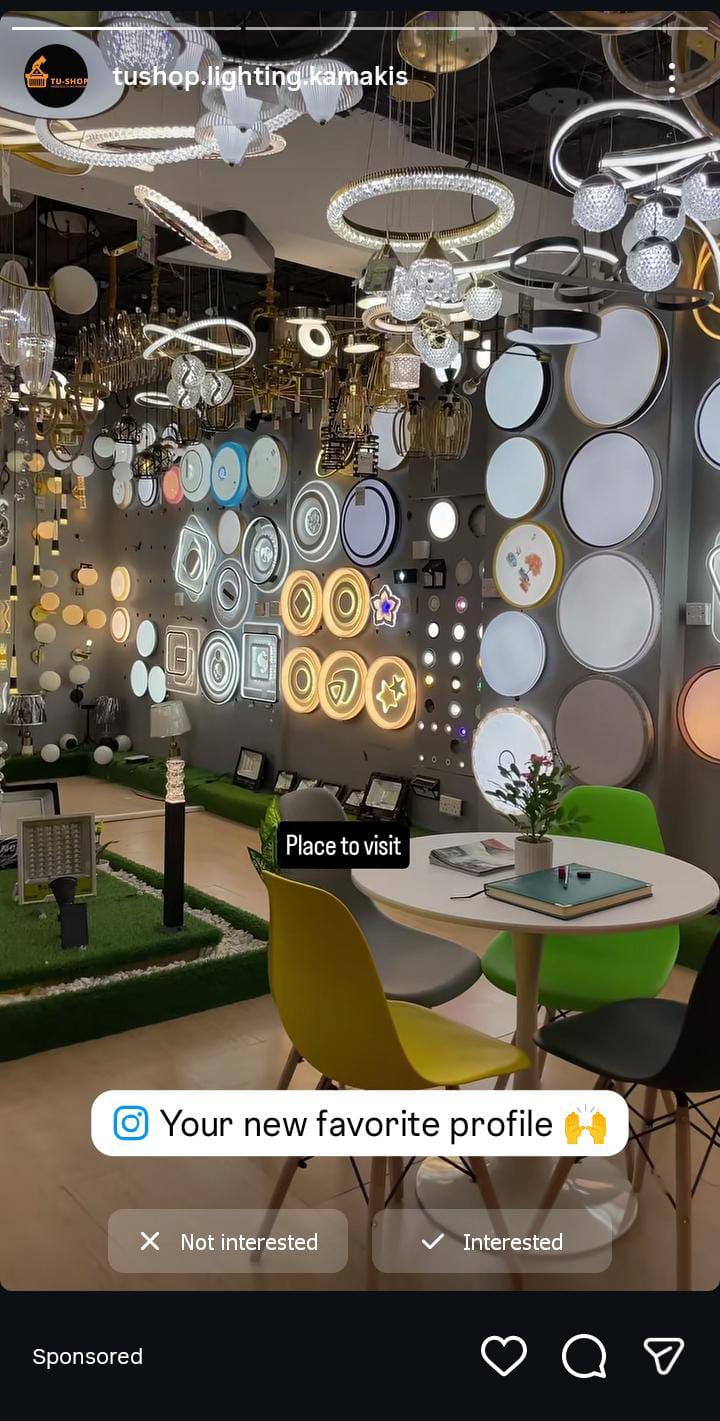
Story ads can be a video, as shown above.
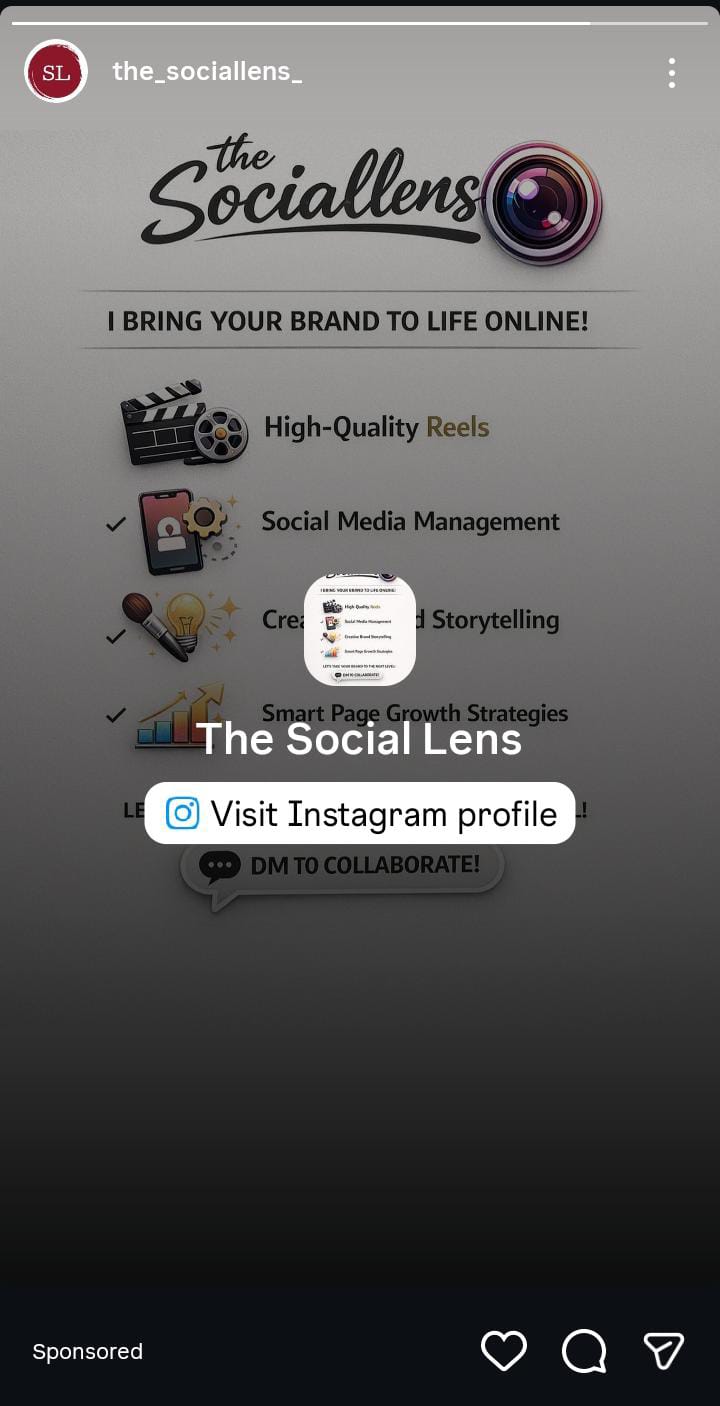
Or, it can be a still image or graphic with more information related to the product, as you can see below.
3. Explore ads
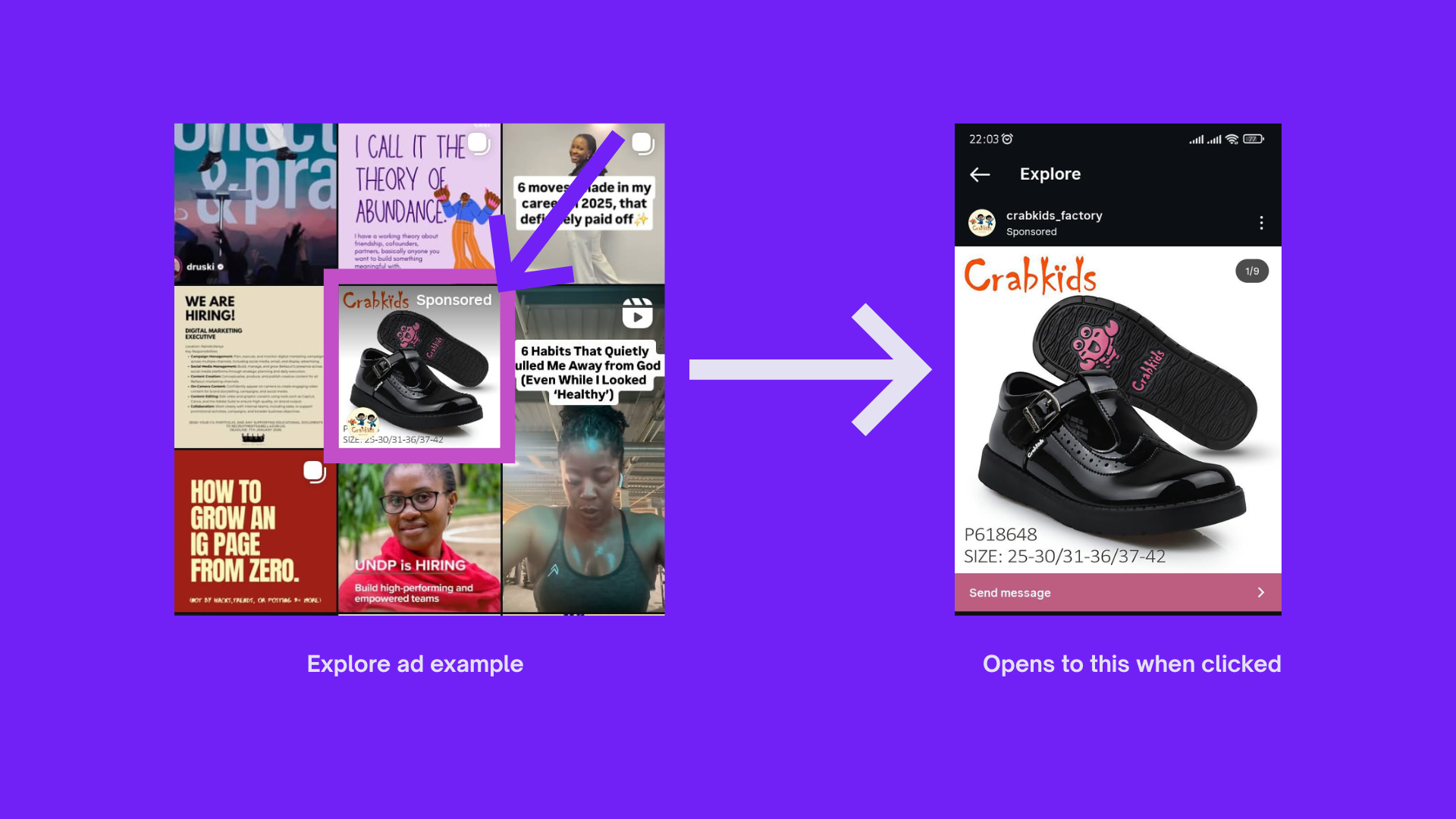
Explore ads appear within the Explore section of Instagram.
These ads are less common and generally not as good for conversions compared to other formats.
Explore ads can be useful if your goal is brand awareness or reaching new audiences who aren’t already following you.
Creative specs:
- Image: 1080 x 1080 pixels
- Video: MP4 or MOV format
- Video length: 1 second to 60 minutes
- File size: 30MB max for images, 4GB max for video
- Aspect ratio: 1:1 or 4:5
- Primary text: 125 characters
Best for: Discovery campaigns.
4. Reel ads
Reel ads appear in the Reels tab as users scroll through short-form videos on Instagram. They play in full-screen vertical format and can be either videos or static images paired with audio.
This ad format demands creatives that grab attention in the first 2-3 seconds and feel native to the platform.
Creative specs:
- Dimensions: 1080 x 1920 pixels
- Aspect ratio: 9:16
- Video format: MP4 or MOV (or static image with audio)
- File size: 4GB maximum for video, 30MB for images
- Length: Up to 30 seconds long
- Primary text: 72 characters
- Safe zones: Keep text and logos away from the top 14% (250 pixels) and bottom 35% to avoid UI overlap
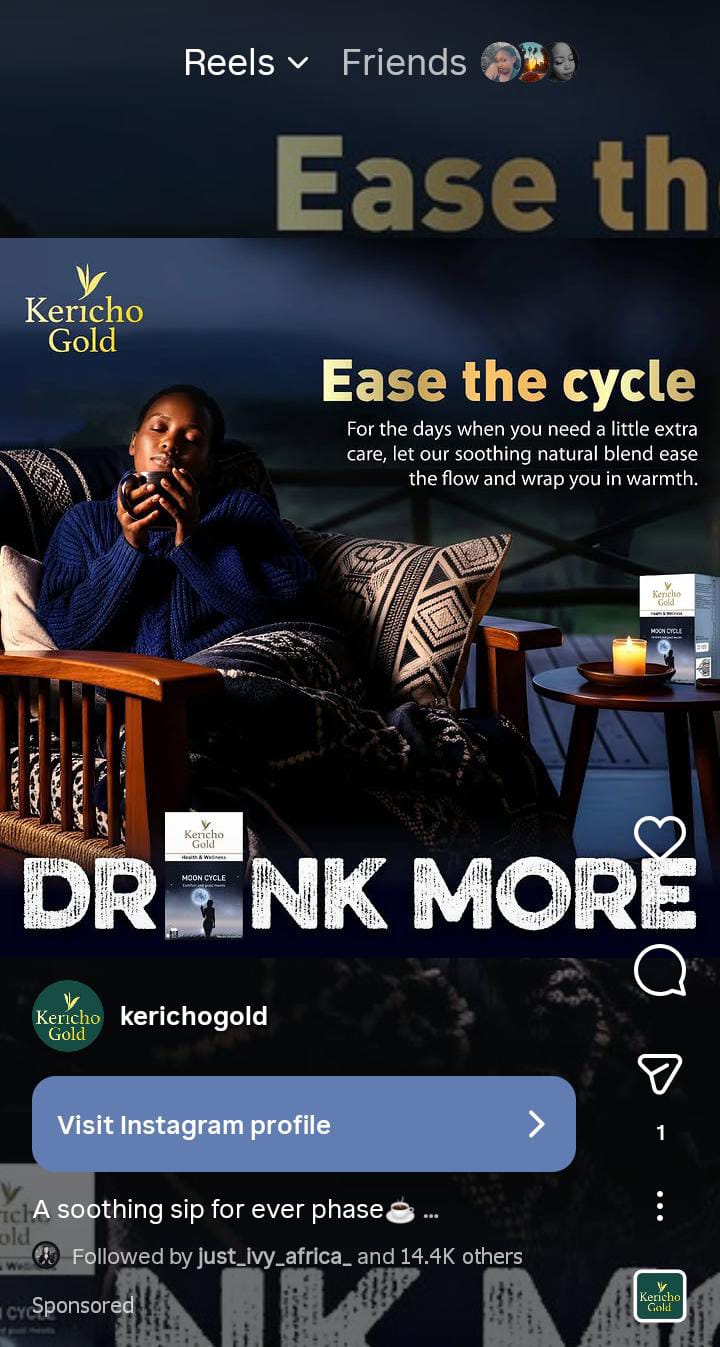
Example of an Instagram Reels ad
5. Shopping ads
Shopping ads look like regular in-feed or Story ads but include product tags that users can tap to view pricing and details.
When someone clicks a product tag, they're taken to your Instagram Shop where they can browse your catalog and initiate a purchase.
Shopping ads require an Instagram-approved product catalog synced to your account.
Creative specs:
- Image: 1080 x 1080 pixels or 1080 x 1350
- Video: MP4 or MOV format
- Video length: Up to 60 minutes
- File size: 30MB max for images, 4GB max for video
- Aspect ratio: 1:1 or 4:5
Best for: Ecommerce brands, product launches, seasonal sales, and driving direct purchases within Instagram.
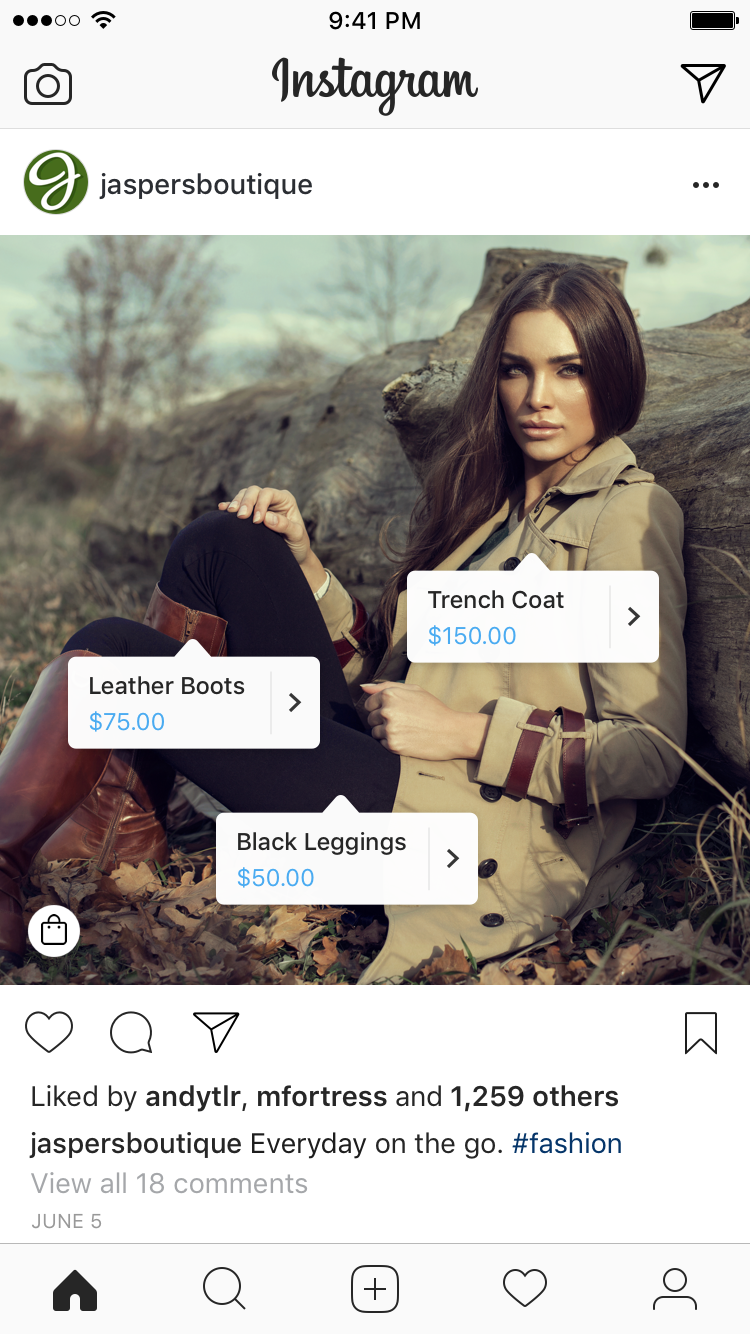
Learn more about Instagram’s shopping ads from this guide on 6 Social Commerce Platforms Top Brands Swear By.
6. Partnership ads
Partnership ads (formerly branded content ads) let you promote content created by influencers or creators.
The creator posts content featuring your product on their profile with a Paid partnership label, then you boost that post as an ad to reach audiences beyond their followers.
You'll need the creator's permission to run partnership ads.
Creative specs: Partnership ads follow the same specs as the original post format (in-feed, Story, or Reel). The creator handles content creation, so specs depend on their chosen format.
Best for: Building trust through third-party endorsement and reaching new audiences.
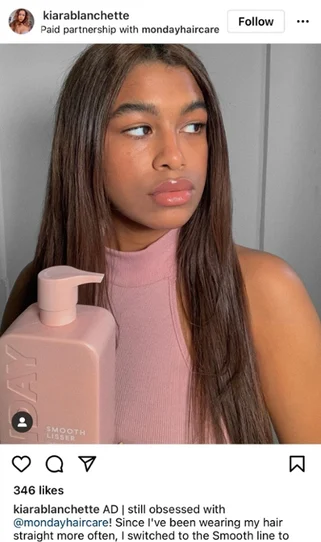
The Paid partnership label tells you that this is a sponsored post where MONDAY Haircare compensated creator Kiara Blanchette to feature their product to her audience.
How to set up an Instagram ad
Instagram offers two setup methods: boosting existing posts (quick and beginner-friendly) or creating campaigns through Meta Ads Manager (more control and advanced features).
We'll cover both, starting with the easier option.
Boost an existing Instagram post
Boosting converts an organic post into a paid ad. It takes about 10 minutes, and you can set it up directly from Instagram.
1. Choose your post
Log in to Instagram (mobile or desktop). Select the post you want to promote and tap Boost Post.
Instagram will ask how you want to set up payment:
- With a Facebook ad account — Uses existing payment info from your linked Facebook account
- Without a Facebook ad account — Requires you to add new payment details
If you have a Facebook Page linked to your Instagram account, use option one.
In our case, we’ll proceed with option one.
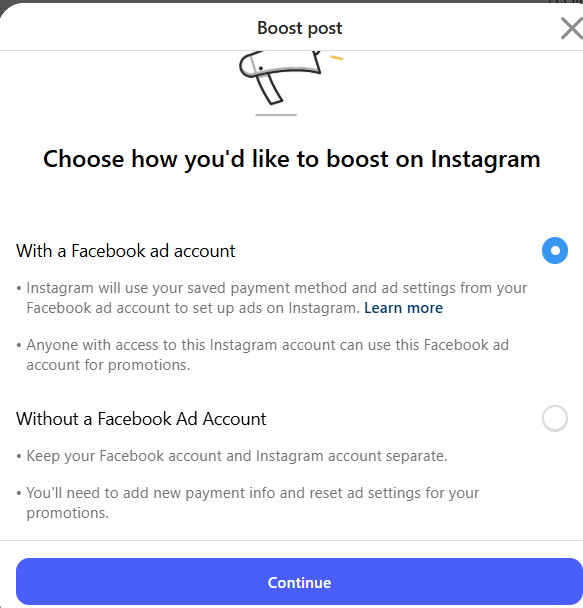
2. Select your goal
Choose what you want the ad to accomplish:
- More profile visits
- More website visits
- More messages
- More promotion views (for businesses with catalogs)
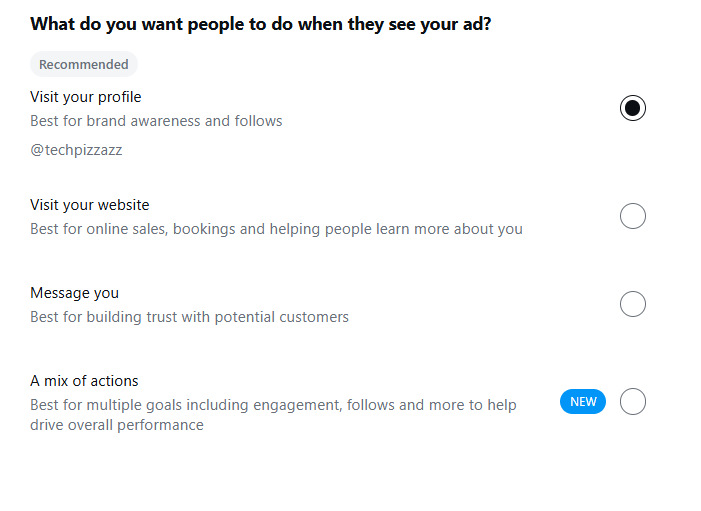
Instagram will automatically format your post for optimal placement.
3. Set your audience
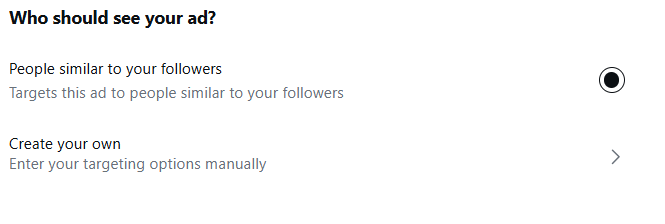
You have three targeting options:
People similar to your followers. Instagram analyzes your current audience and finds lookalikes. This works well if you have at least 1,000 engaged followers. Skip this if you have fewer than 100 followers because there's not enough data for Instagram to work with.
Advantage+ audience. Meta's algorithm automatically finds and targets people likely to engage with your ad.
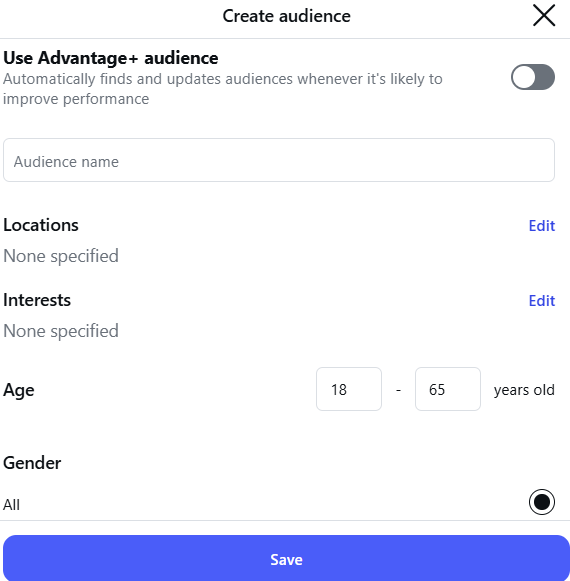
Create your own audience. Manually select location, age, gender, and interests. Use this when you have specific demographic requirements or want to test different audience segments.
Check out our guide on Meta Ads Targeting Options to learn more about audience targeting on Facebook and Instagram.
4. Set your budget and duration
Instagram requires a minimum of $1 per day, but most successful campaigns start at $5-10 daily to gather meaningful data.
Next, determine and set how long you want your ad to run. First-time advertisers should test for at least 3-7 days to allow Instagram's algorithm to optimize delivery.
Need help determining your Instagram ad budget? Check our guide on choosing a Meta ads budget.
5. Review and launch
You can now click Boost Post to submit for review. Instagram reviews ads within 24 hours, though complex ads or first-time accounts may take longer.
You can pause, adjust, or stop your ad anytime after it goes live. Budget changes take effect in a few hours at most.
Running ads via Meta Ads Manager
Meta Ads Manager gives you full control over campaign objectives, creative formats, audience targeting, and budget allocation.
Use this method when you want to run sophisticated campaigns or test multiple ad variations.
1. Prepare your creative assets
Before opening Ads Manager, gather your ad creatives. You'll need images or videos, ad copy, headlines, and a call-to-action.
2. Open Ads Manager and create a new campaign
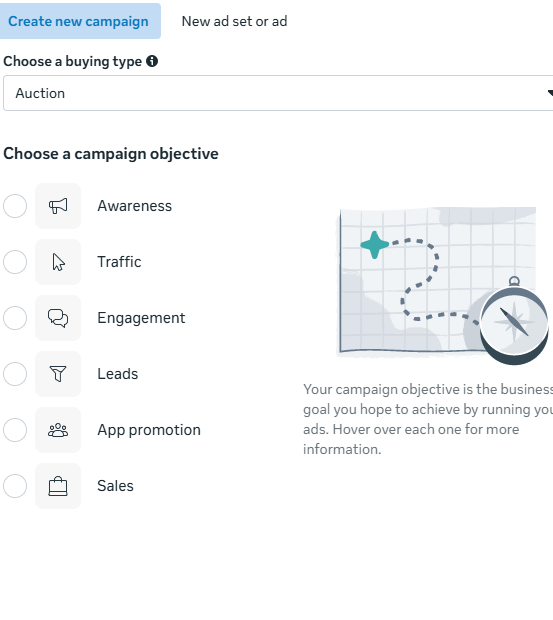
Navigate to Meta Ads Manager and click Create. Select your campaign objective based on what you want to achieve.
For this example, we'll choose Sales because we're assuming you run an ecommerce store. Other objective options are Awareness, Traffic, Engagement, Leads, and App Promotion.
3. Name your campaign and determine how you want to set your budget
Give your campaign a descriptive name (like Q1 2026 Winter Sale or New Product Launch).
Next, decide whether to set your budget at the campaign level or ad set level.
Campaign budget optimization lets Meta distribute spending across multiple ad sets automatically. The ad set budget, however, gives you manual control over how much each audience receives.
4. Configure conversion location and schedule
Click Next to move to the ad set level.
First, set your conversion location. This tells Meta where you want people to take action:
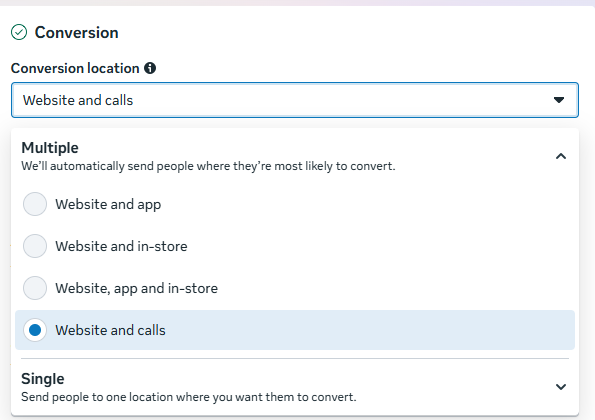
Most ecommerce brands choose Website because their checkout happens off-platform.
Now set your budget (if you opted for ABO) and campaign duration.
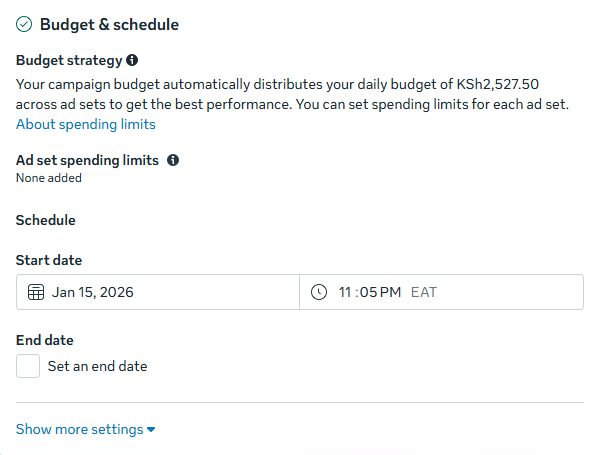
We recommend running your first campaign for at least 7 days. That will give Meta enough time to learn your audience and optimize delivery. For significant results, plan for 30 days minimum.
5. Define your audience
Choose your targeting strategy:
Core audiences: Manual targeting using location, demographics, interests, and behaviors. Use this when you know exactly who your customers are.
Advantage+ audience: Allow Meta to handle targeting by showing ads to people most likely to convert based on your campaign objective.
Custom audiences: Upload your own data (email lists, website visitors, app users) to target people who already know your brand.
Lookalike audiences: Use custom audiences to create a new list of people who share characteristics with your custom audiences. Meta recommends at least 1,000-5,000 people in your source audience.
6. Select Instagram placements
Scroll to Placements and click Edit. Deselect Facebook and other platforms, leaving only Instagram checked.
Then, choose which Instagram placements make sense for your brand. You can run ads across all placements or limit them to specific formats based on your creative.
7. Upload your creatives
Add your images or videos and write your primary text (the caption), headline, and description.
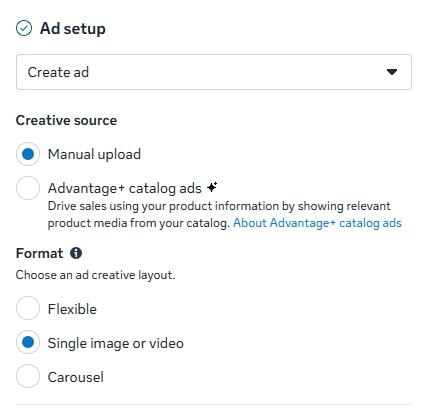
If you're running multiple ad variations, duplicate your ad and swap images, videos, and copy. You’ll need to a/b test 3-5 variations before identifying what resonates with your audience.
Here are 27+ Instagram Ad Examples to borrow from when creating your ads.
8. Install your Meta pixel
Before you launch, make sure you have Meta's tracking pixel installed on your website. The pixel tracks conversions and lets you measure ROI for each ad.
Without pixel tracking, you won't know which ads drive sales or which audiences convert best. This data is essential for scaling successful campaigns.
9. Review and publish
Double-check your targeting, budget, creative, and placements. If everything checks out, click Publish to submit for review.
Meta reviews ads within 24 hours, but more complex campaigns or accounts with limited ad history may take longer. You'll receive an email when your ads go live.
How much will Instagram advertising cost you?
Instagram ad costs vary based on your industry, audience competition, and campaign objective. Check out these benchmarks before you start allocating your budget.
| Metric | Cost Range |
|---|---|
| Cost per click (CPC) | $0.40 - $1.73 |
| Cost per 1,000 impressions (CPM) | $2.50 - $10.81 |
| Cost per engagement | $0.01 - $0.05 |
| Recommended monthly budget | $300 - $500 as a start |
| Typical budget allocation | 11% - 20% of total ad spend |
For a more in-depth breakdown of Instagram ads costs and strategies to reduce your spending, read our complete guide on Instagram advertising costs.
How does Instagram advertising work [recap]
Now that you know how Instagram advertising works, you’re one step closer to running your campaigns,
But before you start with your setup, you’ll need to put a lot of thought into the kind of creatives you use.
Your ads need to grab attention in the first second, deliver value fast, and look native to the platform. That means mobile-optimized visuals, vertical formats, and messaging that resonates with your audience.
For Instagram, you have the options of using videos, still images, carousels, and catalogs.
Cropink supports the last three formats and can help you create eye‑catching ads in minutes.
Check out cropink.com to learn more about how you can automate your ad creation process in just a few minutes.
Sign up for the free forever plan to get started! No credit card required.
FAQs
Instagram ad costs range from $0.40 to $1.73 per click and $2.50 to $10.81 per 1,000 impressions, depending on your industry, audience competition, and campaign objective. Most businesses start with $300-$500 monthly budgets and allocate 11-20% of their total ad spend to Instagram.
Yes, Instagram ads are worth it for most businesses. With 2 billion monthly active users and advanced targeting options, the platform can deliver an excellent ROI when campaigns are optimized properly.
The cost per 1,000 impressions (CPM) on Instagram ranges from $2.50 to $10.81. Your actual CPM depends on factors like audience targeting, ad quality, industry competition, and campaign objective.
Damaris is a Digital Marketing Specialist who writes about digital marketing and performance marketing. At Cropink, she creates data-driven content to help businesses run better ad campaigns for better performance and ROI.
Leszek is the Digital Growth Manager at Feedink & Cropink, specializing in organic growth for eCommerce and SaaS companies. His background includes roles at Poland's largest accommodation portal and FT1000 companies, with his work featured in Forbes, Inc., Business Insider, Fast Company, Entrepreneur, BBC, and TechRepublic.
Related Articles


How Can Cropink Help?
Start with Cropink is easy and free
No credit card required