5 Free Facebook Ads Templates to Speed Up Your Campaigns
Running Facebook ads at scale is hard when templates can’t keep up. With nearly three billion users competing for attention, these free Facebook ads templates are designed for dynamic catalogs, faster testing, and constant product updates.



It's not every day you get access to an audience of nearly three billion people in one place. But that's the reality of advertising on Facebook today. And because of that scale, the pressure to win attention on the feed will only increase from now on.
Unfortunately, many Facebook ad templates rarely support catalog ads, dynamic product feeds, or the rapid testing cycles that ecommerce brands depend on.
They're static, one-off files in an advertising environment that demands personalization and dynamic content.
Today, we will introduce you to five must-have Facebook ads templates for ecommerce brands.
Unlike most templates you've come across, these examples are data-ready, customizable, and made in particular for Meta's advertising ecosystem.
Key takeaways
- Catalog templates can save the most time since they connect to your product feed and update automatically when prices or inventory change.
- Static templates fail at scale because they require manual edits whenever a product feed changes.
- Feed-connected templates let you test faster by applying design changes across hundreds of products at once instead of rebuilding each ad
5 Must-have Facebook ads templates
If you manage an extensive product catalog, you already know how quickly ad creation can become overwhelming.
A single collection update can translate into dozens of new ad creatives. Multiply that across seasons, promos, retargeting flows, and a/b testing cycles, and you’re easily looking at hundreds of ads every year.
Creating all of those manually either requires a large design team or hours of repetitive work.
However, when you have access to a well-curated library of Facebook ads templates, you can produce those same creatives in minutes instead of days.
Below are the essential Facebook ad template types every ecommerce brand should have in their toolkit.
1. Single-image templates
Single-image templates are the backbone of most Facebook ad campaigns. They’re fast to produce and incredibly effective when you have a good product photo.
We recommend using this template when you want to advertise new arrivals or bestsellers directly on the feed. For instance, when you want to spotlight a specific product within a collection, rather than the entire product set, this is the template to grab.
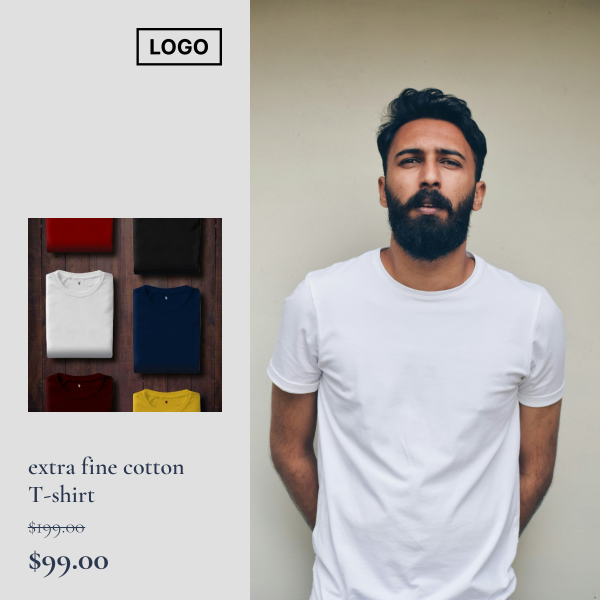
Here is an example of what a high-performing single-image template looks like:
- a crisp product photo
- a clean but aesthetic background
- and minimal text elements, such as the logo, product name, and price.
It directs shoppers' attention exactly where it should be: on the product.
Try this single image template for free on Cropink.
2. Product catalog templates
Catalog templates carry most of the workload for ecommerce advertisers.
When your product range is large and constantly moving, these templates handle the heavy lifting by pulling details directly from your product feed.
Use catalog templates when you want to promote multiple items at once or keep evergreen sales campaigns running in the background.
They’re ideal for stores with frequent updates or brands managing collections that change throughout the year.
A good catalog template should blend into your brand system without demanding too many edits.
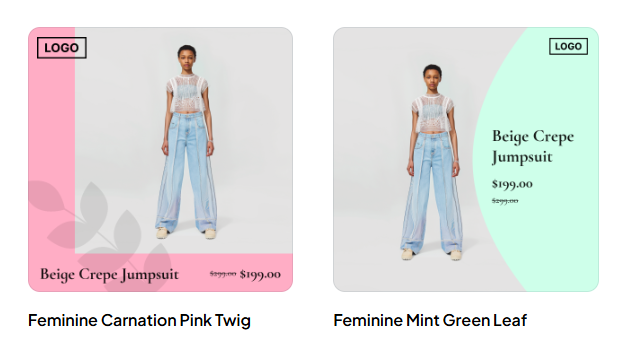
Think layouts that give you enough space to spotlight products and still add in core details like price, discounts, product names, and other product attributes.
These two templates below are good candidates for product catalog ads templates.
Preview these catalog templates with your products.
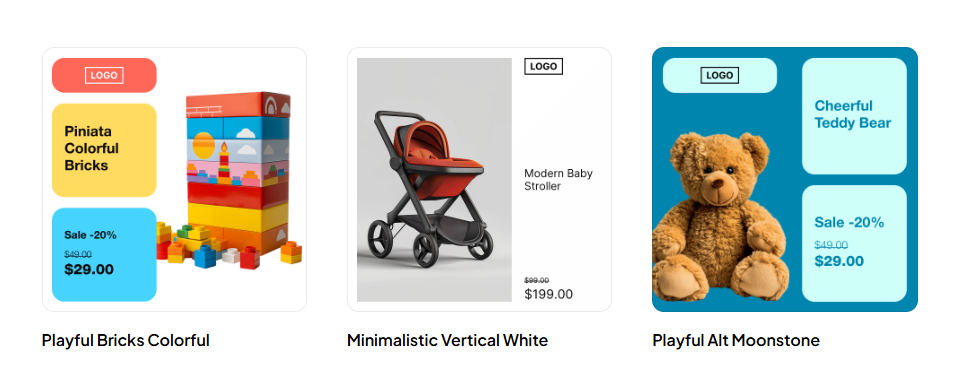
Here’s another example for when you want a bit more dynamic details on your Facebook catalog ads.
See how these templates would look with your product feed.
3. Retargeting templates
Retargeting ads are effective because you're usually speaking to people who already know your brand. They've visited your site, browsed products, maybe even added items to cart.
Adding a hint of credibility to your ads, such as customer ratings, will help bridge the gap for these shoppers who are almost ready to buy.
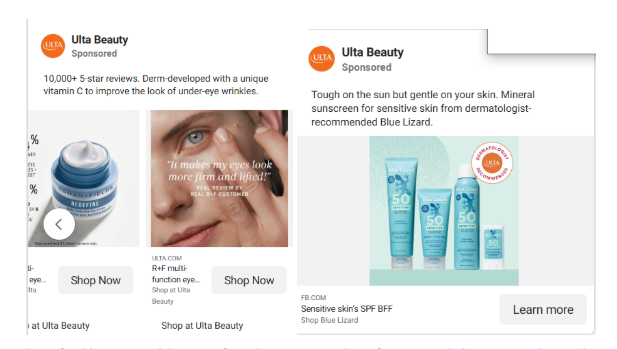
As such, every ecommerce brand must have a template that allows them to layer in trust signals, such as customer reviews, star ratings, trust badges, or 'bestseller' indicators, directly onto their dynamic ads.
Use this template when targeting warmer audiences with higher-ticket items or categories where shoppers require reassurance, such as skincare, electronics, home goods, and furniture.
These ads from Ulta Beauty are a perfect example of incorporating trust signals into your retargeting ads.
Pro tip: You can add trust signals to your ads using any of these templates from Cropink.
4. Offer and promo templates
Offer and promo templates will come in handy when you want to communicate urgency.
Use them when you're running flash sales or clearance events where the discount is the main selling point.
These templates should put the offer front and center, whether that's a percentage off, a coupon code, or a limited-time deal.
Try this promo template with your home and garden products.
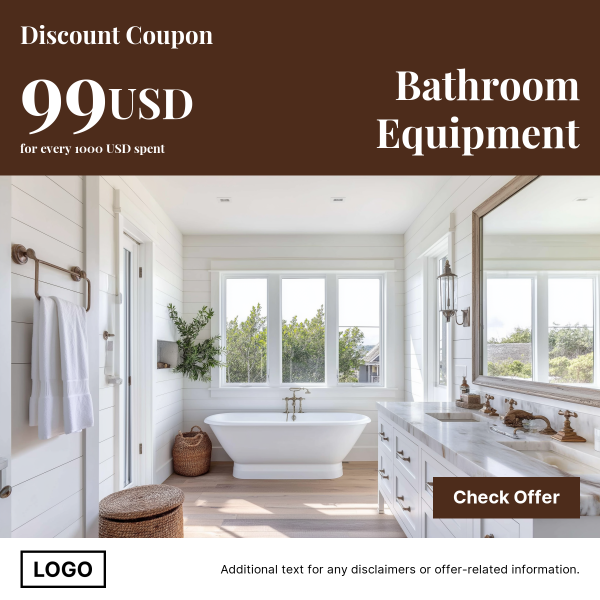
The example above is a good idea for high-value categories, such as home goods or furniture, where the visual context matters as much as the discount.
This other example will be ideal for fashion, electronics, or beauty products thanks to the split visuals and a bold coupon code.
Try this promo template with your products.

5. Black Friday and Cyber Monday templates
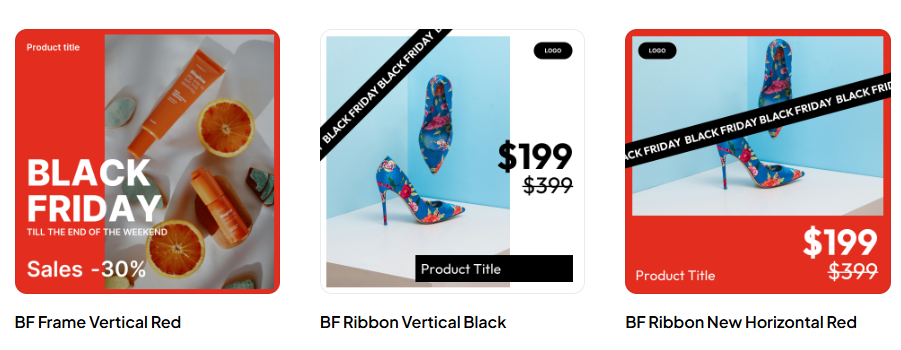
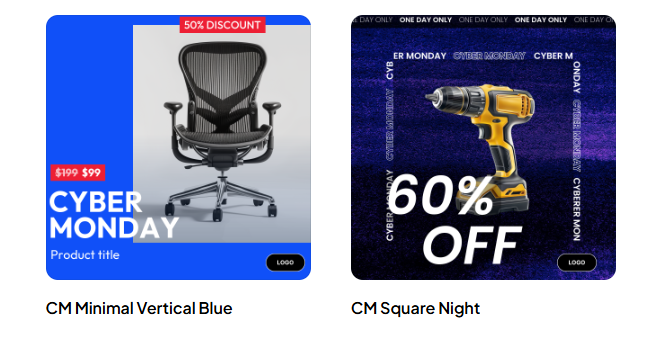
Black Friday and Cyber Monday are the busiest shopping days of the year, and your ads must stand out to have a chance of competing.
These templates are great for when you need to grab attention quickly, as they use bold colors, large discount callouts, and unmistakable seasonal branding.
Use them when you're running discounts or doorbusters that need immediate visibility.
The design should do most of the talking, and shoppers scrolling through their feed should instantly recognize the event and the deal.
Browse more Black Friday templates.
Browse Cyber Monday templates.
Why dynamic and catalog-ready templates perform better
Templates that can't connect to your product data won't do much good in the long term.
They might look polished in a design mockup, but the minute you need to update pricing, swap out a product, or launch a new collection, you're back to manual work.
Dynamic templates are different.
They're created to adapt as your catalog changes, which means you spend less time editing designs and more time optimizing campaigns.
When you switch to feed-connected templates, you unlock three major advantages:
Auto-population means better and faster scalability
One template can generate ads for your entire catalog. You're not creating individual designs for every product or collection because when you build once, the template adapts to whatever data you feed it.
Your brand stays consistent
When your creative is tied to a feed, every SKU follows the same visual style. Colors, typography, spacing, and layout remain on-brand even as your inventory changes. You don’t end up with dozens of mismatched designs or rushed last-minute edits.
Faster testing
When templates pull from your feed, you can test variations without starting from scratch. Change the layout once, and it will be applied across all connected products.
| Feature | Static Facebook ad templates | Dynamic Facebook ad templates |
|---|---|---|
| Product feed integration | No, manual updates required | Yes, connects directly to your feed |
| Scalability | Limited, each ad needs an individual design | High, one template generates hundreds of ads |
| Price/inventory updates | Manual edits every time | Automatic updates when the feed changes |
| Brand consistency | Inconsistent across large catalogs | Stays consistent across all products |
| Testing speed | Slow, rebuild each variation | Fast, change once and apply everywhere |
| Best for | One-off campaigns or small catalogs | Large catalogs with frequent updates |
| Time investment | High, repetitive design work | Low, build once and scale infinitely |
Access free Facebook ads templates with Cropink
If you want templates that keep up with your catalog, Cropink gives you a place to build and customize them.
You’re able to work with layouts designed for Meta’s performance environment while still keeping full control of your branding, copy, and product details.
Everything is responsive to your product data, so your creatives stay up-to-date even as your inventory changes.
What makes Cropink templates different?
- Every template is fully customizable
- Figma integration to let you further customize your templates
- Brand kit to keep all your ads visually consistent across thousands of products
- Generate hundreds of catalog ads from a single product feed upload
- Campaign management tools to help you schedule, filter, and publish directly to Meta
Try Cropink’s Facebook ads templates free!
If you’re still unsure whether Cropink is the right fit, see how Decathlon, one of the most popular sporting goods retailers, advertised 17,000 products with a 2.5X less budget using Cropink templates.
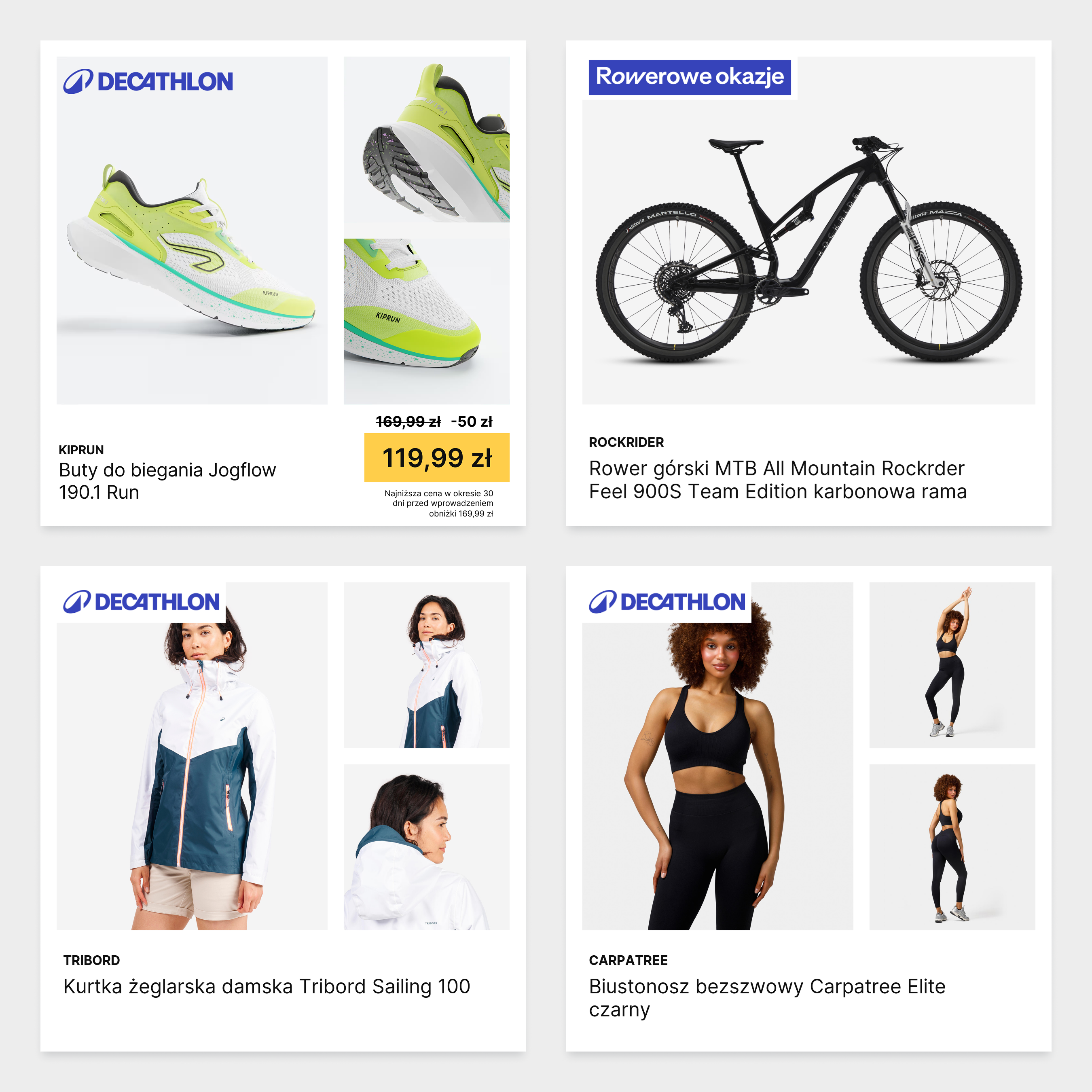
A few of Cropink’s templates used by Decathlon to advertise their 17,000 products.
Wrapping up
The right Facebook ads template can save you time, but only if it can support creating ad creatives at scale.
Static designs might work for one campaign, but they will not be helpful when you need to create quickly or accommodate a changing feed.
On the other hand, feed-connected templates adapt automatically and allow you to test faster without rebuilding from scratch every time.
If you're managing more than a handful of products, try Cropink's Facebook ads templates and see how much faster you can move.
FAQs
A good Facebook ad template should adhere to Meta's placement specifications, remain on-brand across hundreds of products, and enable you to test variations quickly.
With Cropink, you can adjust colors, fonts, layouts, and copy directly in Cropink's design editor. If you need more in-depth customization, Cropink offers a Figma integration that allows you to create or edit templates and export them directly into the platform.
Cropink offers a free plan with full access to all features if you have 25 products or fewer. You can access all templates for free, regardless of whether you are on the free forever plan or a paid plan.
Damaris is a Digital Marketing Specialist who writes about digital marketing and performance marketing. At Cropink, she creates data-driven content to help businesses run better ad campaigns for better performance and ROI.
Leszek is the Digital Growth Manager at Feedink & Cropink, specializing in organic growth for eCommerce and SaaS companies. His background includes roles at Poland's largest accommodation portal and FT1000 companies, with his work featured in Forbes, Inc., Business Insider, Fast Company, Entrepreneur, BBC, and TechRepublic.
Related Articles

How Can Cropink Help?
Start with Cropink is easy and free
No credit card required