How Does FB Advertising Work? [Latest 2026 Guide]
Facebook's advertising platform can be quite overwhelming due to its auction system, targeting options, and campaign structure. Not anymore! We're showing you the mechanics behind Facebook ads, from how to win the auction to the best way to structure your campaigns.


![How Does FB Advertising Work? [Latest 2026 Guide]](https://honest-garden-2954e8e7e9.media.strapiapp.com/how_does_fb_advertising_work_thumbnail_4f02f27b2d.png)
Three billion people. That’s how many users you can potentially reach with Facebook advertising. Over 10 million active advertisers. That’s the level of competition you’re up against.
Clearly, Facebook is a platform with massive potential and significant revenue opportunities.
However, for most beginner marketers, it can feel like a huge mountain they need to conquer. Between targeting options, budgets, auctions, and ad formats, it’s easy to throw in the towel before you even launch your first campaign.
That's exactly why we created this guide.
We're answering your biggest question: how does fb advertising work?
We’ll walk through the mechanics behind Facebook ads in a way that makes it easy to set up your first campaign.
You’ll finally understand not just what to click inside Ads Manager, but why Facebook ads work the way they do, and how to use that knowledge to make better decisions when running your own campaigns.
Key takeaways
- Your campaign objective determines who Facebook shows your ads to.
- The learning phase requires about 50 optimization events before Facebook can deliver results consistently.
- Testing multiple creatives and targeting options is non-negotiable for FB ads.
- Facebook ads auctions don't always award the highest bidder.
How exactly does Facebook advertising work?
At a high level, Facebook advertising happens as follows:
- An advertiser sets a campaign goal
- Ads enter an auction system
- Facebook shows ads to people likely to take that action
- Results are tracked and optimized over time
As Facebook gathers more data, it learns who responds best to your ads and improves delivery accordingly.
Like any other advertising platform, to run Facebook ads, you’ll need three basics: an ad creative, a budget, and at least some information about the people you want to target.
What can you advertise?
Facebook gives you a lot of flexibility in what you can promote. You can advertise:
- Your Facebook page to increase followers
- A post on your Facebook page to increase likes, comments, follows, or link clicks
- Your website, to encourage people to visit a landing page or product page
- Lead forms inside Facebook that allow you to collect emails without sending users off the platform
When you publish an ad, users will most commonly see it in their Facebook feed.
On the desktop, ads can also appear in the sidebar.
More recently, Facebook has expanded ad placements beyond the feed.
Users can now see ads while watching Reels or when browsing Facebook Marketplace.
The Ad auction explained
One of the most important things to understand about Facebook ads is that they don't entirely favor the highest bidder.
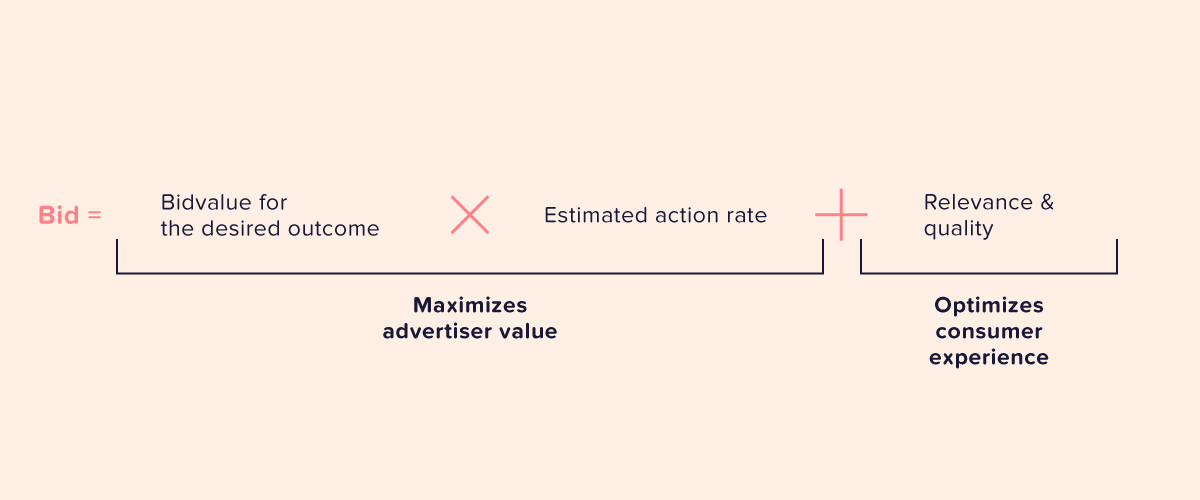
Facebook uses an auction system that considers three factors:
- Bid
What the advertiser is willing to pay. - Estimated Action Rate
Facebook's prediction of how likely a user is to take the desired action. - Ad Quality and Relevance
Engaging, creative, and relevant messaging takes priority because audiences respond to it more effectively.
Facebook's goal is to deliver value to both users (by showing them relevant ads) and advertisers (by helping them reach the right people).
A well-targeted, high-quality ad can outperform a poorly targeted ad with a higher bid.
Since Facebook uses the Vickrey–Clarke–Groves auction model, you pay less than what you bid, namely, closer to the second-highest bid. With this auction system, the optimal strategy for each advertiser is to bid their true value for a conversion.

PhD, Principal Data Scientist / Machine Learning Engineer - Supercell
What does that mean for you?
Don't try to game the system with artificially low bids. Bid what a conversion is actually worth to your business, and let Facebook's algorithm do the rest.
Source: Markus Ojala
Anatomy of a Facebook ad campaign
Facebook ad campaigns are driven by a three-level structure.
Campaign level
This is where you set your Facebook ad objective. Your objective tells Facebook what you want to achieve, whether that's sales, engagement, leads, or traffic.
You can also set your budget at the campaign level, which is known as the Advantage+ campaign budget (CBO).
This budgeting option works best when you don't mind how Meta divides budgets across your ad sets. It's also a good option when you only have one ad set in a campaign.
Ad set level
The ad set level enables you to manage audience targeting, scheduling, and placement options.
You can also set your budget at the ad set level.
When you do this, it's known as Ad Set Budget Optimization (ABO).
If you want a more in-depth breakdown of how to decide between CBO and ABO budgets, you can learn more in our guide on setting your first Facebook ad budget.
Ad level
This is the section where you build the actual ad people will see. You need to upload your creative, write your copy (headline, primary text, and description), and select your call-to-action button.
Components to have in an Ad
- Visuals: High-quality images and videos are critical for grabbing attention.
- Copy: Use compelling headlines and primary text to effectively communicate your offer and address your audience's specific needs.
- Call-to-Action: This should be a bold, short copy that tells users exactly what to do next.
Check out our guide on what ad creatives are and how to make them work to make sure you do it right for your first Facebook ad.
How to create your first FB Ad
We can’t answer ‘how does FB advertising work?’ without showing you the setup process. After all, seeing how everything comes together inside Ads Manager is where it really starts to make sense.
We actually have an in-depth guide on creating good Facebook ads, but here’s the gist if you want a quick version right now.
Typically, you'll begin by researching your target audience, then creating your ad creatives and writing your copy. After that, you can start building your ad on Facebook using the process below (or a variation of it).
One thing you absolutely need to do is take the time to learn your way around Meta Ads Manager. Getting comfortable with the interface will save you a lot of headaches down the road.
1. Define your campaign objective
When you create a new campaign, Facebook will ask you to choose an objective. This is the business goal you want to achieve by running your ads.
Facebook offers six main objectives:
- Awareness
- Traffic
- Engagement
- Leads
- App Promotion
- Sales
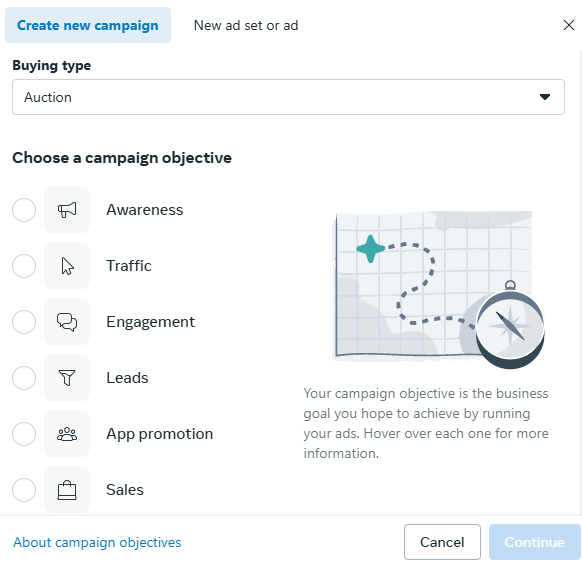
Your objective determines how Facebook's algorithm optimizes your ad delivery.
For example, if you choose Sales, Facebook will show your ads to people most likely to make a purchase. However, if you choose Traffic, Facebook will prioritize users who are more likely to click.
2. Set up targeting
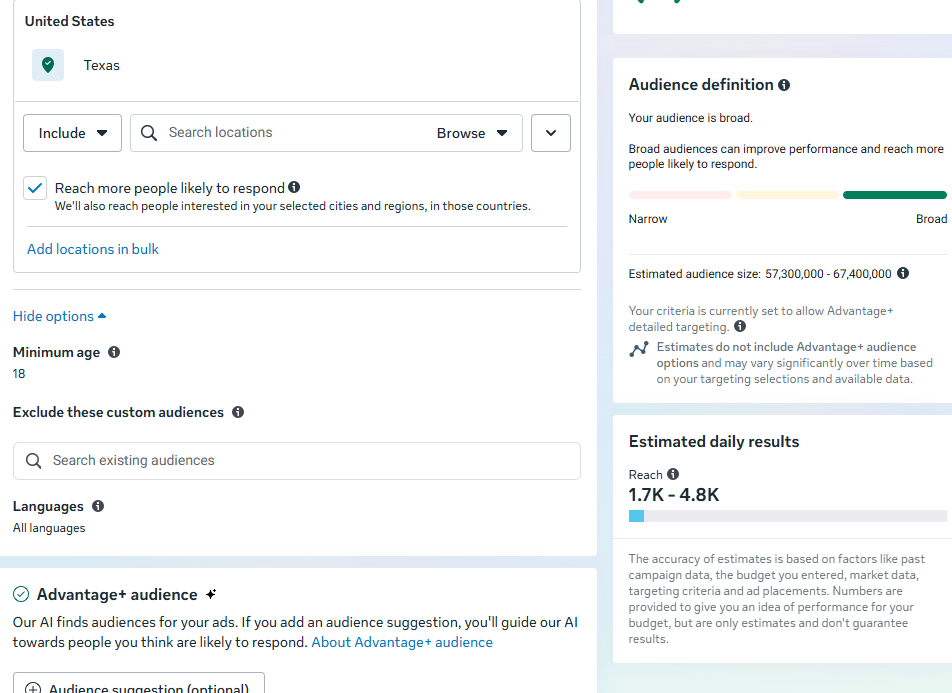
You can target people based on location, demographics, interests, and behaviors. You also have the option to use custom and lookalike audiences. Facebook will also show you an estimated audience size on the right side of the screen to help you gauge whether your targeting is too narrow or too broad.
3. Set your budget and schedule
Decide between a daily budget and a lifetime budget.
If you're just getting started, we recommend starting small, but not so small that you don’t get any results. See the previously mentioned guide on setting your Facebook ad budget.
4. Choose your placement
Placements determine where your ads will appear across Facebook's family of apps and services.
You can opt for two types of placements:
- Advantage+ placements. Facebook automatically shows your ads where they're most likely to perform well.
- Manual placements. You select specific placements like feeds, stories, Messenger, or Marketplace.
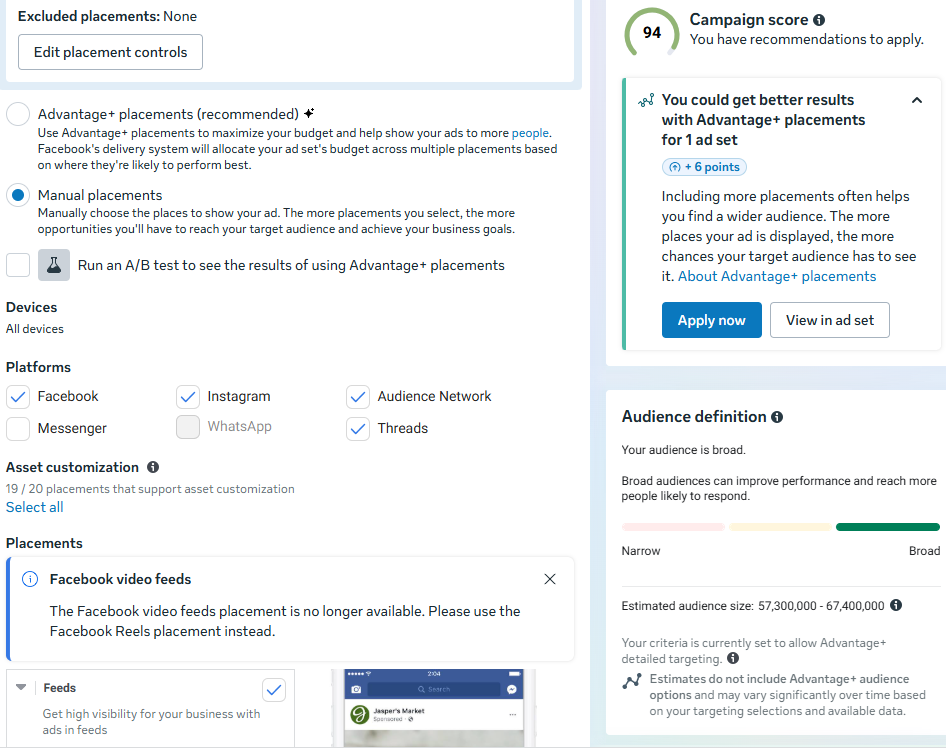
If you're new to Facebook ads, start with Advantage+ placements. Facebook's algorithm is quite effective at identifying the optimal spots for your ads.
5. Upload your ad creatives, launch, and monitor performance
Upload your images or videos, write your headline and ad copy, and choose your call-to-action button.
As we covered earlier, you have multiple ad format options to choose from. Select the one that best fits your campaign objective and the narrative you want to convey.
Once your ad is live, monitor key metrics, such as click-through rate, cost per result, and conversions. Make sure to give your ads time to exit the learning phase before making major changes.
Facebook ad formats
You can run Facebook ads using any of these ad formats, but it depends on your audience and goals.
Here's what you need to know about each option.
Image ads
Image ads use a single still image paired with text, a headline, and a call to action. They are simple to create and work well for offers or announcements.
Best for
- Brand awareness
- Promotions
- Retargeting campaigns
Video ads
Video ads on Facebook use short or long video clips to catch attention and tell a story. Facebook prioritizes video content, especially reels that feel native to feeds.
Best for
- Engagement
- Product demonstrations
- Storytelling
Carousel Ads
Carousel ads allow you to show multiple images or videos in one ad, which users can swipe through. Each card can link to a different page, making this format very flexible.
Best for
- Showcasing multiple products
- Explaining a process step by step
- Highlighting features or benefits
Collection Ads
Collection ads combine a main image or video with a grid of product images underneath. When clicked, they open a full-screen shopping experience inside Facebook.
Best for
- Ecommerce brands
- Product catalogs
- Mobile shopping experiences
Catalog Ads
Catalog ads are dynamic ads that automatically show products from your product catalog to the right people.
To run these ads, you’ll upload a product catalog to Meta, and it will then pull product images, prices, and descriptions directly from the catalog and show them to users based on their behavior.
These ads are often used for retargeting but can also work for prospecting.
Best for
- Ecommerce businesses
- Travel and hospitality listings
- Retargeting website visitors
- Promoting large product inventories
If you’re in any of these categories and are interested in running catalog ads, be sure to check out our guide on How to Create Profitable Facebook Catalog Ads.
Instant Experience Ads
Instant Experience ads are full-screen, interactive pages that load instantly on mobile devices. They can include videos, images, text, and product listings.
Best for
- Storytelling
- Launch campaigns
- High-engagement experience
Lead Ads
Lead ads allow users to submit their contact details directly within Facebook using pre-filled forms.
Best for
- Lead generation
- Newsletter signups
- Event registrations
Interactive and Playable ads
These ads allow users to interact with the content and are often used by app and game developers.
Best for
- App installs
- Product previews
- Engagement-focused campaigns.
What about audience targeting?
Once you start running Facebook ads, you’ll come to realize that targeting is a make-or-break factor in the success of your Facebook ads.
You have three options for how you go about Facebook audience targeting.
Core audience
Core audiences are based on Facebook's own data.
You can target people based on age, location, gender, languages, interests, and behaviors. This is a great starting point for those new to Facebook advertising or for those still building out their custom audiences.
Custom audiences
Custom audiences come from your own data. You can upload email lists, phone numbers, or target people who have engaged with your Facebook page or watched your videos.
This option allows you to target shoppers who are already familiar with your brand.
Lookalike audiences
Lookalike audiences are created from your custom audiences since Facebook uses your custom data to find new people who share similar characteristics with your existing customers.
If you're not sure where to start, Facebook Audience Insights can help you understand who your audience is and what they care about.
Don't forget the Meta Pixel.
The Meta Pixel will play a huge role in how and who you target.
We recommend setting it up before you run your first ad. It tracks website activity and enables advanced targeting and optimization that can dramatically improve your results.
Learn more about setting up and using the Meta Pixel code.
Is the Facebook learning phase a real thing?
Yes, it absolutely is.
According to Facebook:
"The learning phase is the period when the delivery system still needs to learn about how an ad set may deliver and perform. During the learning phase, the delivery system is exploring the best way to deliver your ad set when you either create a new ad or ad set or make a significant edit to an existing one. …The learning phase is necessary to help the delivery system best optimize ads." — Facebook Business Help Center
As a general benchmark, ads exit the learning phase after your ad set generates around 50 optimization events within a week of your last major change.
So, how long do Facebook ads take to work?
The short answer is that it depends on your budget, audience size, and campaign objective.
Most campaigns need at least 3-7 days to exit the learning phase and start performing consistently.
If you're not seeing results right away, don't panic. Resist the urge to make changes within the first few days, and let Facebook gather enough data to optimize properly.
4 common beginner mistakes to avoid with your Facebook ads
If you’re just starting with Facebook ads, make sure you’re cognizant of these four things.
1. Sticking to just one creative
Unless your creative knocked expectations out of the ballpark, you'll usually need more than one. And you won't know which creative will give you results unless you a/b test your Facebook ads.
You can start with these Free Facebook Ads Templates to speed up your creation time.
2. Poor audience targeting
You can only sell with Facebook ads if the people you're advertising to are actually interested in what you're offering. That's why targeting matters so much.
Beware of making these targeting mistakes:
- Targeting everyone
- Over-narrowing interests
- Guessing interests instead of testing them
Your audience should match your offer, location, and buying intent. If those three things don't line up, your ads will struggle no matter how good your creative is.
3. Editing ads too quickly
Facebook ads need time to learn.
Beginners often panic and start editing ads within a day or two when they don’t perform as expected. This resets the learning phase and prevents proper optimization. Every time you make a significant change, Facebook has to start the learning process over from scratch.
Give your ads at least a few days to gather data before making decisions.
Let the algorithm do its job.
4. Not tracking key metrics
Running ads without proper tracking makes it impossible to know if you are running a profitable campaign or not. Make sure you don't fall into any of these traps:
- Lacking a Meta Pixel or Conversions API installation
- Focusing only on vanity metrics like likes or clicks
- Not checking the cost per result
You should track metrics that align with your campaign objective. If your goal is sales, track purchases and return on ad spend. If your goal is to generate leads, track the cost per lead and the quality of leads.
Wrapping up: How do Facebook ads work?
Facebook is still one of the most profitable platforms for businesses that want to advertise their products. However, making a profit requires understanding the platform inside and out.
This guide is a great starting point.
You now understand how the auction system works, how to structure campaigns, what ad formats to use, and how to avoid the most common beginner mistakes.
If you want to dig deeper into Facebook ads strategy, be sure to check out our blog for more advanced tactics.
If you're ready to create your first Facebook campaign, check out Cropink to learn more about automating your creative process and scaling your ad production.
FAQs
You set a campaign goal, choose your target audience, create your ad, and set a budget. Facebook shows your ad to people most likely to take action, and the platform learns and improves delivery over time based on results.
On average, CPM (cost per 1,000 impressions) varies widely based on your industry, audience, and ad quality. It typically ranges from a few dollars to over $10.
With 3 billion users and sophisticated targeting options, Facebook is still one of the most profitable advertising platforms for businesses. Advertising success depends on understanding the auction system, creating quality ads, targeting the right audience, and giving campaigns time to optimize through the learning phase.
Beginners can run Facebook ads successfully if they start with simple objectives like Traffic or Engagement, use Advantage+ placements for easier setup, and test their campaigns with a small daily budget.
Sources
- Statista. Number of active advertisers on Facebook
- Facebook. About ad auctions
- Cropink. How to Create Good Facebook Ads
Damaris is a Digital Marketing Specialist who writes about digital marketing and performance marketing. At Cropink, she creates data-driven content to help businesses run better ad campaigns for better performance and ROI.
Leszek is the Digital Growth Manager at Feedink & Cropink, specializing in organic growth for eCommerce and SaaS companies. His background includes roles at Poland's largest accommodation portal and FT1000 companies, with his work featured in Forbes, Inc., Business Insider, Fast Company, Entrepreneur, BBC, and TechRepublic.
Related Articles


How Can Cropink Help?
Start with Cropink is easy and free
No credit card required